CONTENT:
When a Report Services Document is viewed in presentation mode, white blocks will be displayed around the document. Even the document’s zoom was set to Fit Width or Fit Page, the white block will be displayed across to different size browsers. Users can take advantage of the web SDK to modify the background color to correspond to the color theme of document
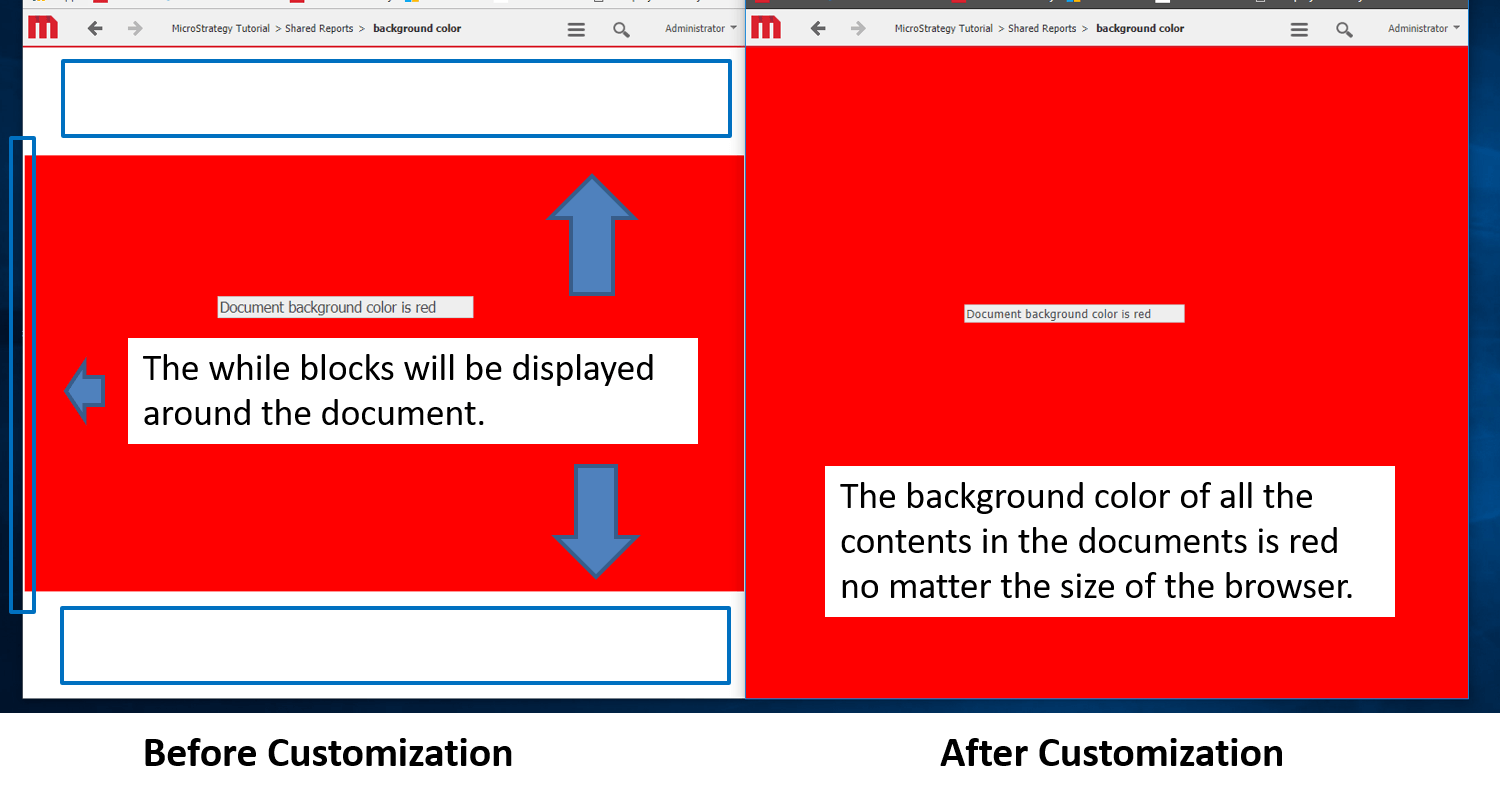
Using the Web Customization Editor to create a plug-in
Strategy SDK provides a Web Customization Editor that can be used to create a customization plug-in. The following steps show how to create the plug-in and deploy.
1. Launch the Web Customization Editor and create a new plugin and give it a meaningful name
2. On Application Settings tab, navigate to Strategy Web Configuration -> Pages -> oivm -> CSS -> Customizations -> oivmPage.css
3. Right click oivmPage.css, choose 'New Selector', name it as ‘.mstrmojo-DocLayoutViewer-layout’
4. Right click oivmPage.css again, choose 'New Selector', name it as ‘.mstrmojo-DocLayout’
4. Double click the above selectors and add same CSS Property 'background-color', set the value as ‘#ff0000 !important’. You can change the Hex Color as the one you like
5. Clear web browser cache and restart web server
The example provided in this document is provided “as-is” to the user and assumes that the user:
PREREQUISITES:
For the sample to work, the Strategy Web JAR files must be accessible by the Java Runtime
Environment. The Strategy Web JAR files can be found under:
Note:
More elaborate programs will require additional library files and are out of the scope of this document.
ADDITIONAL INFORMATION:
The Strategy SDK allows you to customize the standard Strategy Web interface, and extend and integrate the Strategy business intelligence functionality into other applications. However, before changing the way Strategy Web products look or behave, it is helpful to understand how the application is built. For more information regarding the Strategy Web architecture or the process of customizing Strategy Web, please refer to Strategy Developer Zone (https://community.Strategy.com/s/topic/0TO44000000FliLGAS/sdk ).
To access the Strategy Developer Zone, you must have access to the Strategy Knowledge Base, you must have purchased the Strategy SDK, and you must be current on your Strategy maintenance agreement. If you are a US-based business and believe that you satisfy all three of these conditions but you do not have access to the Strategy Developer Zone, please contact Strategy Technical Support at support@Strategy.com or at (703) 848-8700. If you are an international business, please contact Strategy Technical Support at the appropriate email address or phone number found at https://www.microstrategy.com/en/support/contact-support.
CUSTOMIZATION WARNING:
This customization is provided as a convenience to Strategy users and is only directly applicable to the version stated. While this code may apply to other releases directly, Strategy Technical Support makes no guarantees that the code provided will apply to any future or previous builds. In the event of a code change in future builds, Strategy Technical Support makes no guarantee that an updated version of this particular customization will be provided. In the event of a code change in future builds, Strategy may not be able to provide additional code on this matter even though this customization is provided at this time for this specific build. For enhancements to this customization or to incorporate similar functionality into other versions, contact your Account Executive to inquire about Strategy Consulting assistance. KB441099
