Starting with the release of Strategy ONE (March 2024), dossiers are also known as dashboards.
SYMPTOM:
When logging in Strategy Web 10.10 as a user other than the one who created the Dossier, the parent attribute is replaced with the attribute drilled through, even the user has the drill preference set as Keep parent while drill.
STEPS TO REPRODUCE:
1. Create User A and B with the same privilege to create and modify dossier on web
2. Login to Strategy Web 10.10 with user A, access to Preference > User Preference > Drill mode, make sure the setting for Keep parent while drilling is Yes. Confirm the same for user B
3. Create a Dossier with a grid visualization with User A. Drill on an attribute, the parent attribute would be kept while drilling.
4. Login with User B and drill on the same attribute. The parent attribute will be replaced.
CAUSE:
This is a known issue in Strategy web 10.10
ACTION:
This issue has been addressed in the Strategy 11.0. Please upgrade to this version to take advantage of the fix when it is released.
WORKAROUND:
1. Run Developer and login with Administrator. Edit the dataset report. Access to Data->Report Data Option->General->Drilling->Keep parent while drilling

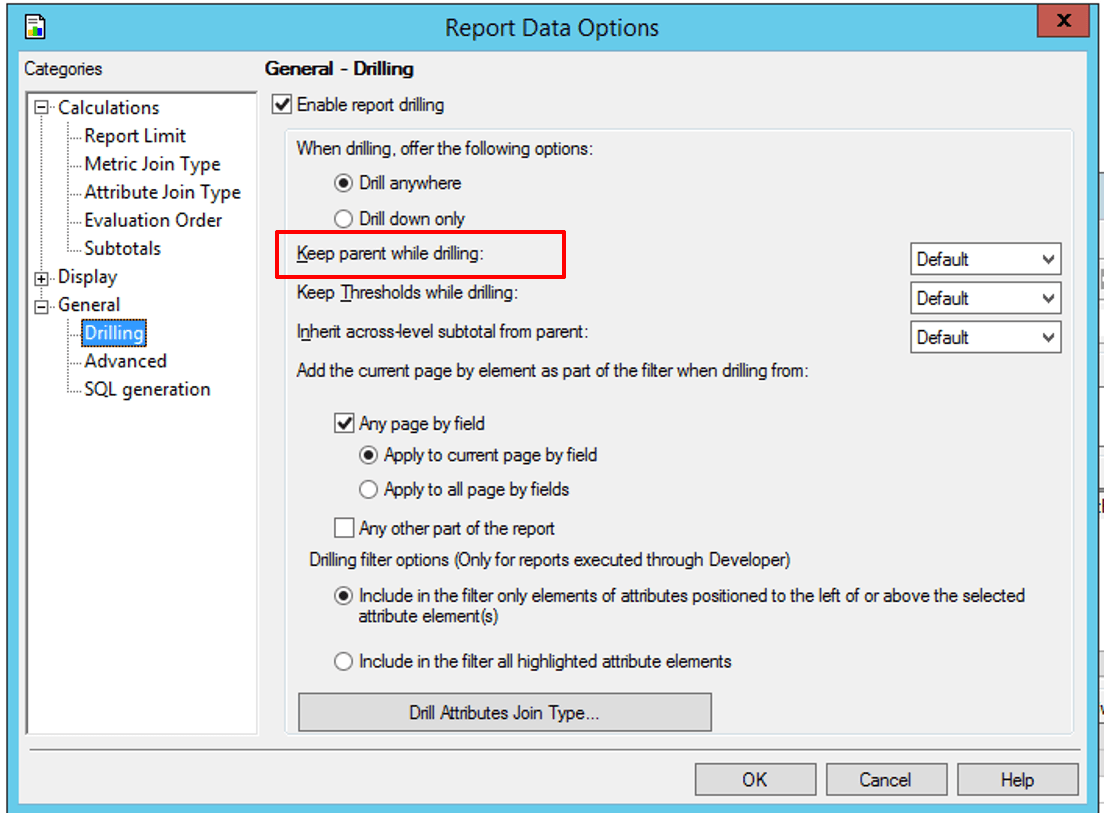
2. If the value is Default, change it to Yes. If the value is Yes, change it to Default. User need modify this value otherwise the setting on web preference will not take effect.
3. Login with user B and drill on the same attribute, the parent attribute will be kept while drilling
Article Reference Number: KB441103
