EducationSoftwareStrategy.com
StrategyCommunity

Knowledge Base

Product

Community

Knowledge Base

TopicsBrowse ArticlesDeveloper Zone

Product

Download SoftwareProduct DocumentationSecurity Hub

Education

Tutorial VideosSolution GalleryEducation courses

Community

GuidelinesGrandmastersEvents
x_social-icon_white.svglinkedin_social-icon_white.svg
Strategy logoCommunity

© Strategy Inc. All Rights Reserved.

LegalTerms of UsePrivacy Policy
  1. Home
  2. Topics

KB44112: How to confirm if MicroStrategy Distribution Services is installed in a MicroStrategy Universal 9.x installation on Windows Operating System.


Community Admin

• Strategy


Strategy Distribution Services is a new product, introduced in the Strategy 9 release. It is an extension/add-on to Strategy Intelligence Server that provides high-volume, automated distribution of reports, documents, dashboards, and business performance alerts via email, file servers, and networked printers.
 
In Strategy License Manager, if it is installed, the option will be under the section Installed Products, as shown:

ka04W000000OaYhQAK_0EM4400000029aS.jpeg


NOTE:
The information on the right side is about the license, informing that this option is available in the referred licensing.


If Strategy Distribution Services is not installed, it won’t be listed in the section, as shown:
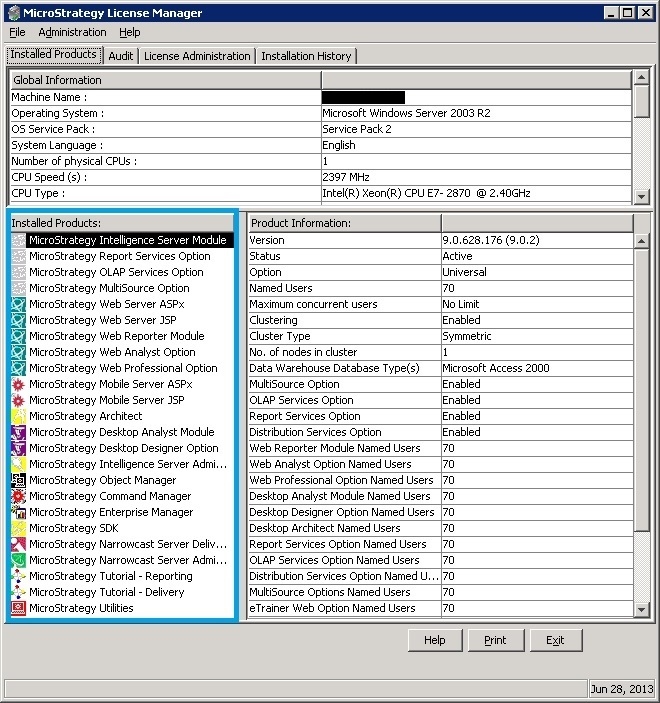
ka04W000000OaYhQAK_0EM4400000029aP.jpeg


KB44112


Comment

0 comments

Details

Knowledge Article

Published:

June 9, 2017

Last Updated:

December 28, 2018