EducationSoftwareStrategy.com
StrategyCommunity

Knowledge Base

Product

Community

Knowledge Base

TopicsBrowse ArticlesDeveloper Zone

Product

Download SoftwareProduct DocumentationSecurity Hub

Education

Tutorial VideosSolution GalleryEducation courses

Community

GuidelinesGrandmastersEvents
x_social-icon_white.svglinkedin_social-icon_white.svg
Strategy logoCommunity

© Strategy Inc. All Rights Reserved.

LegalTerms of UsePrivacy Policy
  1. Home
  2. Topics

KB441199: The Tooltip will be Cut Off and Cannot be Scrolled in Mapbox in MicroStrategy Library 10.11 for iPhone


Community Admin

• Strategy


The tooltip will be cut off and cannot be scrolled in mapbox in MicroStrategy Library 10.11 for iPhone

Starting with the release of Strategy ONE (March 2024), dossiers are also known as dashboards.

Description

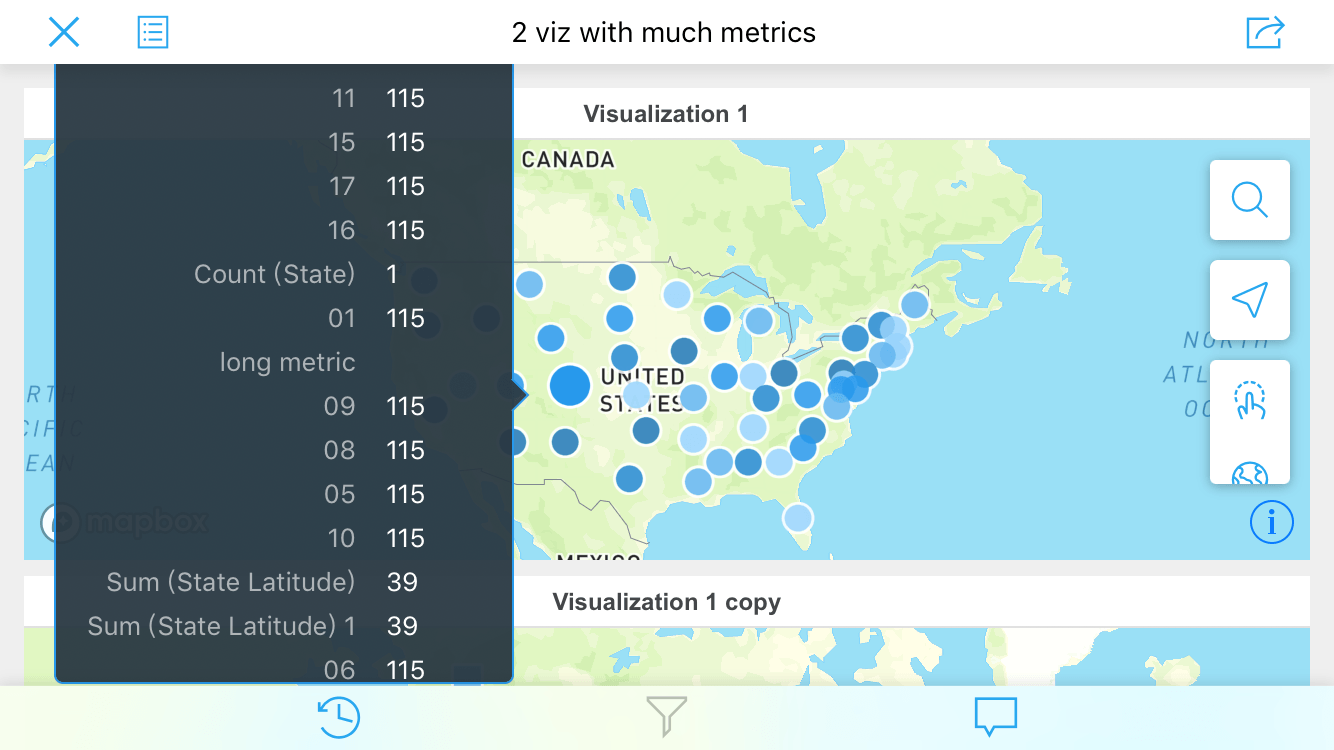
Users of the Strategy Library application on iPhone may notice unexpected behavior when viewing Geospatial Services visualizations (using Mapbox). When tapping on a data marker on the map, the tooltip is displayed. However, if the tooltip contains a large number of metric objects, the tooltip will be cut off. Additionally, the user cannot vertically scroll through the tooltip displayed.
 

ka0PW0000001JjDYAU_0EM44000000WVP5.png

 
Having the phone in portrait orientation may allow for the display of more elements on the screen at once. However, the inability to scroll vertically still exists.

Steps to reproduce

  1. Create a Dossier in Strategy Web 10.11 with a Geospatial Services visualization
  2. After creating a map that shows at least one map marker, add many (e.g. more than 10) metrics into the tooltip section of the visualization
  3. Save the dossier and send it to your Strategy Library
  4. From the Strategy Library on an iPhone, run the dossier
  5. Tap on a map marker to trigger the tooltip and attempt to scroll through/view all elements included in the tooltip

Why is this happening?

This is a known issue in Strategy Library 10.11. This behavior is specific to the Library application for iPhone.

Solution

This issue has been resolved in Strategy 11.0 and newer releases. To take advantage of the fix, please upgrade to the latest version of Strategy.
Looking to upgrade? Click here for more information!


Comment

0 comments

Details

Knowledge Article

Published:

June 28, 2018

Last Updated:

March 21, 2024