EducationSoftwareStrategy.com
StrategyCommunity

Knowledge Base

Product

Community

Knowledge Base

TopicsBrowse ArticlesDeveloper Zone

Product

Download SoftwareProduct DocumentationSecurity Hub

Education

Tutorial VideosSolution GalleryEducation courses

Community

GuidelinesGrandmastersEvents
x_social-icon_white.svglinkedin_social-icon_white.svg
Strategy logoCommunity

© Strategy Inc. All Rights Reserved.

LegalTerms of UsePrivacy Policy
  1. Home
  2. Topics

KB44120: "The object does not exist in the metadata." error appears after a user logs into MicroStrategy Web.


Community Admin

• Strategy


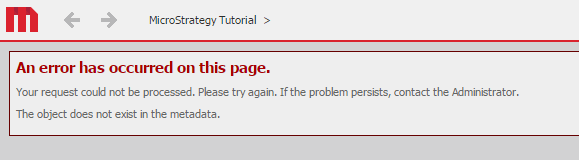
A user gets the following error immediately after logging in to MicroStrategy Web: "An error has occurred on this page. Your request could not be processed. Please try again. If the problem persists, contact the Administrator. The object does not exist in the metadata."

SYMPTOM: 
A user gets the following error immediately after logging in to Strategy Web 9.4.1 and above:
 

ka04W00000148GSQAY_0EM440000002Jjj.png


An error has occurred on this page. Your request could not be processed.
Please try again. If the problem persists, contact the Administrator.
The object does not exist in the metadata.

 
CAUSE: 
The user preference ‘Default start page’ can been set to run a particular report, document, or folder. If this object is later on manually deleted, the login process attempts to run an object that no longer exists in the metadata. The preference is shown below:

ka04W00000148GSQAY_0EM4400000026bc.png

  
ACTION:
The user preference "Default start page" has to be changed to an existing object or "Home". For more information on how to set up this preference, refer to tech note KB12226: How to set a report as the default start page in MicroStrategy Web
 
Note: this setting also exists at the Project Defaults level. If every user has the same issue, this may have been set at this level instead. Changing the preference at the Project Defaults level does not override the setting at the user level.


Comment

0 comments

Details

Knowledge Article

Published:

April 18, 2017

Last Updated:

April 18, 2017