EducationSoftwareStrategy.com
StrategyCommunity

Knowledge Base

Product

Community

Knowledge Base

TopicsBrowse ArticlesDeveloper Zone

Product

Download SoftwareProduct DocumentationSecurity Hub

Education

Tutorial VideosSolution GalleryEducation courses

Community

GuidelinesGrandmastersEvents
x_social-icon_white.svglinkedin_social-icon_white.svg
Strategy logoCommunity

© Strategy Inc. All Rights Reserved.

LegalTerms of UsePrivacy Policy
  1. Home
  2. Topics

KB441213: Command Manager is not recognizing project names with error "Project 'project name' was not found"


Community Admin

• Strategy


This Knowledge Base article describes an issue where Command Manager doesn’t recognize projects.

SYMPTOM
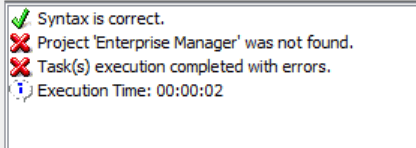
After executing a Command Manager Command the project’s name is not recognized and the command fails with the following error message:
 
Project 'project name' was not found
ka04W00000148ClQAI_0EM44000000WVbG.png

For certain customers, below Project-related command could be executed successfully.


LIST ALL PROPERTIES FOR PROJECT "Project A";

however, below Project-related command failed.

LIST PROPERTIES FOR STATISTICS IN PROJECT "Project A";

CAUSE
The issue might be caused by either FQDN or short name of the Intelligence Server machine being missing from the hosts file on the Command Manager machine.
ACTION
Make sure that the entries related to IServer machine in the hosts file, which by default is under "C:\windows\system32\drivers\etc" on Windows or "/etc/hosts" on Linux, on the CM machine follow this outline:
IP  FQDN  hostname
For example:
10.11.52.113 MY-MACHINE-1.SAMPLE.COMPANY.COM MY-MACHINE-1

 
  KB441213


Comment

0 comments

Details

Knowledge Article

Published:

June 28, 2018

Last Updated:

October 26, 2022