EducationSoftwareStrategy.com
StrategyCommunity

Knowledge Base

Product

Community

Knowledge Base

TopicsBrowse ArticlesDeveloper Zone

Product

Download SoftwareProduct DocumentationSecurity Hub

Education

Tutorial VideosSolution GalleryEducation courses

Community

GuidelinesGrandmastersEvents
x_social-icon_white.svglinkedin_social-icon_white.svg
Strategy logoCommunity

© Strategy Inc. All Rights Reserved.

LegalTerms of UsePrivacy Policy
  1. Home
  2. Topics

KB441250: No shortcut key to exit presentation mode to editable mode in MicroStrategy Web 10.11


Community Admin

• Strategy


This issue has been classified as a defect by MicroStrategy. The impact is limited to MicroStrategy Web 10.11

Starting with the release of Strategy ONE (March 2024), dossiers are also known as dashboards.
SYMPTOM:
As per Strategy 10.11 ReadMe, users should be able to exit presentation mode using ESC key button in MicroStartegy Web 10.11.
https://www2.Strategy.com/producthelp/10.11/AnalyticsDesktop/WebHelp/Lang_1033/Content/Viewing_dashboards_in_Presentation_Mode.htm
However, users reported that exit from Presentation mode does not work using ESC key in Strategy Web 10.11.  
 
CAUSE:
The issue has been defined as a defect by Strategy in Strategy Web 10.11
ACTION: 
Currently this issue is not scoped for any upcoming scheduled Strategy release. Contact Strategy Technical Support for update on the status of the issue
WORKAROUND: 
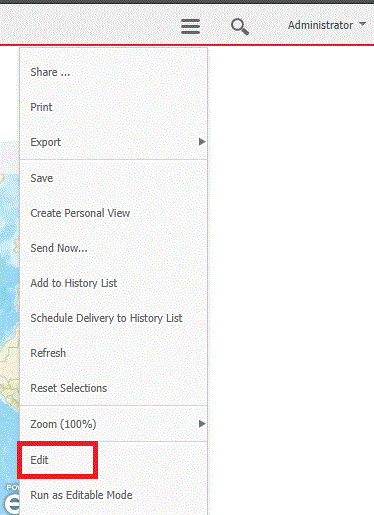
Exit the presentation mode using the “Edit” button.
Dossier:
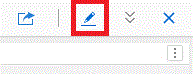
ka0PW0000001JV1YAM_0EM44000000WVoZ.gif

 
Report Services Document:

ka0PW0000001JV1YAM_0EM44000000WVoj.gif


  KB441250


Comment

0 comments

Details

Knowledge Article

Published:

June 29, 2018

Last Updated:

March 21, 2024