DESCRIPTION
After enabling SAML authentication in Strategy Library, the login page does not show SAML as authentication mode but prompts the user to provide standard authentication credentials instead. In addition, the login page is refreshed indefinitely in a loop.
CAUSE
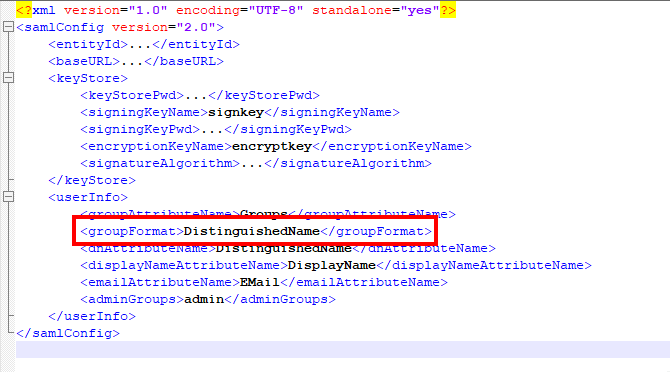
This issue is caused by a known issue when using distinguished names for SAML group membership as seen in mstrSAMLconfig.xml (StrategyLibrary/WEB-INF/classes/auth/SAML/):
ACTION
This issue has been addressed in Strategy Library 11.0. Please upgrade to take advantage of the fix.
WORKAROUND
1. Locate
restful-api-1.0-SNAPSHOT-jar-with-dependencies.jarin the
WEB-INF/libof the Strategy Library file directory.
SAMLConfig.xmlat
auth/inside the jar.
WEB-INF/classes/auth/. Now any modification of the file will take precedence over the original file inside the jar.
SAMLConfig.xmlat
WEB-INF/classes/auth/.
<property name="groupParser" ref="samlGroupParser" />
<property name="groupParser" ref="sanlGroupParser" />
<bean id="samlGroupParser" class="com.Strategy.auth.sso.SSOSimpleGroupParser"/>
<bean id="sanlGroupParser" class="com.Strategy.auth.sso.SSOSimpleGroupParser"/>
