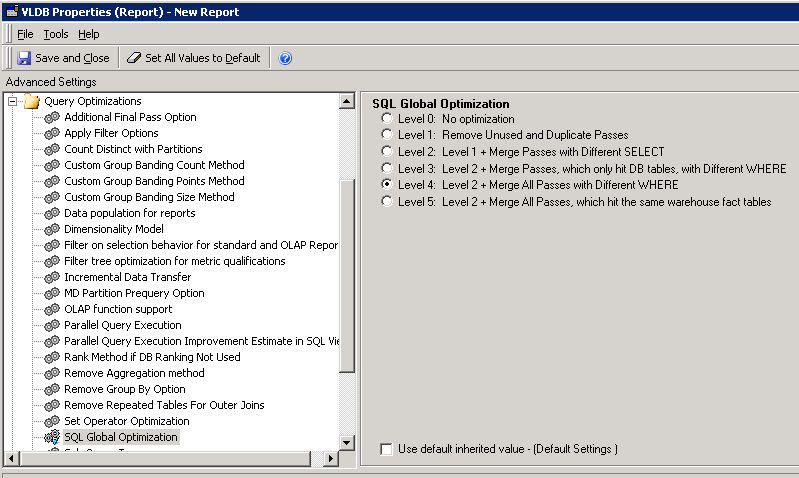
Starting in Strategy 10.11 a new optimization is available for metrics with complex custom logic SQL filters using applycomparison. In earlier versions of the product metrics with different conditions such as the expression 'ApplyComparison("#0 in (select year_id from lu_year where year_id = 2015)",Year@ID)' could not be combined into a single pass of SQL per the SQL Global Optimization VLDB property when set to level 3 or above. This was due to uncertainty that the custom SQL logic would be supported in the select clause inside of a case statement. While there are still possible database limitations, starting in 10.11 we expose a feature flag which can be enable to allow the optimization to happen regardless of the use of complex custom logic. An example of the change in SQL is below.
Unoptimized SQL in Strategy 10.10 and prior:
--
select a11.[YEAR_ID] AS YEAR_ID,
sum(a11.[TOT_DOLLAR_SALES]) AS WJXBFS1
into [ZZMD00]
from [YR_CATEGORY_SLS] a11
where a11.[YEAR_ID] in (select year_id from lu_year where year_id = 2015)
group by a11.[YEAR_ID]
select a11.[YEAR_ID] AS YEAR_ID,
sum(a11.[TOT_DOLLAR_SALES]) AS WJXBFS1
into [ZZMD01]
from [YR_CATEGORY_SLS] a11
where a11.[CATEGORY_ID] in (select category_id from lu_category where category_id = 1)
group by a11.[YEAR_ID]
select pa11.[YEAR_ID] AS YEAR_ID,
pa11.[WJXBFS1] AS WJXBFS1,
pa12.[WJXBFS1] AS WJXBFS2
from [ZZMD00] pa11,
[ZZMD01] pa12
where pa11.[YEAR_ID] = pa12.[YEAR_ID]
--
Optimized SQL in Strategy 10.11 and above:
--
select a11.[YEAR_ID] AS YEAR_ID,
sum(iif(a11.[YEAR_ID] in (select year_id from lu_year where year_id = 2015), a11.[TOT_DOLLAR_SALES], NULL)) AS WJXBFS1,
max(iif(a11.[YEAR_ID] in (select year_id from lu_year where year_id = 2015), 1, 0)) AS GODWFLAG1_1,
sum(iif(a11.[CATEGORY_ID] in (select category_id from lu_category where category_id = 1), a11.[TOT_DOLLAR_SALES], NULL)) AS WJXBFS2,
max(iif(a11.[CATEGORY_ID] in (select category_id from lu_category where category_id = 1), 1, 0)) AS GODWFLAG2_1
into [ZZMD00]
from [YR_CATEGORY_SLS] a11
where (a11.[YEAR_ID] in (select year_id from lu_year where year_id = 2015)
or a11.[CATEGORY_ID] in (select category_id from lu_category where category_id = 1))
group by a11.[YEAR_ID]
select pa12.[YEAR_ID] AS YEAR_ID,
pa12.[WJXBFS1] AS WJXBFS1,
pa12.[WJXBFS2] AS WJXBFS2
from [ZZMD00] pa12
where (pa12.[GODWFLAG1_1] = 1
and pa12.[GODWFLAG2_1] = 1)
--
Please note that not all database platforms can support all filter logic in the select clause. In this example, a subquery is used in the custom filter expression and not all database platforms support subqueries inside the select clause. If custom filter logic is being written that is not supported in the select clause by the database platform used in the environment, then this property should be adjusted accordingly.
ACTION:
This is available in Strategy 10.11 and above.
If you are upgrading to Strategy 11.0 or above, to pick up the fix, enable project level setting "Data Engine Version" to 11. This property can only be enabled through Workstation. For more details on enabling the setting, refer to Change Data Engine Version.
If you are upgrading to Strategy 10.9 / 10.10 / 10.11: To pick up the fix, enable the Feature Flag "Defect fixes that may impact Data, SQL, MDX, CSI" within the Web Preferences -> Project Defaults. For more details on enabling Feature Flags refer to What are the Feature Flag options and what do they accomplish in MicroStrategy Web 10.8 and up. Starting Strategy 11.0, this Feature Flag is removed and replaced with project level setting called "Data Engine Version".
Strategy reference numbers for this technical note are KB441423 and DE74046.
