EducationSoftwareStrategy.com
StrategyCommunity

Knowledge Base

Product

Community

Knowledge Base

TopicsBrowse ArticlesDeveloper Zone

Product

Download SoftwareProduct DocumentationSecurity Hub

Education

Tutorial VideosSolution GalleryEducation courses

Community

GuidelinesGrandmastersEvents
x_social-icon_white.svglinkedin_social-icon_white.svg
Strategy logoCommunity

© Strategy Inc. All Rights Reserved.

LegalTerms of UsePrivacy Policy
  1. Home
  2. Topics

KB441424: Error "Cannot save, move or copy this ServerDef object because it has been changed in the Metadata.” is received when setting up trusted relationship.


Yuxia Zhang

Quality Engineer • MicroStrategy


This KB article states a possible solution for the error "Cannot save, move or copy this ServerDef object because it has been changed in the Metadata.”.

​SYMPTOM:
Error "Cannot save, move or copy this ServerDef object because it has been changed in the Metadata.” is received when setting up trusted relationship in web administrator page.

ka044000000kNyBAAU_0EM44000000WdCY.jpeg

ACTION:
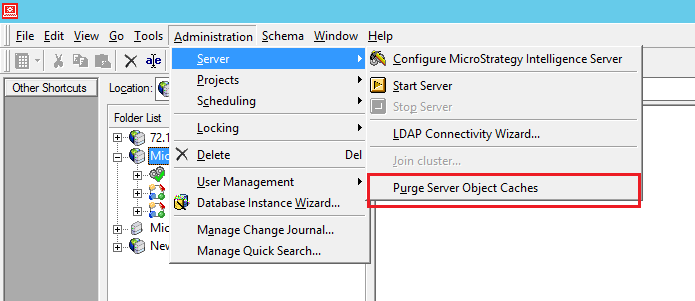
Purge the Server Object Caches in Strategy Developer under the Administration -> Server -> Purge Server Object Caches, and restart intelligence server.
ka044000000kNyBAAU_0EM44000000WdCi.png


Comment

0 comments

Details

Knowledge Article

Published:

July 27, 2018

Last Updated:

July 27, 2018