Starting with the release of Strategy ONE (March 2024), dossiers are also known as dashboards.
SYMPTOM
Performance of creating new dashboard is poor when the project contains large amount of attributes and when the default project drill map is blank in Strategy Web 10.x
Follow below steps to reproduce the issue:
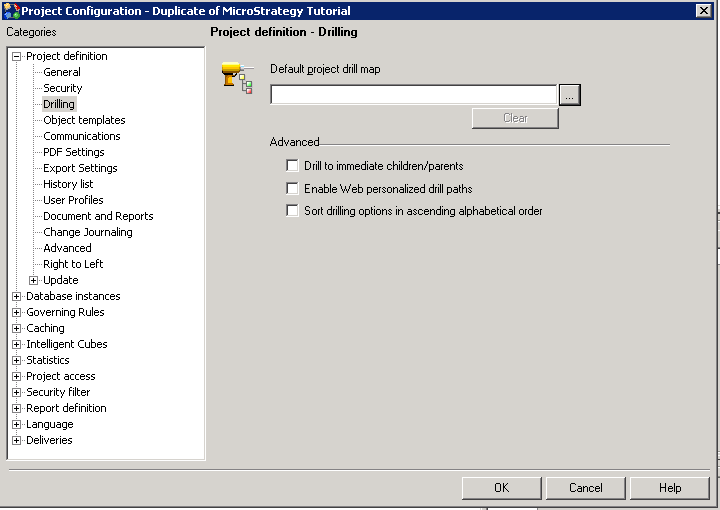
Per the in-house testing, when the project contains about 4000 attributes and the report contains 20 attributes with 1 row of data,
it may take 10 minutes for the loading when the project default drill map is blank.
And it only takes 4 seconds when a dummy drill map is set to default.
CAUSE
This is a known issue in Strategy Web 10.x for dashboard/dossier creation.
In current flow, to support drill-within function (for which, it is allowed to drill to attributes which are included in the dashboard), Strategy Web will load the project default drill map when right mouse clicking on a report and creating dashboard/dossier because it allows to only drill to the attributes in common between the datasets and the drill map.
When the default drill map is blank, system hierarchy will be used instead. Namely, all attributes in the project will be loaded.
When the project has large amount of attributes, the Json result returned from Intelligence server would increase rapidly. This can be confirmed in both HTTP web trace on Client side or Kernel XML API trace in Intelligence server side.
It may hit one or multiple limitations as below thus encounter related errors even if the report itself is rather small.
Note
1) Not only when the project default drill map is blank, but also if the defined drill map contains too many attributes, the same performance decrease would be observed.
2) Right mouse clicking on a report to create dashboard is just one scenario to reproduce the behavior. Same issue will happen even if a blank dashboard is created and then the dataset is added. The issue might occur when users try to add attributes to grid when the drill path is loaded.
3) Dashboard/Dossier does'nt support and isn't planned to support "Drill anywhere" function. Thus project default drill map is not expected to be loaded anywhere for Dashboard/Dossier manipulation.
ACTION
The flow when creating a new dossier has been improved in Strategy 11.0 or above.
It will load only necessary drill path, instead of the whole project default drill map.
Please upgrade to take the advantage.
WORKAROUND
Avoid leaving the project default drill map as blank.
If drill-within function is not allowed to end user, just set a dummy drill map as above step 5.
If drill-within function is necessary, create a meaningful drill map with the most often used attributes only and set it as project default drill map.
The Strategy Internal Reference Number for the issue discussed in this technical note is DE104953.
KB441453
