When exporting a multi page prompted document to excel, an error may occur. The error states:
<?xml version="1.0" encoding="UTF-8" standalone="yes"?>
<recoveryLog xmlns="http://schemas.openxmlformats.org/spreadsheetml/2006/main"><logFileName>error025280_01.xml</logFileName><summary>Errors were detected in file 'file in drive location'</summary><repairedParts><repairedPart>Repaired Part: /xl/worksheets/worksheet2.xml part with XML error. Load error. Line 1, column 0.</repairedPart></repairedParts></recoveryLog>

We found a problem with some content in "Document Name.xmlx". Do you want us to try to recover as much as we can? If you trust the source of this workbook, click Yes.
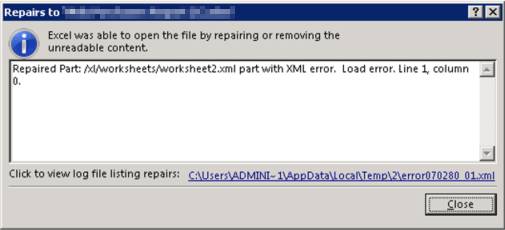
The Strategy Export Engine cannot generate a complete result due to a set memory limitation. The current governing limit for file generation is not enough to fully export the document. This causes the warning message to display stating that only part of the result is exported. Since only part of the result is exported, some data is missing which leads to the file not opening.
The user should increase the Excel Generation governing limit to "-1," unlimited, and export the document again. As long as the server's total memory limit is not reached the export should be successful.
To change the Governing Limit:
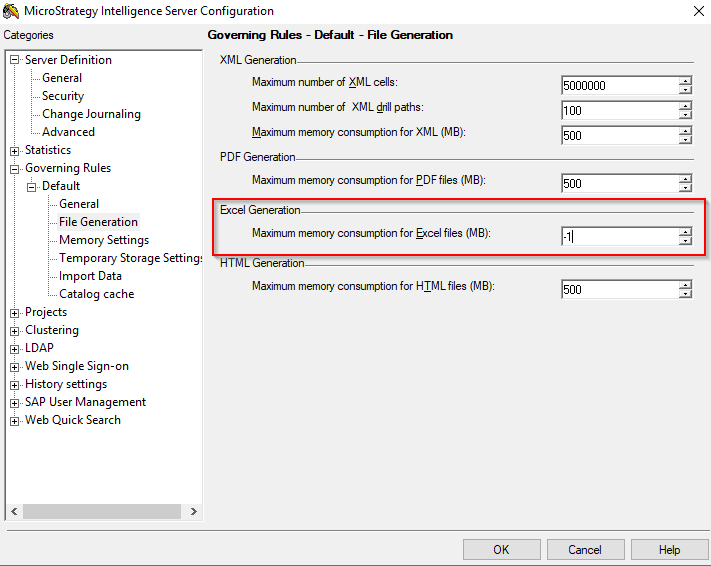
This should allow the Excel file generation to consume as much memory as required to successfully export. Please be aware that this will not be successful if the generation requires more memory than is available on your machine.
