Starting with the release of Strategy ONE (March 2024), dossiers are also known as dashboards.
Troubleshooting
This knowledge base article describes a defect when executing a dossier, an unnecessary cross join occurs when a filter on an attribute not in the template is applied. The cross join may have negative performance implications, but should not affect the data.
When using an attribute that is not in the template to filter a visualization in a dossier, an unnecessary cross join occurs when a filter on an attribute not in the template is applied in Dossier in Strategy 10.11. The filter attribute as shown in the below CSI:
Tables Accessed:
Table11    [REL_REGION_CALL_CENTER]:    Region, Call Center,         RELATIONSHIP_TABLE,    ONE_TO_MANY
Table14    [REL_QUARTER_MONTH]:    Quarter, Month,         RELATIONSHIP_TABLE,    ONE_TO_MANY
Table15    [REL_YEAR_QUARTER]:    Year, Quarter,         RELATIONSHIP_TABLE,    ONE_TO_MANY
Table20    [F_ITEM_CCTR_MNTH_SLS5605309749A29E91B899BBBED78B5E25]:    Call Center, Month, Item,     Tot Cost, Row Count - ITEM_CCTR_MNTH_SLS, Gross Dollar Sales, Tot Unit Sales, Tot Dollar Sales,     FACT_TABLE


select    [Quarter]@[QUARTER_ID_2],
    [Year]@[YEAR_ID_2],
    sum([[F_ITEM_CCTR_MNTH_SLS5605309749A29E91B899BBBED78B5E25].Tot Cost])@{[Quarter]} as [Tot Cost]
from    ITEM_CCTR_MNTH_SLS LU_MONTH LU... (6 tables)
with Table Join Tree:     [F_ITEM_CCTR_MNTH_SLS5605309749A29E91B899BBBED78B5E25]<[Call Center]@[CALL_CTR_ID] in (1, 2, 3)>
     Join [REL_QUARTER_MONTH] with output level Tuple([Call Center]@[CALL_CTR_ID], [Item]@[ITEM_ID], [Month]@[MONTH_ID_INT], [Quarter]@[QUARTER_ID_2])
     Join [REL_YEAR_QUARTER] with output level Tuple([Call Center]@[CALL_CTR_ID], [Item]@[ITEM_ID], [Month]@[MONTH_ID_INT], [Quarter]@[QUARTER_ID_2], [Year]@[YEAR_ID_2])
Save As TempTable26


select    [Quarter]@[QUARTER_ID_2],
    [Year]@[YEAR_ID_2],
    [TempTable26.Tot Cost] as [Tot Cost]
from    ITEM_CCTR_MNTH_SLS LU_MONTH LU... (6 tables)
with Table Join Tree:     [REL_REGION_CALL_CENTER]<[Call Center]@[CALL_CTR_ID] in (1, 2, 3)>
     CrossJoin (Set of Tuple([Quarter]@[QUARTER_ID_2], [Year]@[YEAR_ID_2]) where Tuple([Quarter]@[QUARTER_ID_2], [Year]@[YEAR_ID_2])
in [REL_YEAR_QUARTER]) with output level distinct Tuple([Call Center]@[CALL_CTR_ID], [Quarter]@[QUARTER_ID_2], [Region]@[REGION_ID], [Year]@[YEAR_ID_2])
     LeftOuterJoin TempTable26 with output level Tuple([Quarter]@[QUARTER_ID_2], [Year]@[YEAR_ID_2])
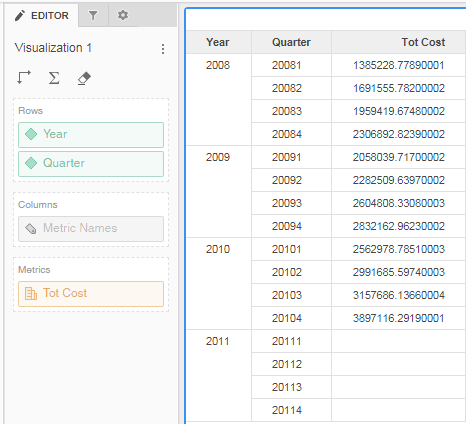
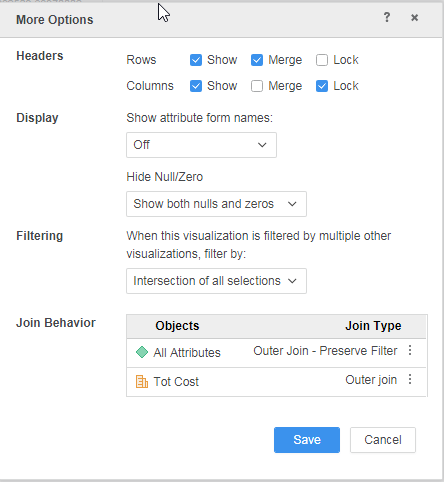
6. Set the visualization "Join Behavior" for "All Attributes" to "Outer Join - Preserve Filter"
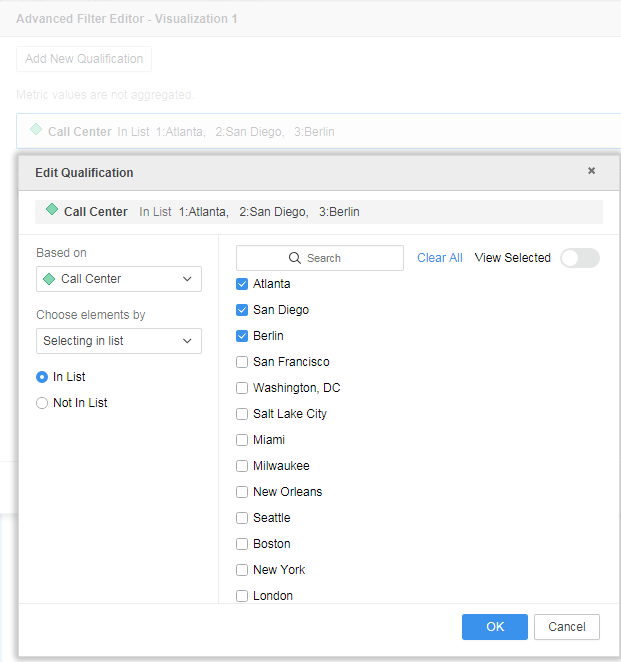
7. Add a filter condition based on Call Center attribute.
8. View the visualization's Query details and notice a cross join is used to join the template attributes and filter attribute.
select	[Quarter]@[QUARTER_ID_2],
	[Year]@[YEAR_ID_2],
	[TempTable26.Tot Cost] as [Tot Cost]
from	ITEM_CCTR_MNTH_SLS LU_MONTH LU... (6 tables)
with Table Join Tree: 	[REL_REGION_CALL_CENTER]<[Call Center]@[CALL_CTR_ID] in (1, 2, 3)>
	 CrossJoin (Set of Tuple([Quarter]@[QUARTER_ID_2], [Year]@[YEAR_ID_2]) where Tuple([Quarter]@[QUARTER_ID_2], [Year]@[YEAR_ID_2])
in [REL_YEAR_QUARTER]) with output level distinct Tuple([Call Center]@[CALL_CTR_ID], [Quarter]@[QUARTER_ID_2], [Region]@[REGION_ID], [Year]@[YEAR_ID_2])
	 LeftOuterJoin TempTable26 with output level Tuple([Quarter]@[QUARTER_ID_2], [Year]@[YEAR_ID_2])
Tables Accessed:
Table14	[REL_QUARTER_MONTH]:	Quarter, Month, 		RELATIONSHIP_TABLE,	ONE_TO_MANY
Table15	[REL_YEAR_QUARTER]:	Year, Quarter, 		RELATIONSHIP_TABLE,	ONE_TO_MANY
Table20	[F_ITEM_CCTR_MNTH_SLS5605309749A29E91B899BBBED78B5E25]:	Call Center, Month, Item,
Tot Cost, Row Count - ITEM_CCTR_MNTH_SLS, Gross Dollar Sales, Tot Unit Sales, Tot Dollar Sales, 	FACT_TABLE

select	[Quarter]@[QUARTER_ID_2],
	[Year]@[YEAR_ID_2],
	sum([[F_ITEM_CCTR_MNTH_SLS5605309749A29E91B899BBBED78B5E25].Tot Cost])@{[Quarter]} as [Tot Cost]
from	ITEM_CCTR_MNTH_SLS LU_MONTH LU... (6 tables)
with Table Join Tree: 	[F_ITEM_CCTR_MNTH_SLS5605309749A29E91B899BBBED78B5E25]<[Call Center]@[CALL_CTR_ID] in (1, 2, 3)>
	 Join [REL_QUARTER_MONTH] with output level Tuple([Call Center]@[CALL_CTR_ID], [Item]@[ITEM_ID], [Month]@[MONTH_ID_INT], [Quarter]@[QUARTER_ID_2])
	 Join [REL_YEAR_QUARTER] with output level Tuple([Call Center]@[CALL_CTR_ID], [Item]@[ITEM_ID], [Month]@[MONTH_ID_INT], [Quarter]@[QUARTER_ID_2], [Year]@[YEAR_ID_2])
Save As TempTable26

select	[Quarter]@[QUARTER_ID_2],
	[Year]@[YEAR_ID_2],
	[TempTable26.Tot Cost] as [Tot Cost]
from	ITEM_CCTR_MNTH_SLS LU_MONTH LU... (6 tables)
with Table Join Tree: 	TempTable26
