EducationSoftwareStrategy.com
StrategyCommunity

Knowledge Base

Product

Community

Knowledge Base

TopicsBrowse ArticlesDeveloper Zone

Product

Download SoftwareProduct DocumentationSecurity Hub

Education

Tutorial VideosSolution GalleryEducation courses

Community

GuidelinesGrandmastersEvents
x_social-icon_white.svglinkedin_social-icon_white.svg
Strategy logoCommunity

© Strategy Inc. All Rights Reserved.

LegalTerms of UsePrivacy Policy
  1. Home
  2. Topics

KB441530: Menu bar, Toolbar and Object Browser panel disappears when running report with certain attribute in MicroStrategy Web 10.x


Ruiyu Han

Senior Support Engineer • MicroStrategy


SYMPTOM
Menu bar, Toolbar and Object Browser panel disappears when running a report with a certain attribute in Strategy Web 10.x
 
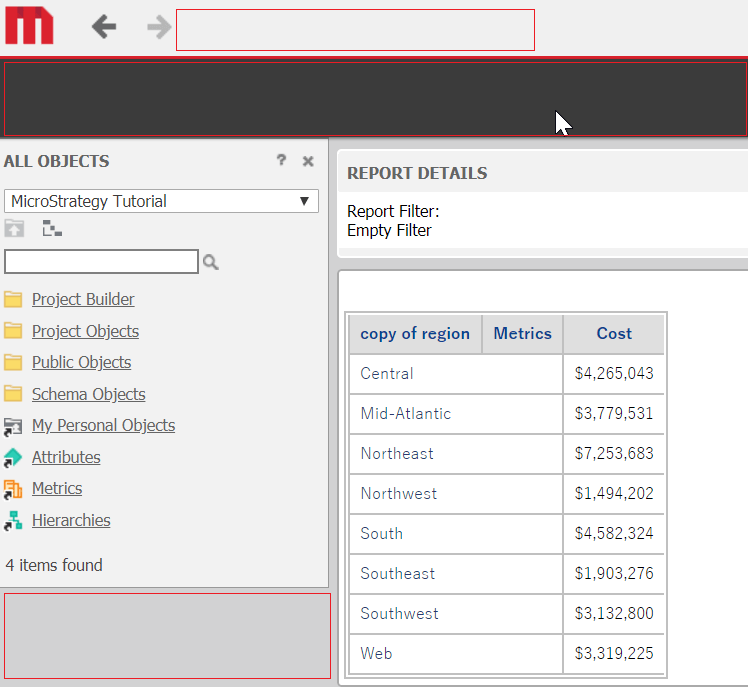
When a certain report or the report with the certain attribute is executed from Strategy Web, it is observed that the menu bar, toolbar and object browser panel disappeared as below:
ka02R000000kb3VQAQ_0EM44000000Qckk.png


The report could not be edited in Strategy Web either.
However, the execution and edit from Developer work fine.
There are no related error messages in DSSErrors or Web log files.
CAUSE
It might be caused by the line-break in attribute name.
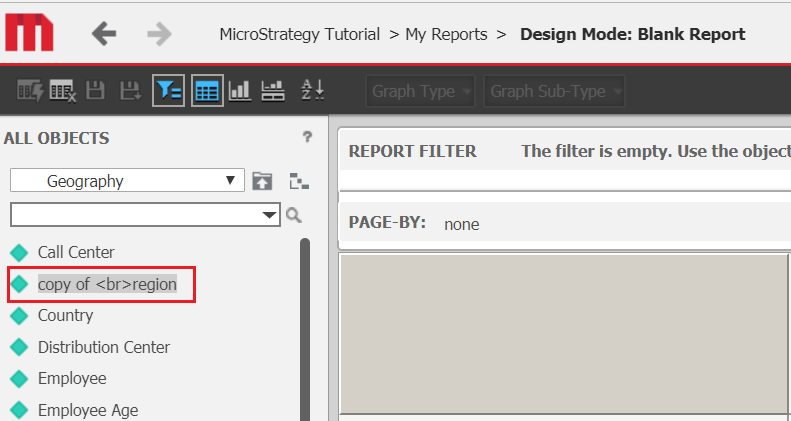
When browsed in All object panel, the problematic attribute is displayed as below with <br> in the name:
ka02R000000kb3VQAQ_0EM44000000Qckp.png

 
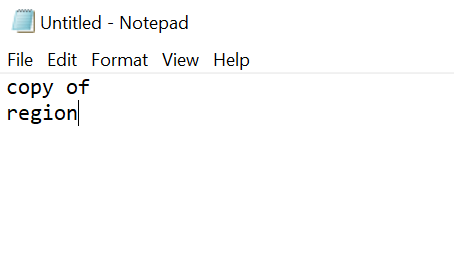
When the attribute name is copied and pasted to Notepad, it contains a line-break.
ka02R000000kb3VQAQ_0EM44000000Qcku.png

 
ACTION
Remove the line-break from the attribute name.
  KB441530


Comment

0 comments

Details

Knowledge Article

Published:

August 16, 2018

Last Updated:

December 28, 2018