EducationSoftwareStrategy.com
StrategyCommunity

Knowledge Base

Product

Community

Knowledge Base

TopicsBrowse ArticlesDeveloper Zone

Product

Download SoftwareProduct DocumentationSecurity Hub

Education

Tutorial VideosSolution GalleryEducation courses

Community

GuidelinesGrandmastersEvents
x_social-icon_white.svglinkedin_social-icon_white.svg
Strategy logoCommunity

© Strategy Inc. All Rights Reserved.

LegalTerms of UsePrivacy Policy
  1. Home
  2. Topics

KB441588: When running Integrity Manager different data formats are used although the regional settings are the same


Community Admin

• Strategy


This Knowledge Base article describes how some users when running Integrity Manager find there are discrepancies in the data format despite the fact that the same regional settings are used.

SYMPTOM
When analyzing two environments some users may find two machines where Developer shows same date format, but IM shows different Date format. Comparing project vs. project. By running the same report in both environments on Strategy Web and Developer, it looks the same.
STEPS TO REPRODUCE
Run two environments with the same regional settings as shown below:
Machine 1:
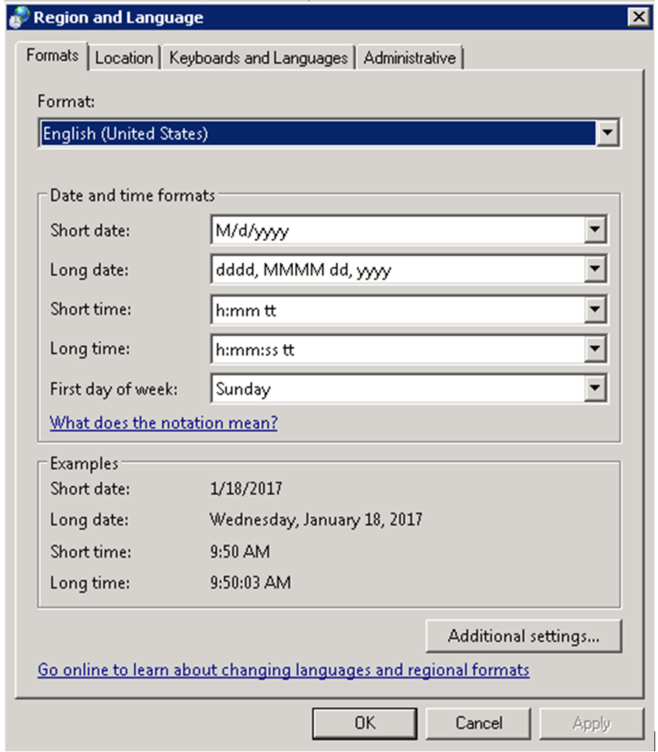
ka04W000000Ob8kQAC_0EM44000000Qh8Q.png
ka04W000000Ob8kQAC_0EM44000000Qh8V.png

Machine 2:

ka04W000000Ob8kQAC_0EM44000000Qh8a.png

When running Strategy Integrity Manager, the data formats appear to be inconsistent (despite looking the same in Developer and Web):
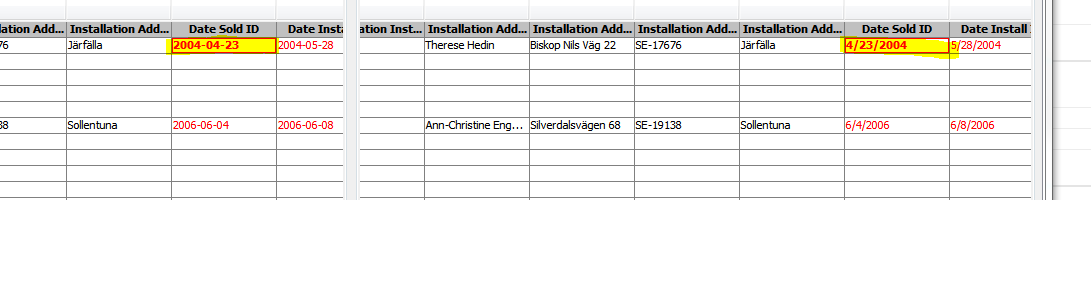
ka04W000000Ob8kQAC_0EM44000000Qh8f.png

ACTION
This issue has been addressed in Strategy 10.4 HF2. Upgrade to this version or upward to take advantage of this fix.
Article Reference Number: KB441588


Comment

0 comments

Details

Knowledge Article

Published:

August 28, 2018

Last Updated:

January 4, 2019