EducationSoftwareStrategy.com
StrategyCommunity

Knowledge Base

Product

Community

Knowledge Base

TopicsBrowse ArticlesDeveloper Zone

Product

Download SoftwareProduct DocumentationSecurity Hub

Education

Tutorial VideosSolution GalleryEducation courses

Community

GuidelinesGrandmastersEvents
x_social-icon_white.svglinkedin_social-icon_white.svg
Strategy logoCommunity

© Strategy Inc. All Rights Reserved.

LegalTerms of UsePrivacy Policy
  1. Home
  2. Topics

KB441601: “We could not locate a task from the supplied request. Please specify a value for the “taskId” parameter” error received when a user attempts to import data from Excel or csv file as prompt answers in MicroStrategy Web


Community Admin

• Strategy


This issue might be caused by lack of permissions for temp folder under Apache. The impact is limited to MicroStrategy Web.

SYMPTOM:
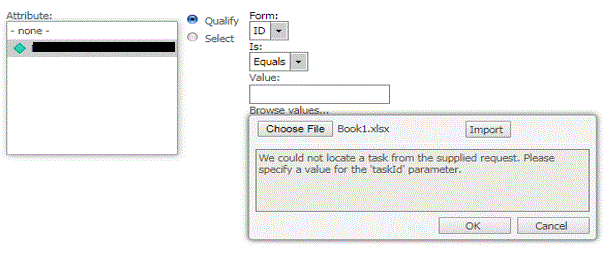
Users want to import data from an Excel or a csv file as prompt answers. However, after navigating to the file location, selecting the file, and pressing ‘Import”, the following error appears in Strategy Web 10.4:


“We could not locate a task from the supplied request. Please specify a value for the “taskId” parameter”
ka04W00000148jFQAQ_0EM44000000QiKI.gif

STEPS TO REPRODUCE:

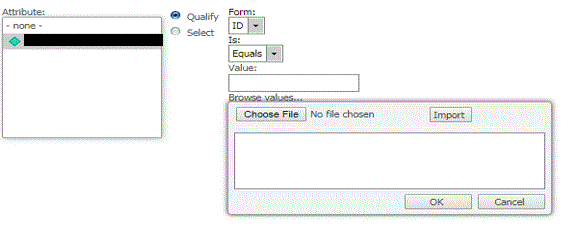
  1. Run a report that contains an expression prompt
  2. On the prompt page, select “Qualify” and click on "Import file"
ka04W00000148jFQAQ_0EM44000000QiKm.gif

       3. Click on "Choose File" and select a file that contains data that will be used as prompt answers for the report
       4. Clicking on "Import" will throw the error “We could not locate a task from the supplied request. Please specify a value for the 'taskId' parameter.”  
CAUSE:
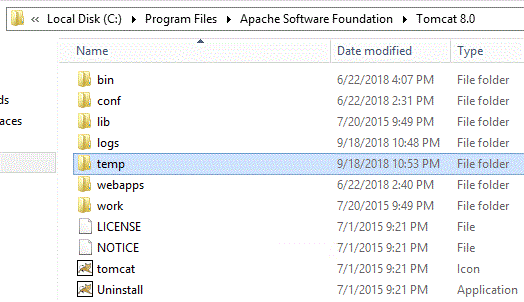
This issue could be caused by not having enough permissions for the temp folder under Apache on the Web Server.
 
ACTION: 
Check permission for the temp folder under Apache. Give Full Permissions, test the issue again to verify the fix
 

ka04W00000148jFQAQ_0EM44000000Qr0J.gif

The Strategy Article reference number is KB441601


Comment

0 comments

Details

Knowledge Article

Published:

September 18, 2018

Last Updated:

December 31, 2018