EducationSoftwareStrategy.com
StrategyCommunity

Knowledge Base

Product

Community

Knowledge Base

TopicsBrowse ArticlesDeveloper Zone

Product

Download SoftwareProduct DocumentationSecurity Hub

Education

Tutorial VideosSolution GalleryEducation courses

Community

GuidelinesGrandmastersEvents
x_social-icon_white.svglinkedin_social-icon_white.svg
Strategy logoCommunity

© Strategy Inc. All Rights Reserved.

LegalTerms of UsePrivacy Policy
  1. Home
  2. Topics

KB441613: The selector elements are unchecked but the data is reflected for all selections in MicroStrategy Web 2021


Mengran (Molly) Wang

Senior Cloud Support Engineer III • MicroStrategy


The selector elements are unchecked but the data is reflected for all selections in MicroStrategy Web 2021

Symptoms


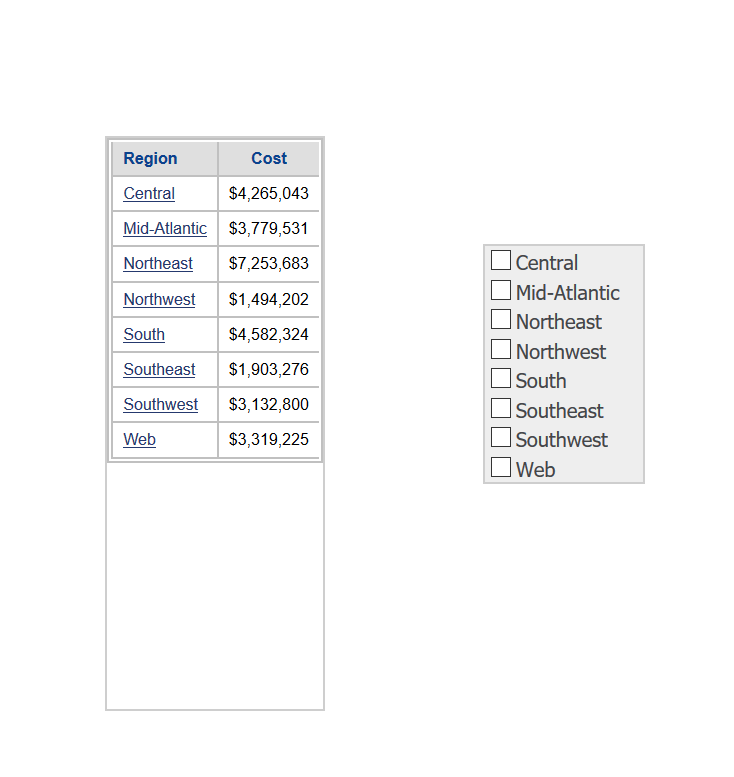
When running a document, the selector elements are unchecked but the data is reflected for all selections. This is confusing for end-users.
ka04W000000uGZ2QAM_0EM44000000QjLb.png

Steps to reproduce


1. Create a simple grid-like Region and Cost
2. Add a checkbox selector targeting on the grid
3. Uncheck "Show option for All", and make it a filter selector
4. Run document.---See the none of the checkbox selectors is checked, but the grid is still displaying all elements.
 

Cause

This has been identified as expected, because uncheck means "Unset (no filter)" status. 


Comment

0 comments

Details

Knowledge Article

Published:

September 6, 2018

Last Updated:

September 28, 2023