EducationSoftwareStrategy.com
StrategyCommunity

Knowledge Base

Product

Community

Knowledge Base

TopicsBrowse ArticlesDeveloper Zone

Product

Download SoftwareProduct DocumentationSecurity Hub

Education

Tutorial VideosSolution GalleryEducation courses

Community

GuidelinesGrandmastersEvents
x_social-icon_white.svglinkedin_social-icon_white.svg
Strategy logoCommunity

© Strategy Inc. All Rights Reserved.

LegalTerms of UsePrivacy Policy
  1. Home
  2. Topics

KB441619: After applying 10.4 Hotfix 8, 'Class does not support Automation or does not support expected interface' error occurs when saving a report.


Community Admin

• Strategy


This KB article discusses a known issue that may occur in MicroStrategy Developer 10.4 HF8.

SYMPTOM
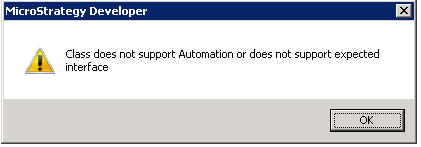
After applying 10.4 Hotfix 8, users will notice that the below error message occurs when they try to save a report:
ka04W00000148gmQAA_0EM44000000Qjcm.png


Class does not support Automation or does not support expected interface
Not all reports may be affected by the issue.
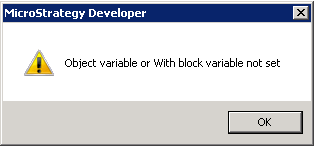
When trying to edit any attribute contained in the problem reports, another error occurs:

ka04W00000148gmQAA_0EM44000000Qjcr.png


Object variable or with block variable not set

CAUSE:
This is an identified defect in Strategy Developer 10.4 HF8.
ACTION:
Try to save report from Strategy Web instead. 
And a patch by request has been prepared by Strategy to fix this issue on top of 10.4 HF8. 
If saving from Developer is inevitable, e.g. to change some Developer-specific settings, please contact Strategy Technical Support to request for the patch. 
RELATED KB ARTICLES:

  • After applying 10.4 Hotfix 8, 'Object variable or with block variable not set' error occurs when editing an attribute in a newly duplicated project.
  • After applying 10.4 Hotfix 8, update schema fails with the error ‘value does not fall within the expected range’ in a newly duplicated project.

Article reference: KB441619


Comment

0 comments

Details

Knowledge Article

Published:

September 3, 2018

Last Updated:

December 31, 2018