EducationSoftwareStrategy.com
StrategyCommunity

Knowledge Base

Product

Community

Knowledge Base

TopicsBrowse ArticlesDeveloper Zone

Product

Download SoftwareProduct DocumentationSecurity Hub

Education

Tutorial VideosSolution GalleryEducation courses

Community

GuidelinesGrandmastersEvents
x_social-icon_white.svglinkedin_social-icon_white.svg
Strategy logoCommunity

© Strategy Inc. All Rights Reserved.

LegalTerms of UsePrivacy Policy
  1. Home
  2. Topics

KB44162: How to format the content of an email subscription created in MicroStrategy Command Manager 10.x?


Community Admin

• Strategy


This technote describes how to format the e-mail content using HTML.

When creating an email subscription through Strategy Command Manager, the message content can be specified as HTML and formatted by using HTML syntax.
In the example below, the message has been formatted and it will contain two paragraphs.  The first paragraph will display in bold through the usage of the <b> HTML tag.


CREATE EMAILSUBSCRIPTION "My formatted email subscription" FOR OWNER "Administrator" SCHEDULE "All The Time" CONTACT "Manager" CONTENT "Customers Summary" IN FOLDER "\Public Objects\Reports\Subject Areas\Customer Analysis" IN PROJECT "Strategy Tutorial" DELIVERYFORMAT PDF EXPIRATIONDATE 11/11/2013 FILENAME "MySubscription" SUBJECT "Formatted Email Subscription" MESSAGE "<html><p><b>This text has been formatted</b></p>second paragraph</html>";
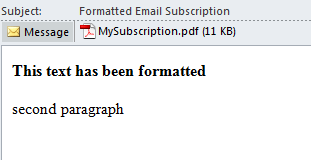
Once the subscription above is triggered, an email as shown below will be sent out:

ka04W000000OgloQAC_0EM4400000029ZX.png


Comment

0 comments

Details

Knowledge Article

Published:

June 9, 2017

Last Updated:

June 9, 2017