EducationSoftwareStrategy.com
StrategyCommunity

Knowledge Base

Product

Community

Knowledge Base

TopicsBrowse ArticlesDeveloper Zone

Product

Download SoftwareProduct DocumentationSecurity Hub

Education

Tutorial VideosSolution GalleryEducation courses

Community

GuidelinesGrandmastersEvents
x_social-icon_white.svglinkedin_social-icon_white.svg
Strategy logoCommunity

© Strategy Inc. All Rights Reserved.

LegalTerms of UsePrivacy Policy
  1. Home
  2. Topics

KB441623: Slow performance while querying tables that have columns set to varchar(max) or char(max) data types.


Community Admin

• Strategy


This issue has been classified as a work by design behavior by MicroStrategy. The impact is limited to to varchar(max) or char(max) data types using the Microstrategy ODBC Driver for Amazon Redshift Wire Protocol. A workaround is available in the current document.  

SYMPTOM:
 
In Strategy 10.x and newer versions, slow performance has been observed while querying tables that have columns set to varchar(max) or char(max) data types using the Strategy ODBC Driver for Amazon Redshift Wire Protocol.
 
CAUSE:
 
Strategy Intelligence Server uses an ODBC Call (SQLDescribeCol) to determine the proper resources to allocate for the query results coming back from Amazon Redshift. In cases where the column datatype is varchar(max) the call to SQLDescribeCol will return a value of 65535 bytes. 
If the SQL is bringing back values with varchar(max) dataype, the Strategy Intelligence Server will have to allocate a lot of memory resources to fetch back the data causing degradation in query performance or out of memory issues. Similar issue is observed where there is a large precision for varchar or char columns (varchar(20000) or char(max) for example). 
 
 
WORKAROUND:
 
 
For DSN Connection
 
Windows
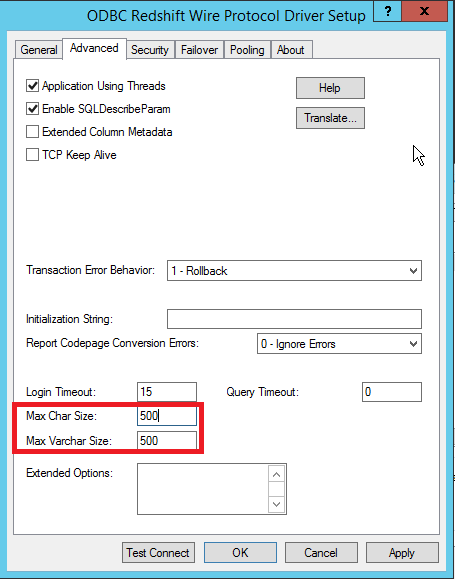
 

  • Navigate to you Amazon Redshift DSN from the ODBC Administrator. In the Advanced tab set the values for Max Char Size and Max Varchar Size.
  • For the example below the default value has been set to be 500.  Note:  Consult DBA and set the max size values based on his/her recommendations after analyzing the data in the underlying database. Note: If this value is set too low it can lead to data truncation issues
ka04W00000148PyQAI_0EM44000000Qjjx.png

Linux
 

  • Create a DSN to Redshift using connectivity wizard.
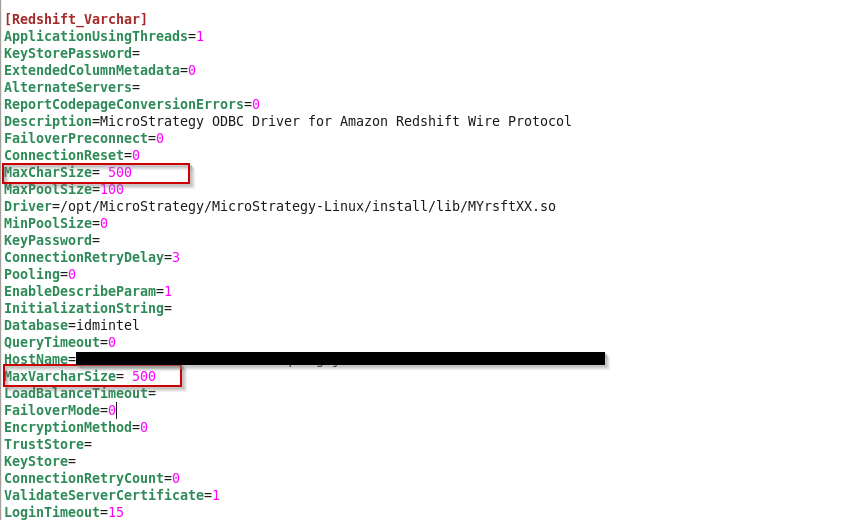
  • Edit the DSN parameters in odbc.ini file set the values for Max Char Size and Max Varchar Size based on DBA's suggestion as shown below:
ka04W00000148PyQAI_0EM44000000Qjk2.png


For DSN-Less Connection
 

  1. Navigate to MSTR Web → Access External Data → Amazon Redshift → Select DSNLess Connection
  2. Enter the Server name, Port and Database name and check the Edit Connection String option and add MaxCharSize=500;MaxVarcharSize=500; Note: Consult your DBA and set the max size values based on his/her recommendations after analyzing the data in the underlying database.


Article Reference Number:   KB441623


Comment

0 comments

Details

Knowledge Article

Published:

September 4, 2018

Last Updated:

March 15, 2022