EducationSoftwareStrategy.com
StrategyCommunity

Knowledge Base

Product

Community

Knowledge Base

TopicsBrowse ArticlesDeveloper Zone

Product

Download SoftwareProduct DocumentationSecurity Hub

Education

Tutorial VideosSolution GalleryEducation courses

Community

GuidelinesGrandmastersEvents
x_social-icon_white.svglinkedin_social-icon_white.svg
Strategy logoCommunity

© Strategy Inc. All Rights Reserved.

LegalTerms of UsePrivacy Policy
  1. Home
  2. Topics

KB44168: The error "Cannot execute mdx query. OLAP error (1260046): Unknown Member xxx used in query" appears when browsing MDX attribute elements or running an attribute-only MDX report in MicroStrategy Developer 9.3.0 and above.


Stefan Zepeda

Salesforce Solutions Architect • Strategy


This article describes and error seen running an attribute only report afer upgrading from a pre 9.3.0 version of MicroStrategy. The error "Cannot execute mdx query. OLAP error (1260046): Unknown Member xxx used in query" appears when browsing MDX attribute elements or running an attribute-only MDX report in MicroStrategy Developer 9.3.0 and above.

SYMPTOM:
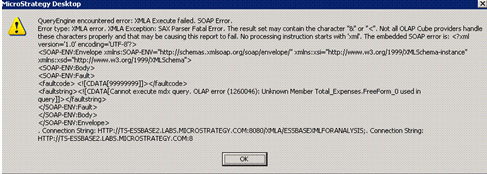
The following error message appears in Strategy Developer 9.3.0 and above when browsing MDX attribute elements or running an attribute-only MDX report.  This should only be seen if the metadata is upgraded from 9.2.1m or lower versions and the MDX datasource type is Essbase:
ka02R000000kcStQAI_0EM440000002CCp.png


QueryEngine encountered error: XMLA Execute failed. SOAP Error.Error type: XMLA error. XMLA Exception: SAX Parser Fatal Error. The result set may contain the character "&" or "<". Not all OLAP Cube providers handle these characters properly and that may be causing this report to fail. No processing instruction starts with 'xml'. The embedded SOAP error is: <?xml version='1.0' encoding='UTF-8'?><SOAP-ENV:Envelope xmlns:SOAP-ENV="http://schemas.xmlsoap.org/soap/envelope/" xmlns:xsi="http://www.w3.org/1999/XMLSchema-instance" xmlns:xsd="http://www.w3.org/1999/XMLSchema"><SOAP-ENV:Body><SOAP-ENV:Fault><faultcode> <!]></faultcode><faultstring><!]></faultstring></SOAP-ENV:Fault></SOAP-ENV:Body></SOAP-ENV:Envelope>. Connection String: HTTP://TS-ESSBASE2.LABS.Strategy.COM:8080/XMLA/ESSBASEXMLFORANALYSIS;. Connection String: HTTP://TS-ESSBASE2.LABS.Strategy.COM:8080/XMLA/ESSBASEXMLFORANALYSIS;. SQL Statement: with member . as '1'set as '{.Levels(0).members}'select {.} on columns,non empty on rowsfrom ...
  
CAUSE:
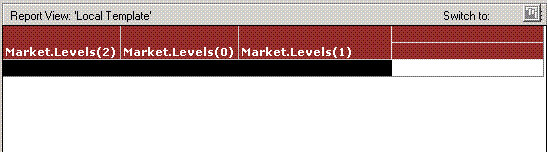
The MDX statement includes unknown member .. Below is an example of attribute-only report:

ka02R000000kcStQAI_0EM440000002CCb.png

 
Below is the MDX statement of this report which is incorrect:


with member . as '1'set as '{.Levels(2).members, .Levels(0).members, .Levels(1).members}'select {.} on columns,non empty hierarchize({}) on rowsfrom .

The problem is caused by the following changes made in versions 9.3.0 and above for Essbase in 930 GA.

  1. Dimension Unique Name of Metric type column is imported on 930 but not on 921m.
  2. Default value of VLDB setting "MDX Add Fake Measure" is changed from 0 to 1.
  3. Default value of VLDB setting "MDX Remember Measures Dimension" is changed from 0 to 1.

  
WORKAROUND:
 
There are two workarounds and any one is applicable.
Workaround 1: Upgrade MDX Cube structure using MDX Cube Catalog.
 
Detailed steps:
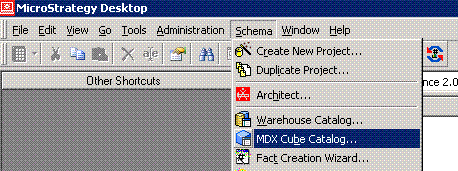
  • On Strategy Developer and launch the MDX Cube Catalog.
ka02R000000kcStQAI_0EM440000002CCf.gif
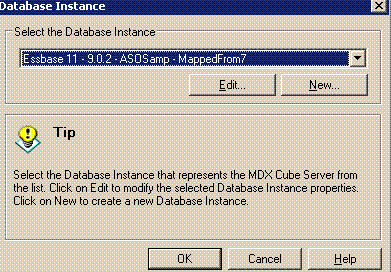
  • Select the Essbase type Database Instance.
ka02R000000kcStQAI_0EM440000002CCm.gif
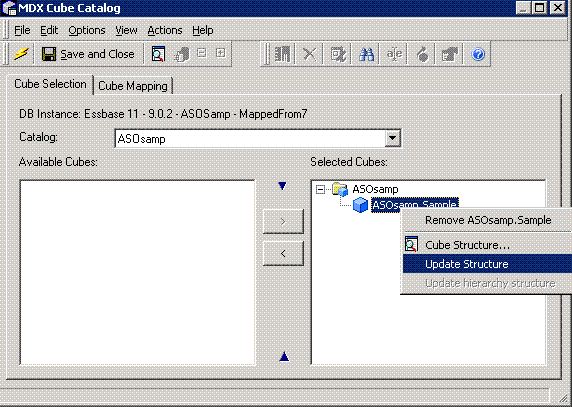
  • Update the Cube structure and then "Save and Close".
ka02R000000kcStQAI_0EM440000002CCr.gif
  • Update Schema.
ka02R000000kcStQAI_0EM440000002CCZ.gif

 
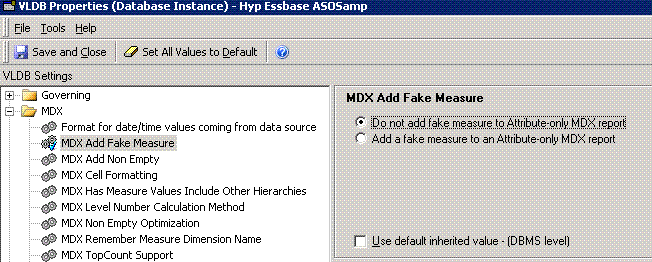
Workaround 2: Change VLDB property "MDX Add Fake Measure" of Essbase type Database Instance. Set the value to be "Do not add fake measure to Attribute-only MDX report".
 
Detailed steps:

  • On Strategy Developer and launch the VLDB properties of Essbase type Database Instance.
ka02R000000kcStQAI_0EM440000002CCd.gif
  • |
  • Change VLDB property "MDX Add Fake Measure" to be "Do not add fake measure to Attribute-only MDX report".
ka02R000000kcStQAI_0EM440000002CCn.gif
  • Restart the Intelligence Server for the new VLDB settings to take effect. 

 
 The Internal Reference Number for the issue discussed in this technical note is 741120.


Comment

0 comments

Details

Knowledge Article

Published:

April 18, 2017

Last Updated:

April 18, 2017