Introduction
In the Strategy Intelligence Server, data corresponding to History List messages is stored in a History List repository, which can be located on disk, or in a database.
What is Hybrid History List repository?
Hybrid History List repository is an extension of Database History List, where the Inbox messages are stored in the database and the Inbox content i.e., results are stored as files on a disk location (as in the case of file based History List).
How to configure Hybrid History List?
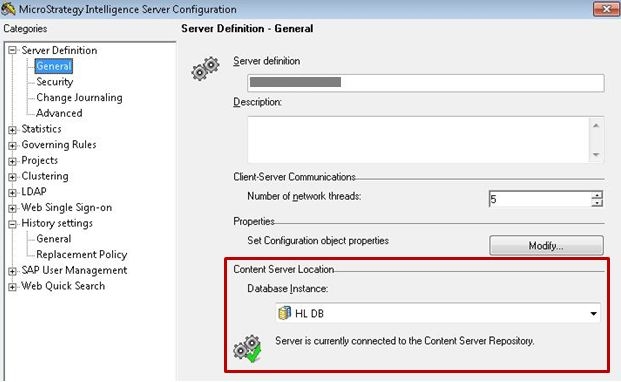
From the Strategy Intelligence Server Configuration editor, setup the use of Database History List. When Database History List is configured, a successful configuration is seen by the green check mark below the Content Server location in the Strategy Intelligence Server configuration editor, as shown below.
After the Content Server database instance has been setup correctly, in the Strategy Intelligence Server Configuration editor, go to History settings > General and setup a folder location in the text box under 'External central storage for Database-based History List', as shown below.
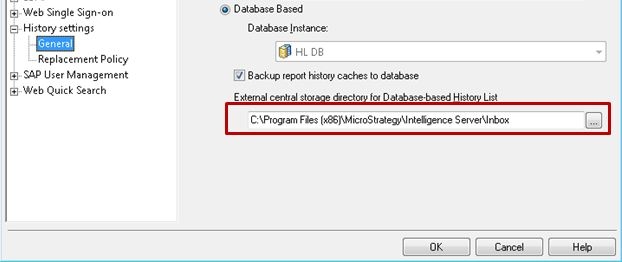
After setting up a location, users will be prompted to restart the Strategy Intelligence Server for the changes to take effect.
What data is stored on disk?
In the central directory chosen, a folder is created for every user that exists in the metadata. The names of the folders are same as the GUID of user objects in the metadata. The result files are saved within the folder at the message level. The names of the files are in the format 'UserGUID-R-DATE-MessageGUID'. An example result file can be '54F3D26011D2896560009A8E67019608-R-2013-7-2-C85BE43B46A20834AB9DDB9A4CE65827'The following data files are chosen within each folder:

What are the advantages of Hybrid History List repository?
Writing binary content to a database is slower when compared to writing to disk. This difference can be noticeable when the size of the message is huge or when a large number of message are being saved at the same time. Also, retrieving binary content from file is faster as compared to database. Conversely, in a file based Inbox system, as message information files are stored at the user-project-day level, adding a new message or changing information about an existing message results in the re-creation of the full message information file. This can affect adversely in a situation where a large number of Inbox message are being modified at the same time. In a database based History list repository, information is stored at the message level. Therefore any change that needs to be performed would be at that row level. As seen above, each scheme of storing Inbox messages (File based or Database based) has its own advantage. Hybrid History List repository is a combination of both the schemes where we take the best of each world - where we save the message results to disk (which is more efficient) and the message information to database (which is more efficient)
Also, for a hybrid scheme, in a clustered environment, instead of having separate folders for each Strategy Intelligence Server folder, all the files are created under the same folder which is created for each user. Therefore, in case of a failure, the surviving Intelligence Server does not have to take over the messages from the failed server as all the result files are already located on ONE centralized location which is accessible to all the nodes in the cluster.
How to migrate to Hybrid history list repository?
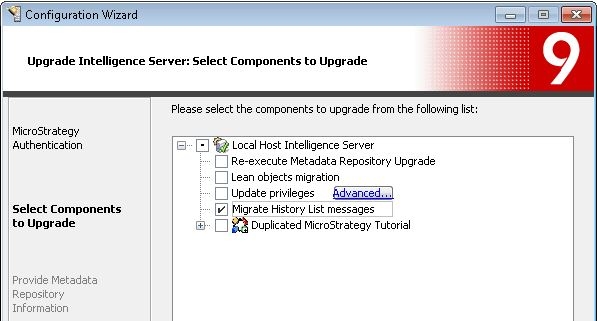
It is possible to migrate from File or Database History List to Hybrid History List repository. Users can migrate to Hybrid History List repository using Configuration Wizard. Choose the option 'Upgrade existing environment' > 'Intelligence Server components'. After logging in to the metadata, choose the option 'Migrate history list messages' as shown below.
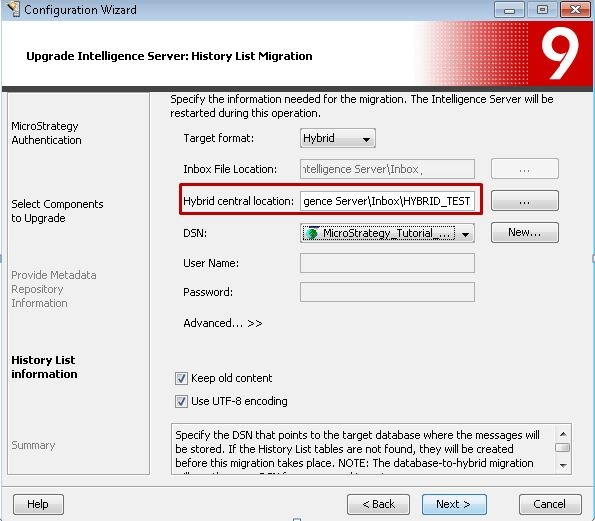
When migrating from file based History List to Hybrid History List, users have to provide a database location as well as the required file location (where the result files will be created). When migrating from Database History List to Hybrid History List, users just need to provide a file location as shown below. If required, a new database location can be provided as well. If users check the option to keep old content, the message results will be retained on the database as well.