EducationSoftwareStrategy.com
StrategyCommunity

Knowledge Base

Product

Community

Knowledge Base

TopicsBrowse ArticlesDeveloper Zone

Product

Download SoftwareProduct DocumentationSecurity Hub

Education

Tutorial VideosSolution GalleryEducation courses

Community

GuidelinesGrandmastersEvents
x_social-icon_white.svglinkedin_social-icon_white.svg
Strategy logoCommunity

© Strategy Inc. All Rights Reserved.

LegalTerms of UsePrivacy Policy
  1. Home
  2. Topics

KB44178: The value of "RP NUMBER OF JOBS" metric per Day is displayed incorrectly in MicroStrategy Enterprise Manager 9.3.x


Community Admin

• Strategy


In MicroStrategy Enterprise Manager 9.3.x, the value of 'RP NUMBER OF JOBS' metric per Day is displayed incorrectly.

SYMPTOM:
 
In Strategy Enterprise Manager 9.3.x, the value of 'RP NUMBER OF JOBS' metric per Day is displayed incorrectly.
 
STEPS TO REPRODUCE:
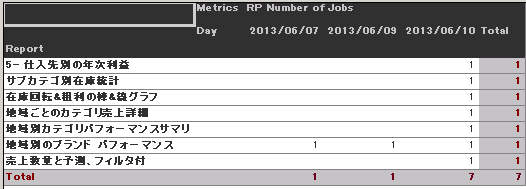
  • Run the out of the box '4003. User Report Activity’ report in Enterprise Manager
  • Remove all the metrics except 'RP Number of Jobs' from the report to simplify the report.
  • Move 'Day' attribute from page-by to column.
  • Note that the metric value shows 1 for that specific Report on all days, as shown in the image below:
     
ka04W000000ObLoQAK_0EM4400000029Zi.png

 
CAUSE:
 
The out of the box ‘Day’ attribute in Strategy Enterprise Manager 9.3.0 has an incorrect parent-child relationship.
 
ACTION:
 
This issue has been addressed in Strategy 9.4.0. Upgrade to this version to take advantage of this fix.
 
WORKAROUND:
 
For this report to correctly calculate its values two modifications are necessary:

  • Changing the relationship of ‘Day’ attribute to Many to Many from One to Many between ‘Day’ and ‘Report’, ‘Day’ and ‘Document’.  Please note that, in version 9.3.1, it is also necessary to modify the relationship between 'Day' and 'Intelligent Cube' in this way:
     
    Version 9.3.0:
     
ka04W000000ObLoQAK_0EM4400000029Zh.png
  •  
    Version 9.3.1:
     
ka04W000000ObLoQAK_0EM4400000029Zj.png

After making the above changes the report shows correct value, as shown in the image below:


ka04W000000ObLoQAK_0EM4400000029Zg.png


Comment

0 comments

Details

Knowledge Article

Published:

June 2, 2017

Last Updated:

June 2, 2017