EducationSoftwareStrategy.com
StrategyCommunity

Knowledge Base

Product

Community

Knowledge Base

TopicsBrowse ArticlesDeveloper Zone

Product

Download SoftwareProduct DocumentationSecurity Hub

Education

Tutorial VideosSolution GalleryEducation courses

Community

GuidelinesGrandmastersEvents
x_social-icon_white.svglinkedin_social-icon_white.svg
Strategy logoCommunity

© Strategy Inc. All Rights Reserved.

LegalTerms of UsePrivacy Policy
  1. Home
  2. Topics

KB441792: "GC overhead limit exceed" error when connecting to MongoD due to low memory setting in DSN


Community Admin

• Strategy


When connecting to a MicroStrategy to a Mongo-DB database in ODBC the error message "GC overhead limit exceed" appears.

SYMPTOM


When running reports through the Mongo Database or connecting to the database through connectivity wizard, an error message appears stating "GC overhead limit exceed." 
In Connectivity Wizard error also includes "GC overhead limit exceed". 

CAUSE


The default or specified heap size used by the JVM is not sufficient to fulfill the query execution. 

ACTION


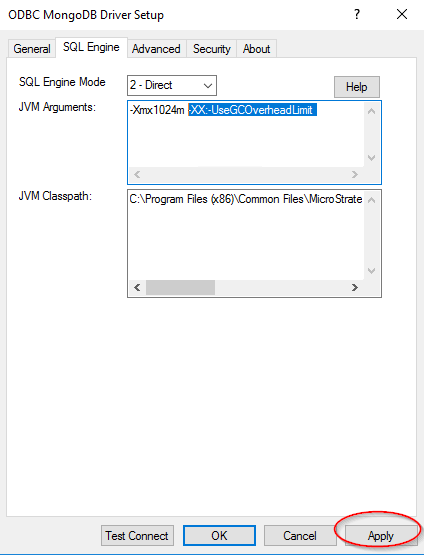
Increase the JVM Argument in the ODBC MongoDB Driver Setup by appending "-Xmx1024m " or higher value. 
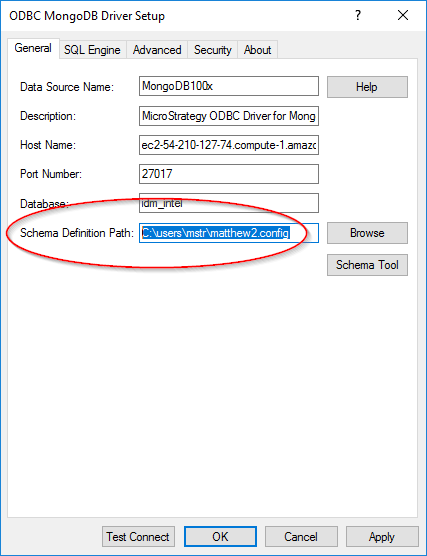
  1. Delete the original database config files or give an updated path to the new one so that the new ones are not overwritten:
ka04W00000148BgQAI_0EM2R000000lsYH.jpeg


  1. Add the setting in the SQL Engine tab and hit the "Apply" button to save the DSN.  


ka04W00000148BgQAI_0EM2R000000lsYM.jpeg
  1. Exit the DSN and close the ODBC administrator.  
  2. Reopen the ODBC administrator and try to connect again to MongoDB.

It is recommended to use a -Xmx that is a higher value than the default of 256m.


Comment

0 comments

Details

Knowledge Article

Published:

September 27, 2018

Last Updated:

November 20, 2018