Users viewed in User manager across multiple pages are disordered in Strategy Developer 10.x and above.
In User manager, by default, each page will show 500 users.
This value can be adjusted in Developer-Tools-Preferences-Developer-Browsing:
Maximum number of users displayed per page
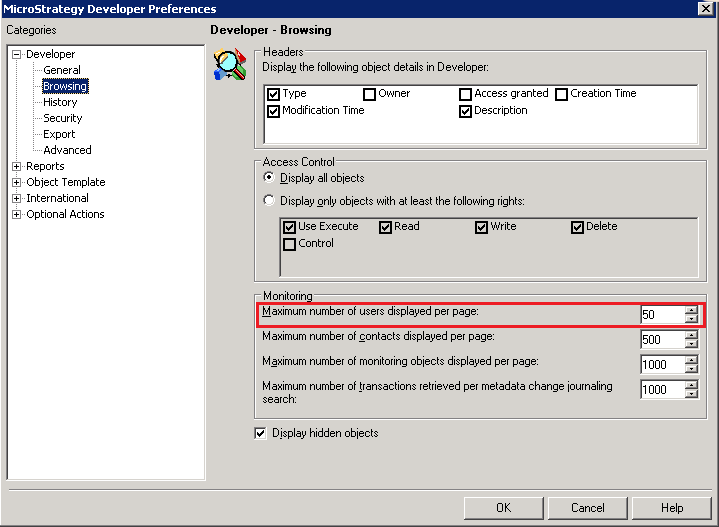
When the total user number is large or above setting is changed to small value, users are divided into multiple pages.
It might be observed that they are disordered as below:
Page 1

Page 2

User might consider that the top users in Page2 should be prior to the bottom users in Page1, as they are sorted by “Developer login” column.
This behavior is per design due to the logic to fetch user list.
There are 2 stages when clicking on User Manager to view all users:
Stage 1:
Below SQL is executed to fetch the users from Metadata DB, where the data is sorted by TRANSLATION(if it existis) or Object Name(if the translation is not available) and then by Object ID.
SELECT DISTINCT info.OBJECT_ID, info.PROJECT_ID, info.OBJECT_TYPE, COALESCE(otrns.TRANSLATION, info.OBJECT_UNAME)
FROM DSSMDOBJINFO info LEFT JOIN DSSMDOBJTRNS otrns
ON otrns.PROPERTY=1 AND otrns.LOCALE=1033 AND
info.OBJECT_ID=otrns.OBJECT_ID AND info.PROJECT_ID=otrns.PROJECT_ID
WHERE info.PROJECT_ID='38A062302D4411D28E71006008960167' AND
info.SUBTYPE=8704 AND info.OBJECT_ID NOT IN ('EE9BD70043F0F571B38E43BF19B9301A', '027B542144A77860ACD37BB3ED40AA07') AND
info.PARENT_ID NOT IN ('EE9BD70043F0F571B38E43BF19B9301A', '027B542144A77860ACD37BB3ED40AA07')
ORDER BY 4, 1;
Stage 2:
Clinet side(Developer) would display the user following the setting “Maximum number of users displayed per page” and sort them by Developer Login, by default.
It follows alphabetical order where lower-case letters are mixed with upper-case.
Changing the sorting order by clicking on each column header would affect the current page only.
KB441852
