EducationSoftwareStrategy.com
StrategyCommunity

Knowledge Base

Product

Community

Knowledge Base

TopicsBrowse ArticlesDeveloper Zone

Product

Download SoftwareProduct DocumentationSecurity Hub

Education

Tutorial VideosSolution GalleryEducation courses

Community

GuidelinesGrandmastersEvents
x_social-icon_white.svglinkedin_social-icon_white.svg
Strategy logoCommunity

© Strategy Inc. All Rights Reserved.

LegalTerms of UsePrivacy Policy
  1. Home
  2. Topics

KB441936: Spaces in heatmap box texts are replaced by "#labelnbsp;" on MicroStrategy 10.11 dossiers


Willian Tomazini

Senior Cloud Support Engineer I • MicroStrategy


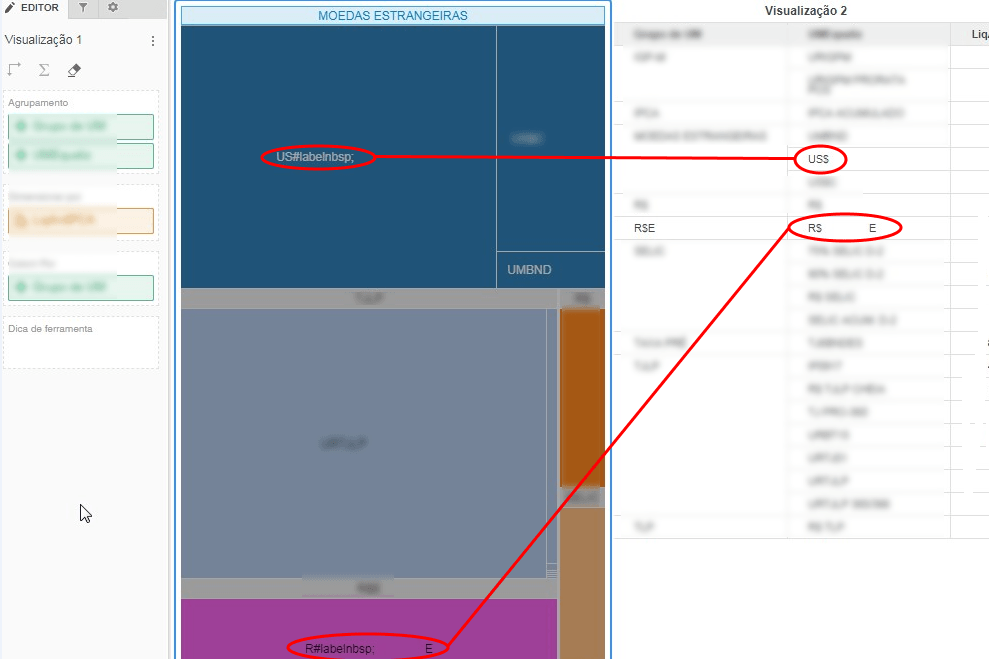
When data consisting of a dollar sign followed by space "$ " is inserted on a dossier in MicroStrategy 10.11.

Starting with the release of Strategy ONE (March 2024), dossiers are also known as dashboards.
​SYMPTON
When data consisting of a dollar sign followed by space "$ " is inserted into a dossier in Strategy 10.11.
ka0PW0000001JUxYAM_0EM44000000QvIv.png

STEPS TO REPRODUCE
1 - Create a dossier in Strategy Web 10.11; 
2 - Add attributes that contain "$ " (dollar sign followed by space); 
3 - Add metrics; 
4 - Create a heatmap with the attributes and metrics; 
5 - The boxes with "$ " are displayed as "R#labelnbsp;".
CAUSE
This is a known issue with Strategy Web 10.11.
ACTION
This issue has been addressed in Strategy 11.0. Upgrade to this version to take advantage of the fix.


Comment

0 comments

Details

Knowledge Article

Published:

September 26, 2018

Last Updated:

March 21, 2024