SYMPTOM:
When building a conditional derived metric in Strategy while a separate view filter or filter panel filter exists doesn't apply the view filter to the metric calculation. This happens when the filter attribute in the filter panel is related to the filter in the condition of the derived metric. For example if a derived metric has a condition of year = 2017 it will return all data for 2017 even if there is a filter panel filter on quarter = Q1 2017.
CAUSE:
This is an expected behavior by default. This is caused by a default advanced conditionality setting that exists for all metrics. The setting is "remove related report filter elements" which defaults to enabled. This setting ignores filters related to the condition by default. A screenshot of the setting is shown below.
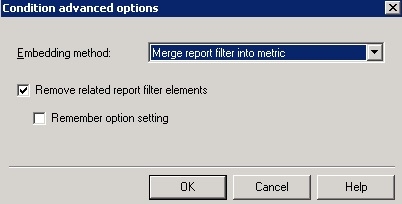
Now this setting is applied to derived metrics in Strategy Web despite the checkbox not being available in the GUI.
ACTION:
This setting can be controlled through the advanced symbols at the end of a conditional derived metric formula. When building a derived metric with a condition in Web the formula will look like the below.
HistogramMedian(Revenue, 5) {~+} <[Select a Month]; @2; ->
The entries at the end within the <> symbols are the advanced conditionality settings. By changing the final entry from - to + the setting for removed related report filter elements is changed to include all filters. The example formula with the change is below.
HistogramMedian(Revenue, 5) {~+} <[Select a Month]; @2; +>
Make sure that all desired conditional metrics have this changed if regular filter panel filters should always apply.
The internal reference number for this article is KB441973.
