EducationSoftwareStrategy.com
StrategyCommunity

Knowledge Base

Product

Community

Knowledge Base

TopicsBrowse ArticlesDeveloper Zone

Product

Download SoftwareProduct DocumentationSecurity Hub

Education

Tutorial VideosSolution GalleryEducation courses

Community

GuidelinesGrandmastersEvents
x_social-icon_white.svglinkedin_social-icon_white.svg
Strategy logoCommunity

© Strategy Inc. All Rights Reserved.

LegalTerms of UsePrivacy Policy
  1. Home
  2. Topics

KB442001: Error when importing data from a URL: “…does not meet the criteria set in the ‘Allowed URLs’ list that is controlled by the administrator”


Community Admin

• Strategy


This article describes how to get the "Allow URLs' list" that is controlled by the administrator.

Starting with the release of Strategy ONE (March 2024), dossiers are also known as dashboards.
SYMPTOM:
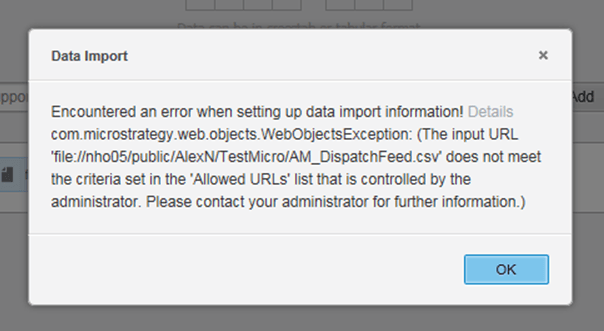
The below error is received when importing data from URL in Strategy Web:


"Encountered an error when setting up data import information: (The input URL 'file://path/to/file.csv' does not meet the criteria set in the 'Allowed URLs' list that is controlled by the administrator. Please contact your administrator for further information.)"
STEPS TO REPRODUCE:

  1. Create a dossier
  2. Click import data
  3. Click on the Data from URL import option and get an error:
ka0PW0000001JmgYAE_0EM44000000QwvA.png

CAUSE:
This error can appear when the project configuration settings have not been changed to enable URL file uploads.
ACTION:
To resolve this issue:
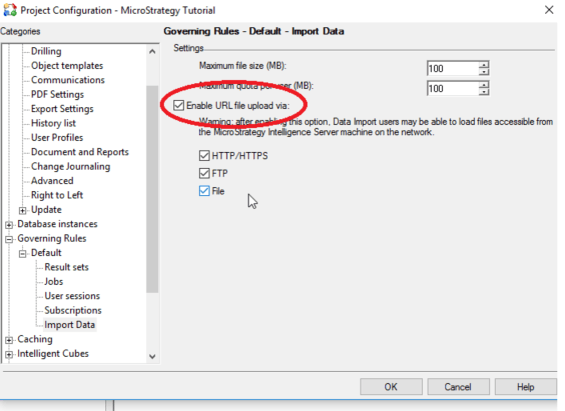
  1. Open Strategy Developer.
  2. Right click on the Project where the error is occurring and navigate to the Project Configuration. 
  3. Select Governing Rules > Default > Import data.
  4. Make sure the “enable URL file upload” is checked
ka0PW0000001JmgYAE_0EM44000000QwvF.png

 
KB442001


Comment

0 comments

Details

Knowledge Article

Published:

September 28, 2018

Last Updated:

March 21, 2024