EducationSoftwareStrategy.com
StrategyCommunity

Knowledge Base

Product

Community

Knowledge Base

TopicsBrowse ArticlesDeveloper Zone

Product

Download SoftwareProduct DocumentationSecurity Hub

Education

Tutorial VideosSolution GalleryEducation courses

Community

GuidelinesGrandmastersEvents
x_social-icon_white.svglinkedin_social-icon_white.svg
Strategy logoCommunity

© Strategy Inc. All Rights Reserved.

LegalTerms of UsePrivacy Policy
  1. Home
  2. Topics

KB442041: “Cannot allocate memory” error seen when trying to install MicroStrategy on Linux Operating System


Community Admin

• Strategy


After the base install has completed without issues, administrators might need to install a hotfix. When installing the Hotfix using the command “./setupHF.sh -console” and having the HugePages feature enabled in the Operating System, the installation fails to perform the integrity check.

SUMMARY
After the base install has completed without issues, administrators might need to install a hotfix. When installing the Hotfix using the command “./setupHF.sh -console” and having the HugePages feature enabled in the Operating System, the installation fails to perform the integrity check.
 
SYMPTOM
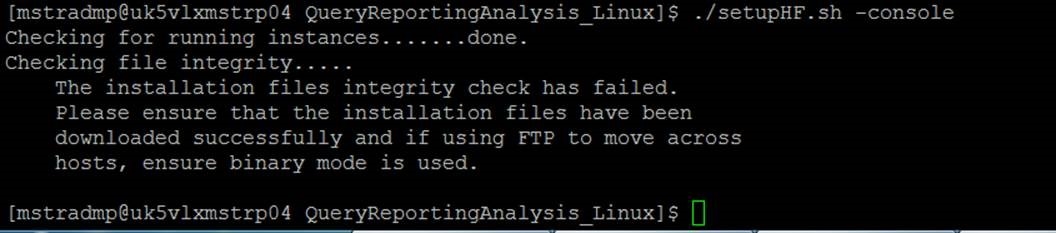
This issue was tested in Linux RHEL 6.4, when using the “sh” command the installation could not be completed successfully as seen in the image below:
ka04W00000148IyQAI_0EM44000000QxwY.jpeg


To get the full error to perform a verbose command with the “-x” or “--verbose” option and the following errors were seen:


./setupHF.sh: line 620: [: : integer expression expected
+ integrityCheckFailed
+ cat
    The installation files integrity check has failed.
    Please ensure that the installation files have been
    downloaded successfully and if using FTP to move across
                   hosts, ensure binary mode is used.


Integrity check failed for file Java HotSpot(TM) 64-Bit Server VM warning: 
INFO: os::commit_memory(0x0000000085200000, 1430257664, 2097152, 0) failed;
error='\''Cannot allocate memory'\'' (errno=12);
Cannot allocate large pages, falling back to regular pages.

After this, the installation does not complete.
CAUSE
The Intelligence Server uses smart heap mechanism for memory allocation. Smart heap doesn't allocate shared memory, which is the base for HugePage, as such, when the HugePages feature is enabled in the Operating System this error will occur.
 
ACTION
Disable Linux Huge Pages. These instructions might be different depending on the version of the Operating System for Red Hat, for example, the number of Huge Pages can be configured and activated by setting nr_hugepages in the proc file system an example to set at 512 use the command “echo 512 > /proc/sys/vm/nr_hugepages”. Using the following command “cat /proc/meminfo | grep Huge” or “grep HugePages_Total /proc/meminfo” the result should be “HugePages_Total = 0” after that the installation should complete successfully.
 
More details on this Linux feature can be found in the vendor documentation of the Operating System distribution with some examples below:

  • https://access.redhat.com - https://access.redhat.com/documentation/en-US/Red_Hat_Enterprise_Linux/5/html/Tuning_and_Optimizing_Red_Hat_Enterprise_Linux_for_Oracle_9i_and_10g_Databases/sect-Oracle_9i_and_10g_Tuning_Guide-Large_Memory_Optimization_Big_Pages_and_Huge_Pages-Configuring_Huge_Pages_in_Red_Hat_Enterprise_Linux_4_or_5.html
  • https://wiki.debian.org - https://wiki.debian.org/Hugepages


To know more about Strategy support on HugePages please look at this technical note:

  • KB45547: Does the Strategy Intelligence Server 9.x support the use of hugepages on Linux operating systems? 


KB442041


Comment

0 comments

Details

Knowledge Article

Published:

September 28, 2018

Last Updated:

December 31, 2018