EducationSoftwareStrategy.com
StrategyCommunity

Knowledge Base

Product

Community

Knowledge Base

TopicsBrowse ArticlesDeveloper Zone

Product

Download SoftwareProduct DocumentationSecurity Hub

Education

Tutorial VideosSolution GalleryEducation courses

Community

GuidelinesGrandmastersEvents
x_social-icon_white.svglinkedin_social-icon_white.svg
Strategy logoCommunity

© Strategy Inc. All Rights Reserved.

LegalTerms of UsePrivacy Policy
  1. Home
  2. Topics

KB442049: 10.4 MicroStrategy Wen Passing an Attribute Element from a Graph with an Ampersand ‘&’ in the attribute name to a report filter on a target document via Edit Links throws an error


Darren Burns

Senior Cloud Support Engineer III • MicroStrategy


This knowledge base article describes a behavior in MicroStrategy 10.x where if the attribute elements being passed to an Attribute element prompt via Edit Links on a Graph contain an Ampersand &, then an error is thrown regarding incorrect parameters being passed.

Symptom
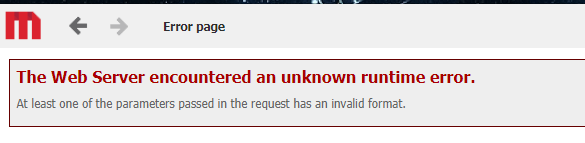
When passing attribute elements from a graph to another document using Edit Links, the error is thrown saying that "The Web Server encountered an unknown runtime error. At least one of the parameters passed in the request has an invalid format."
 

ka04W000001Ivy9QAC_0EM44000000Qxzc.png

Steps to Reproduce

  1. Change the Name of the "Books" attribute element of Category in the Microsoft Access Tutorial Data to "Books&"

 (Additionally, utilize the Tutorial Data attached to the case that has this change already made)
  1. In Strategy Web, Create a Report (Report1)
  2. Add the Category Attribute and a Metric to the Report
  3. Add an Element Prompt to the filter of the report
  4. Save the Report
  5. Create a Document (Document1) from Report1
  6. Add a Grid to Document1 with Category and the Metric from Report1
  7. Duplicate Document1 (save as Document2)
  8. In Document1, add an Edit Links to the Category column
  9. Configure the Edit Links to "Execute Document2" and "Pass Prompt Answers Dynamically"
  10. In Document1, change the View Mod of the grid to "Graph"
  11. Save Document1
  12. Execute Document1
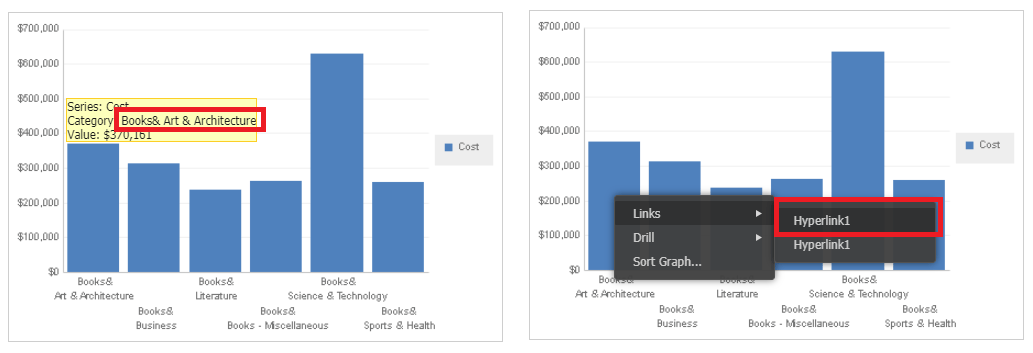
  13. Right-Click "Books&" on the Graph, and select 'Links' > Hyperink1
  14. Note that an error is thrown: "The Web Server encountered an unknown runtime error. At least one of the parameters passed in the request has an invalid format."


ka04W000001Ivy9QAC_0EM44000000Qxzh.png

Cause
This is an identified defect in Strategy where the XML that is sent from Web when linking to another Document does not encode the display name of the attribute, including the ampersand ‘&’ which throws the error.
Action
Currently, this issue is still being reviewed for feasibility by our Technology team and it is not scoped for any upcoming scheduled Strategy release.
 
THIRD PARTY SOFTWARE INSTALLATION WARNING:
The third-party product(s) discussed in this technical note is manufactured by vendors independent of Strategy. Strategy makes no warranty, express, implied or otherwise, regarding this product, including its performance or reliability.
 
Keywords
The Strategy Internal Reference Number for this issue is: KB ID
This issue has been logged as Rally ID # DE109502 and Scopus ID # 258555
 
  KB442049


Comment

0 comments

Details

Knowledge Article

Published:

September 28, 2018

Last Updated:

December 28, 2018