EducationSoftwareStrategy.com
StrategyCommunity

Knowledge Base

Product

Community

Knowledge Base

TopicsBrowse ArticlesDeveloper Zone

Product

Download SoftwareProduct DocumentationSecurity Hub

Education

Tutorial VideosSolution GalleryEducation courses

Community

GuidelinesGrandmastersEvents
x_social-icon_white.svglinkedin_social-icon_white.svg
Strategy logoCommunity

© Strategy Inc. All Rights Reserved.

LegalTerms of UsePrivacy Policy
  1. Home
  2. Topics

KB44209: How to migrate projects from one metadata database to another in MicroStrategy 9.4.x-10.x?


Stefan Zepeda

Salesforce Solutions Architect • Strategy


This knowledge base article explains how to migrate projects from one metadata database to another in MicroStrategy 9.4.x-10.x?

In order to migrate projects from one metadata database to another, the projects need to be duplicated into another metadata shell of the new database first.  For this example and steps on how to do this, assume the source metadata is in SQL Server 2008 and the environment needs to be in Oracle 11gR2  (This same process applies if upgrading versions of the same database).
  • Before anything in Strategy can be done a new connection to the database is required.  For this example the connection to the Oracle 11gR2 database is needed.
  • Create a new DSN using the new connection from step 1 using Strategy Connectivity Wizard.
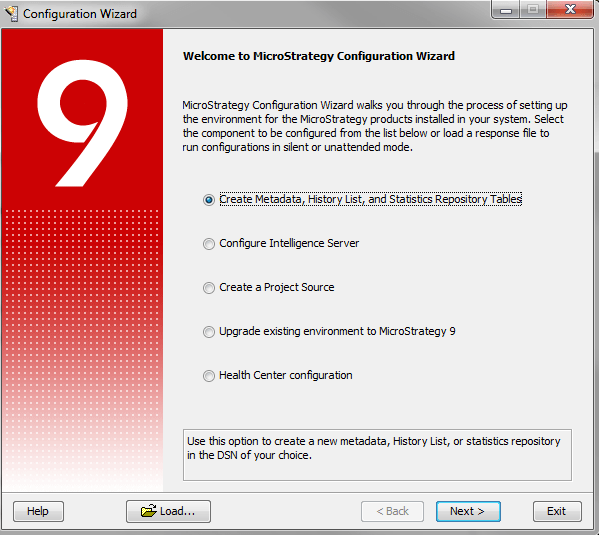
  • Createa  new metadata shell.  To do this, select the first option in Strategy Configuration Wizard and follow the steps from there.
ka04W000000rZQJQA2_0EM440000002CjW.png
  • Once the metadata shell is created, create a project source using this DSN.
  • In Strategy Developer, duplicate each of the projects into this new project source.  Duplication is the only way to get the projects into another environment.

The reason why this method is required is that certain settings and features are set only upon the creation of a metadata and are database specific. This includes but is not limited to the referential integrity trigger (a necessary feature to ensure the continued consistency of the metadata), indexes and the actual reference in the metadata to the type of database platform in use. A straight migration of the metadata through database backup and restore tools cannot be guaranteed to maintain these necessary features in a valid state which is why they are not supported.


Comment

0 comments

Details

Knowledge Article

Published:

April 28, 2017

Last Updated:

April 28, 2017