EducationSoftwareStrategy.com
StrategyCommunity

Knowledge Base

Product

Community

Knowledge Base

TopicsBrowse ArticlesDeveloper Zone

Product

Download SoftwareProduct DocumentationSecurity Hub

Education

Tutorial VideosSolution GalleryEducation courses

Community

GuidelinesGrandmastersEvents
x_social-icon_white.svglinkedin_social-icon_white.svg
Strategy logoCommunity

© Strategy Inc. All Rights Reserved.

LegalTerms of UsePrivacy Policy
  1. Home
  2. Topics

KB44211: Specific privileges and permissions required for a user to select "Take ownership of this object" checkbox in the Security settings of a specific object in MicroStrategy Developer 10.x


Stefan Zepeda

Salesforce Solutions Architect • Strategy


In order for a user to take ownership of an object through the "Take ownership of the selected object" checkbox in an object's Security settings the user must have the following privileges and permissions

In order for a user to take ownership of an object through the "Take ownership of the selected object" checkbox in an object's Security settings the user must have the following privileges and permissions

  1. Privilege to create the type of object in which the user wants to take ownership
    1. For example, if a user wants to take ownership of a report, then the user must have the privilege to "Create application objects"
    2. For example, if a user wants to take ownership of an attribute, then the user must have the privilege to "Create schema objects"
    3. These privileges are found in the Project Access section of the User Editor
  2. ACL permissions of either Full Control or the custom permissions granted to Browse, Write, and Control
    1. If the permissions do not contain Browse, Read, Write, and Control, then the "Take ownership of the selected object" checkbox will be grayed out
    2. Full Control grants these permissions, and includes settings for the others as well, so this is also an option

Here is an example of a user, test1, that is taking ownership of a report in Developer. 
Test1 has been granted the privilege to "Create application objects" and the ACL permissions for Browse, Write, and Control, as seen below:

ka02R000000kbkoQAA_0EM440000002CjR.png

Notice in the next screenshot that the "Take ownership of the selected object" checkbox is able to be interacted with/checked by the user based on these privileges and permissions:

ka02R000000kbkoQAA_0EM440000002CjM.png

Also, take note that the ownership successfully changes to test1 when hitting OK after checking "Take ownership of the selected object"
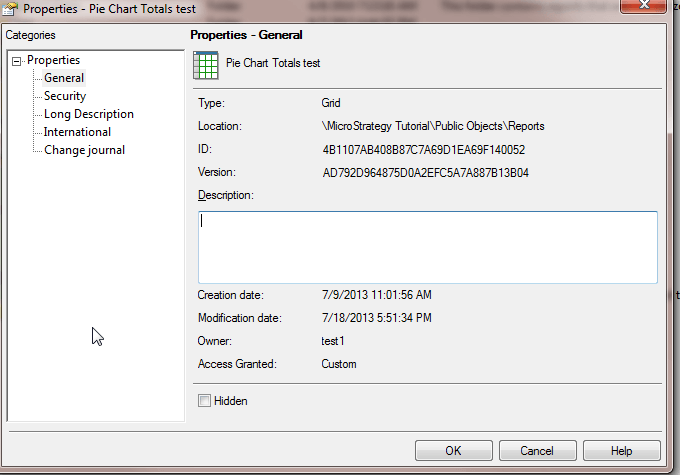
ka02R000000kbkoQAA_0EM440000002Cjf.png

If the privilege to "Create application objects" is revoked, and if test1 attempts to take ownership, then the following warning message is displayed:

ka02R000000kbkoQAA_0EM440000002CjQ.png

You do not have access privileges to create objects of type 'Report Definition'.
 If the ACL permissions differ from either Full Control or do not contain the custom permissions to grant Browse, Write, and Control, then the "Take ownership of the selected object" will be grayed out.

ka02R000000kbkoQAA_0EM440000002CjN.png

Therefore, if a user needs to be able to take ownership of an object, then ensure that (1) the user has the ability to create objects of that type, and that (2) the user is granted either Full Control or the custom permissions to Browse, Write, and Control the object in which the user wants to take ownership.


Comment

0 comments

Details

Knowledge Article

Published:

June 9, 2017

Last Updated:

June 9, 2017