Starting with the release of Strategy ONE (March 2024), dossiers are also known as dashboards.
SYMPTOM
When a metric is defined on an attribute (For ex: Count of Order) and requires Data Blending Engine to calculate the metric then unnecessary attributes are fetched into Data Blending Engine causing extra memory usage and even hit the governing limit of the Intelligence Server and leads to error.
STEPS TO REPRODUCE
1. Strategy Tutorial project is used to demonstrate the problem.
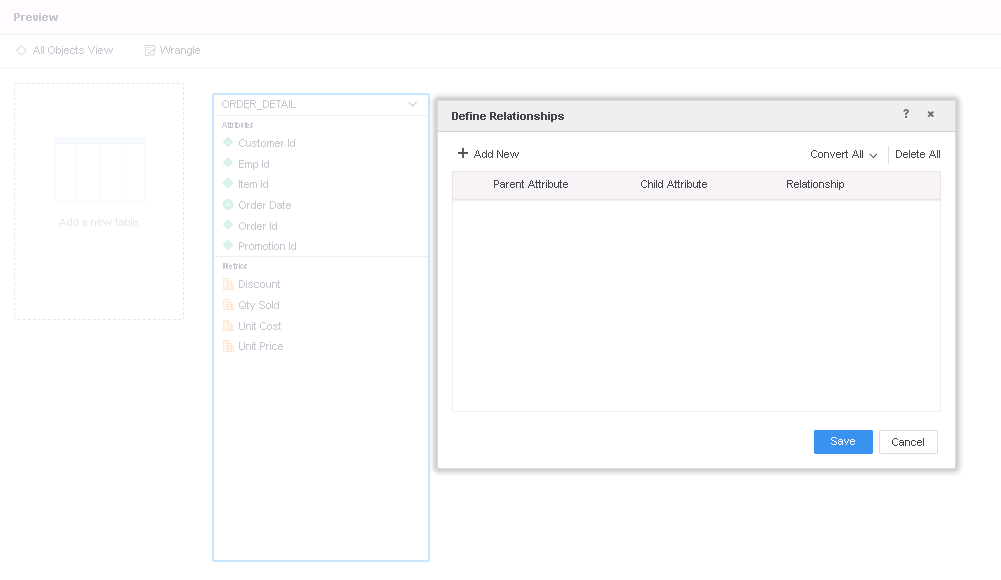
2. Create a new Dossier and add New Data and add ORDER_DETAIL table and define no relationships as specified below and publish as In-Memory Cube:
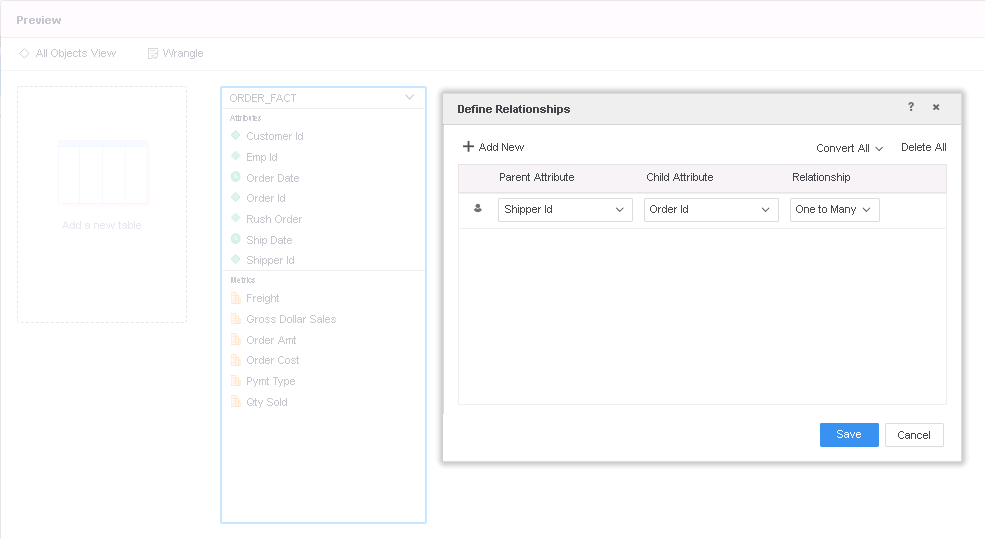
2. Add New Data and add ORDER_FACT table and define following relationship as specified below and publish as In-Memory Cube:
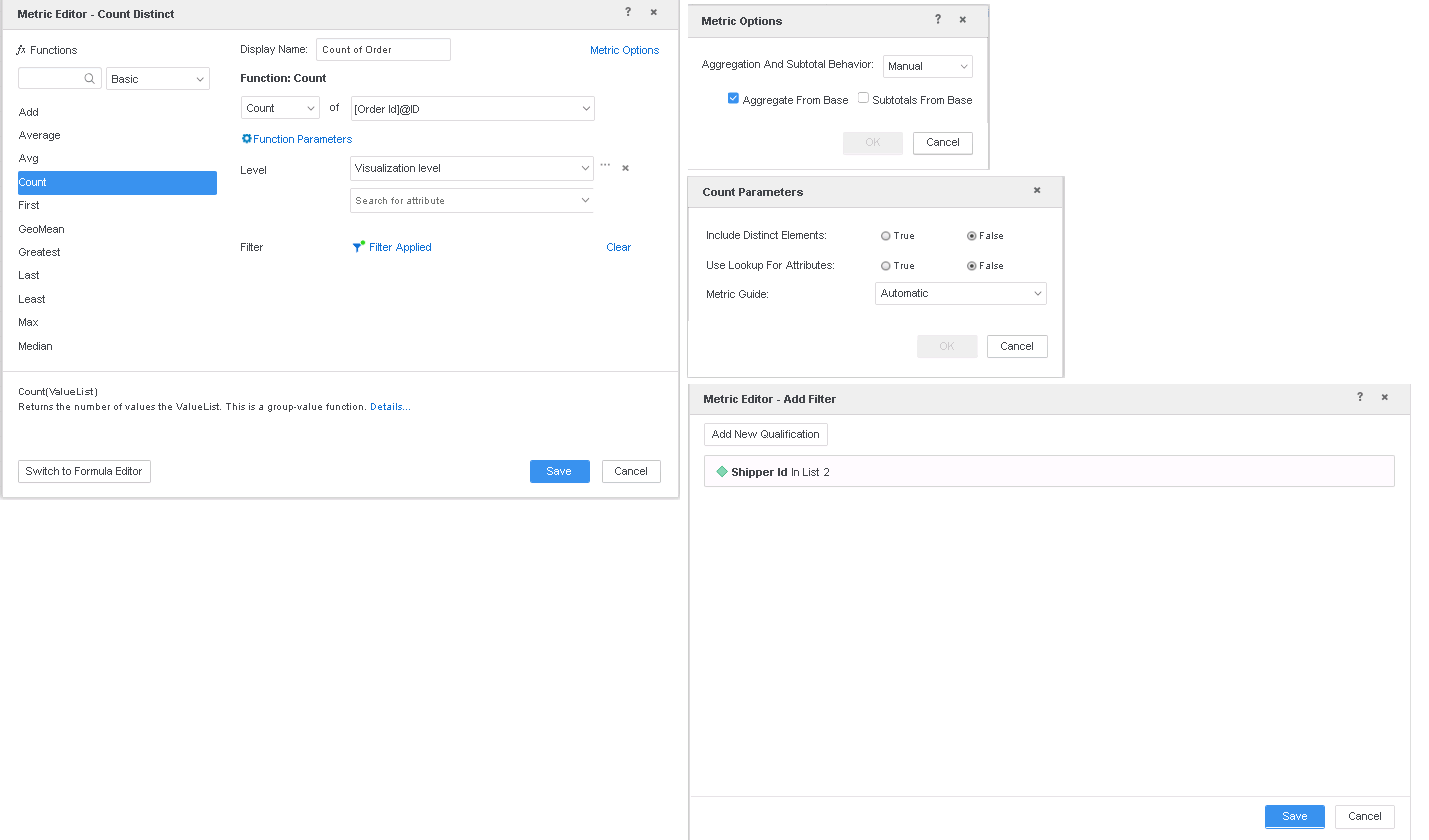
3. Create a new derived metric as following:
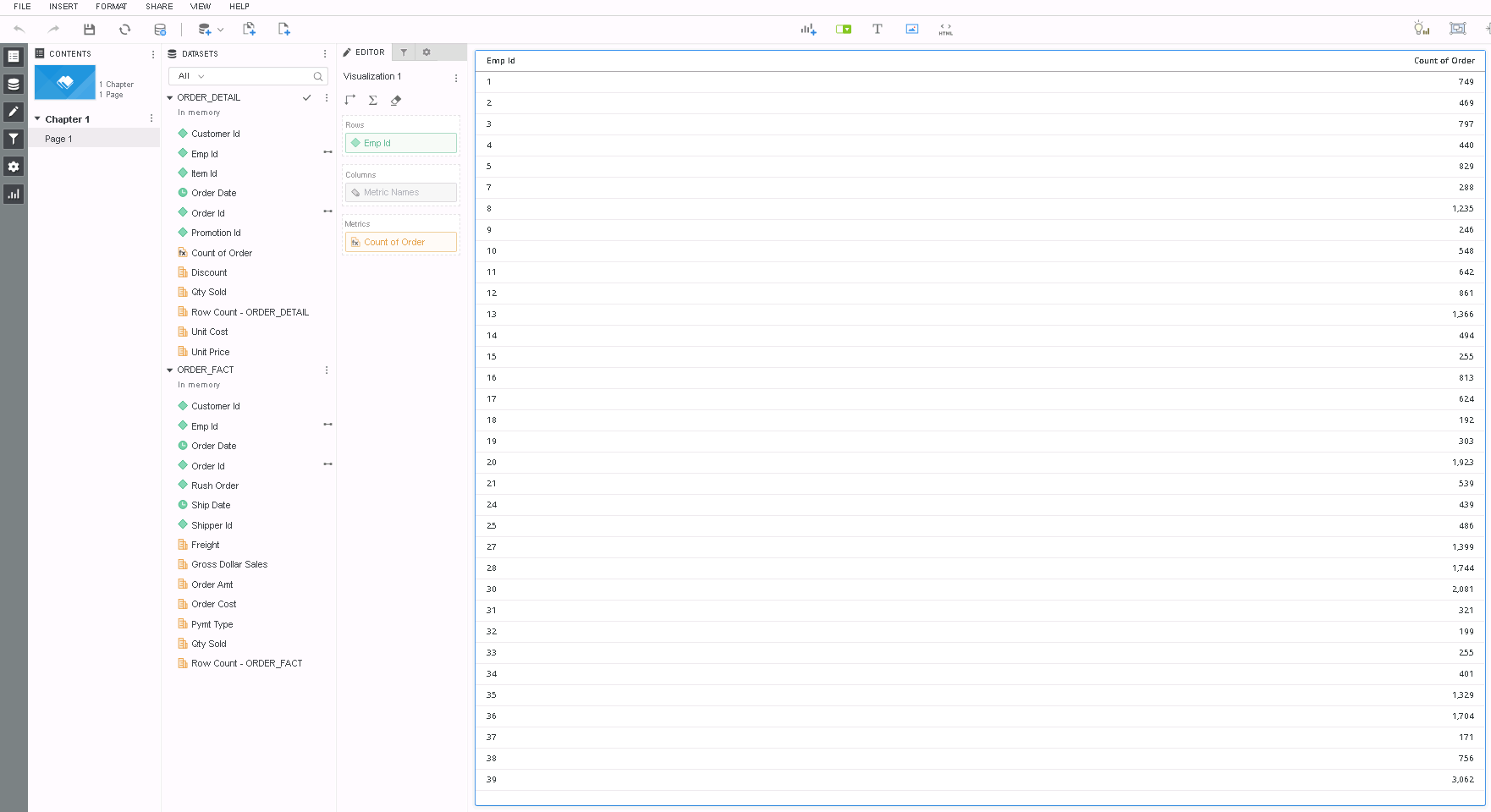
4. Put "Emp Id" and "Count of Order" on visualization and the Dossier looks like the one following:
5. Go to Query Details and note that all the columns are fetched (in red below) from the table to calculate the metric in Data Blending Engine:
*********   Visualization Summary Start  **********
Time Spent: 0.122 sec(s)
Query Execution Start Time: 3/5/2019 6:27:00 PM
Query Execution End Time: 3/5/2019 6:27:00 PM

Note: The total 'Time Spent' above may be greater than the summation of the individual step execution times below.
There are preparation tasks for each step that are not individually measured.
*********   Visualization Summary End    **********


************   Individual Step Start   ************
Number of Rows Returned: 153990
Time Spent: 0.011 sec(s)
Query Execution Start Time: 3/5/2019 6:27:00 PM
Query Execution End Time: 3/5/2019 6:27:00 PM

select	([Order Id]@[ORDER_ID]) as ([Order Id]@[ORDER_ID]),
	[Shipper Id]@[SHIPPER_ID]
from	RELATION0-<Shipper Id, Order Id>
to	Ex4_tempcube1
************   Individual Step End     ************


************   Individual Step Start   ************
Number of Rows Returned: 3986
Time Spent: 0.010 sec(s)
Query Execution Start Time: 3/5/2019 6:27:00 PM
Query Execution End Time: 3/5/2019 6:27:00 PM

select	[Order Id]@[ORDER_ID]
from	Ex4_tempcube1
where	[Shipper Id]@[SHIPPER_ID] in (2)
to	Ex4_tempcube0
************   Individual Step End     ************


************   Individual Step Start   ************
Time Spent: 0.001 sec(s)
Query Execution Start Time: 3/5/2019 6:27:00 PM
Query Execution End Time: 3/5/2019 6:27:00 PM

Drop	Ex4_tempcube1
************   Individual Step End     ************


************   Individual Step Start   ************
Number of Rows Returned: 27960
Time Spent: 0.049 sec(s)
Query Execution Start Time: 3/5/2019 6:27:00 PM
Query Execution End Time: 3/5/2019 6:27:00 PM

Tables Accessed:
Table6	[F_ORDER_DETAILF9F6C7C31694FE17BD41973219117746]:	Promotion Id, Emp Id, Item Id, Order Date, Customer Id, Order Id, 	Unit Cost, Unit Price, Row Count - ORDER_DETAIL, Discount, Qty Sold, 	FACT_TABLE

select	distinct	[Customer Id]@[CUSTOMER_ID],
	[Promotion Id]@[PROMOTION_ID],
	([Emp Id]@[EMP_ID]) as ([Emp Id]@[EMP_ID]),
	([Order Id]@[ORDER_ID]) as ([Order Id]@[ORDER_ID]),
	[Order Date]@[ORDER_DATE],
	[Item Id]@[ITEM_ID]
from	ORDER_DETAIL
with Table Join Tree: 	[F_ORDER_DETAILF9F6C7C31694FE17BD41973219117746]<<Order Id> in (Ex4_tempcube0)>
to	Ex4_tempcube2
************   Individual Step End     ************


************   Individual Step Start   ************
Number of Rows Returned: 3986
Time Spent: 0.008 sec(s)
Query Execution Start Time: 3/5/2019 6:27:00 PM
Query Execution End Time: 3/5/2019 6:27:00 PM

select	[Order Id]@[ORDER_ID],
	[Shipper Id]@[SHIPPER_ID]
from	RELATION0-<Shipper Id, Order Id>
where	[Shipper Id]@[SHIPPER_ID] in (2)
to	Ex4_tempcube3
************   Individual Step End     ************


************   Individual Step Start   ************
Number of Rows Returned: 27960
Time Spent: 0.024 sec(s)
Query Execution Start Time: 3/5/2019 6:27:00 PM
Query Execution End Time: 3/5/2019 6:27:00 PM

select	*
from	Left Outer Join(
	                Ex4_tempcube2,
	                Ex4_tempcube3
	               ) on Order Id
to	Ex4_tempcube4
************   Individual Step End     ************


************   Individual Step Start   ************
Time Spent: 0.000 sec(s)
Query Execution Start Time: 3/5/2019 6:27:00 PM
Query Execution End Time: 3/5/2019 6:27:00 PM

Drop	Ex4_tempcube0
************   Individual Step End     ************


************   Individual Step Start   ************
Time Spent: 0.000 sec(s)
Query Execution Start Time: 3/5/2019 6:27:00 PM
Query Execution End Time: 3/5/2019 6:27:00 PM

Drop	Ex4_tempcube2
************   Individual Step End     ************


************   Individual Step Start   ************
Time Spent: 0.000 sec(s)
Query Execution Start Time: 3/5/2019 6:27:00 PM
Query Execution End Time: 3/5/2019 6:27:00 PM

Drop	Ex4_tempcube3
************   Individual Step End     ************


************   Individual Step Start   ************
Number of Rows Returned: 34
Time Spent: 0.008 sec(s)
Query Execution Start Time: 3/5/2019 6:27:00 PM
Query Execution End Time: 3/5/2019 6:27:00 PM

select	([Emp Id]@[EMP_ID]) as ([Emp Id]@[EMP_ID]),
	count([Order Id]@[ORDER_ID])@{[Emp Id]} as [Count of Order]
from	Ex4_tempcube4
where	[Shipper Id]@[SHIPPER_ID] in (2)
************   Individual Step End     ************


************   Individual Step Start   ************
Time Spent: 0.000 sec(s)
Query Execution Start Time: 3/5/2019 6:27:00 PM
Query Execution End Time: 3/5/2019 6:27:00 PM

Drop	Ex4_tempcube4
************   Individual Step End     ************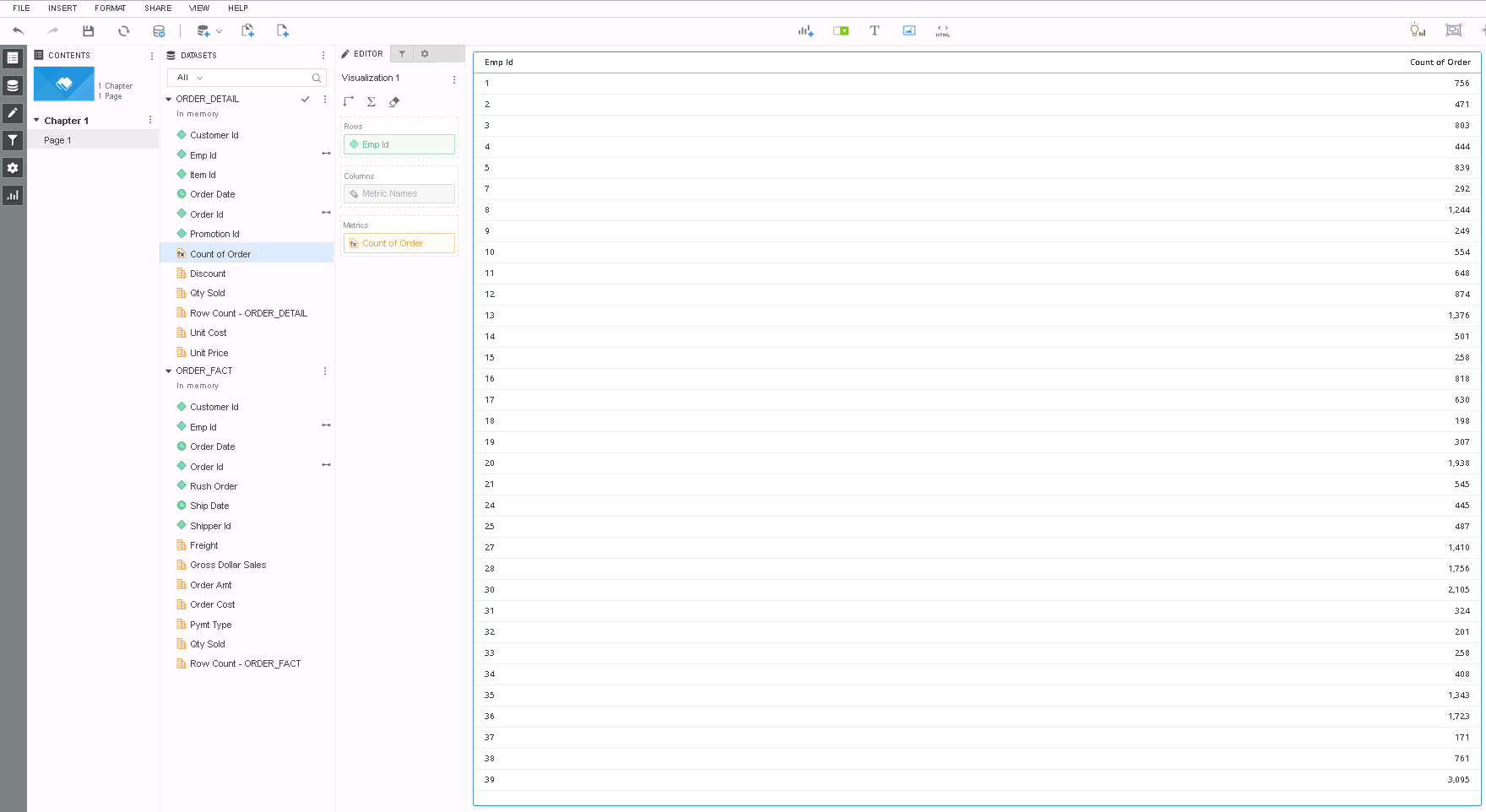
*********   Visualization Summary Start  **********
Time Spent: 0.129 sec(s)
Query Execution Start Time: 3/5/2019 6:48:07 PM
Query Execution End Time: 3/5/2019 6:48:07 PM

Note: The total 'Time Spent' above may be greater than the summation of the individual step execution times below.
There are preparation tasks for each step that are not individually measured.
*********   Visualization Summary End    **********


************   Individual Step Start   ************
Number of Rows Returned: 153990
Time Spent: 0.020 sec(s)
Query Execution Start Time: 3/5/2019 6:48:07 PM
Query Execution End Time: 3/5/2019 6:48:07 PM

Tables Accessed:
Table7	[REL_SHIPPER_ID_ORDER_ID]:	Shipper Id, Order Id, 		RELATIONSHIP_TABLE,	ONE_TO_MANY

select	[Order Id]@[ORDER_ID],
	[Shipper Id]@[SHIPPER_ID]
from	ORDER_FACT
with Table Join Tree: 	[REL_SHIPPER_ID_ORDER_ID]
************   Individual Step End     ************


************   Individual Step Start   ************
Number of Rows Returned: 3986
Time Spent: 0.015 sec(s)
Query Execution Start Time: 3/5/2019 6:48:07 PM
Query Execution End Time: 3/5/2019 6:48:07 PM

select	[Order Id]@[ORDER_ID]
from	RELATION0-<Shipper Id, Order Id>
where	[Shipper Id]@[SHIPPER_ID] in (2)
to	Ex4_tempcube0
************   Individual Step End     ************


************   Individual Step Start   ************
Number of Rows Returned: 3986
Time Spent: 0.054 sec(s)
Query Execution Start Time: 3/5/2019 6:48:07 PM
Query Execution End Time: 3/5/2019 6:48:07 PM

Tables Accessed:
Table6	[F_ORDER_DETAILF9F6C7C31694FE17BD41973219117746]:	Promotion Id, Emp Id, Item Id, Order Date, Customer Id, Order Id, 	Unit Cost, Unit Price, Row Count - ORDER_DETAIL, Discount, Qty Sold, 	FACT_TABLE

select	[Emp Id]@[EMP_ID],
	[Order Id]@[ORDER_ID],
	count([Order Id]@[ORDER_ID])@{[Order Id],[Emp Id]} as [Count of Order]
from	ORDER_DETAIL
with Table Join Tree: 	[F_ORDER_DETAILF9F6C7C31694FE17BD41973219117746]<<Order Id> in (Ex4_tempcube0)>
to	Ex4_tempcube1
************   Individual Step End     ************


************   Individual Step Start   ************
Number of Rows Returned: 3986
Time Spent: 0.009 sec(s)
Query Execution Start Time: 3/5/2019 6:48:07 PM
Query Execution End Time: 3/5/2019 6:48:07 PM

select	[Order Id]@[ORDER_ID],
	[Shipper Id]@[SHIPPER_ID]
from	RELATION0-<Shipper Id, Order Id>
where	[Shipper Id]@[SHIPPER_ID] in (2)
to	Ex4_tempcube2
************   Individual Step End     ************


************   Individual Step Start   ************
Number of Rows Returned: 3986
Time Spent: 0.008 sec(s)
Query Execution Start Time: 3/5/2019 6:48:07 PM
Query Execution End Time: 3/5/2019 6:48:07 PM

select	*
from	Left Outer Join(
	                Ex4_tempcube1,
	                Ex4_tempcube2
	               ) on Order Id
to	Ex4_tempcube3
************   Individual Step End     ************


************   Individual Step Start   ************
Time Spent: 0.000 sec(s)
Query Execution Start Time: 3/5/2019 6:48:07 PM
Query Execution End Time: 3/5/2019 6:48:07 PM

Drop	Ex4_tempcube0
************   Individual Step End     ************


************   Individual Step Start   ************
Time Spent: 0.000 sec(s)
Query Execution Start Time: 3/5/2019 6:48:07 PM
Query Execution End Time: 3/5/2019 6:48:07 PM

Drop	Ex4_tempcube1
************   Individual Step End     ************


************   Individual Step Start   ************
Time Spent: 0.000 sec(s)
Query Execution Start Time: 3/5/2019 6:48:07 PM
Query Execution End Time: 3/5/2019 6:48:07 PM

Drop	Ex4_tempcube2
************   Individual Step End     ************


************   Individual Step Start   ************
Number of Rows Returned: 34
Time Spent: 0.003 sec(s)
Query Execution Start Time: 3/5/2019 6:48:07 PM
Query Execution End Time: 3/5/2019 6:48:07 PM

select	[Emp Id]@[EMP_ID],
	sum([Count of Order])@{[Emp Id]} as [Count of Order]
from	Ex4_tempcube3
where	[Shipper Id]@[SHIPPER_ID] in (2)
************   Individual Step End     ************


************   Individual Step Start   ************
Time Spent: 0.000 sec(s)
Query Execution Start Time: 3/5/2019 6:48:07 PM
Query Execution End Time: 3/5/2019 6:48:07 PM

Drop	Ex4_tempcube3
************   Individual Step End     ************
