Starting with the release of Strategy ONE (March 2024), dossiers are also known as dashboards.
DESCRIPTION:
When turning an advanced filter qualification into a set qualification on a document or dossier in Strategy 10.10 and below incorrect filtering behavior is seen. The previous advanced qualification that was converted is still separately applied from the set qualification leading to invalid results. The advanced qualification in question needs to contain an OR qualification to trigger the defect. An example of this can be seen in the below picture where an advanced qualification on supplier and item category is converted to a set qualification of set of supplier where the original qualification is true.
STEPS TO REPRODUCE:
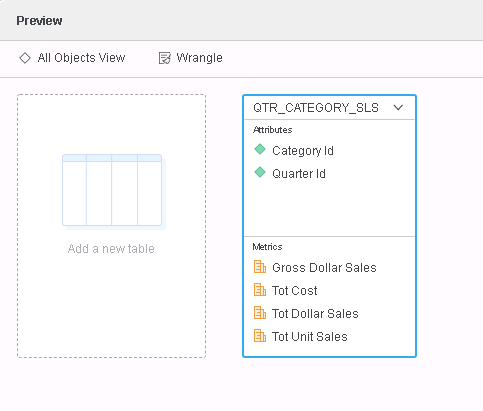
1. Using Strategy Tutorial Warehouse, create a Data Import Intelligent Cube with following structure. only QTR_CATEGORY_SLS table is sufficient to see the problem.
2. Create a visualization with following objects on it and also create an advanced filter like one mentioned below.


3. Note that the visualization data is not what you expect to see and look into the Query Details and note that the "Set of Category" is applied as well as the filter inside it is also applied independently, in red below.
*********   Visualization Summary Start  **********
Time Spent: 0.337 sec(s)
Query Execution Start Time: 2/21/2019 5:54:06 PM
Query Execution End Time: 2/21/2019 5:54:06 PM
Note: The total 'Time Spent' above may be greater than the summation of the individual step execution times below.There are preparation tasks for each step that are not individually measured.
*********   Visualization Summary End    **********

************   Individual Step Start   ************
Number of Rows Returned: 15
Time Spent: 0.298 sec(s)
Query Execution Start Time: 2/21/2019 5:54:06 PM
Query Execution End Time: 2/21/2019 5:54:06 PM
Tables Accessed:Table2	[F_QTR_CATEGORY_SLSEA9EE5FA15E7BF2829911124DF046499]:	Category, Quarter, 	Gross Dollar Sales, Tot Dollar Sales, Tot Cost, Tot Unit Sales, Row Count - QTR_CATEGORY_SLS, 	FACT_TABLE

select	[Category]@[CATEGORY_ID_2],	[Quarter]@[QUARTER_ID_2],	[[F_QTR_CATEGORY_SLSEA9EE5FA15E7BF2829911124DF046499].Tot Cost] as [Tot Cost]
from	C01=QTR_CATEGORY_SLS
with Table Join Tree: 	[F_QTR_CATEGORY_SLSEA9EE5FA15E7BF2829911124DF046499]<(([Category]@[CATEGORY_ID_2] in (1) or [Quarter]@[QUARTER_ID_2] in (20081)) and [Category]@[CATEGORY_ID_2] in (Set of [Category]@[CATEGORY_ID_2] where ([Category]@[CATEGORY_ID_2] in (1) or [Quarter]@[QUARTER_ID_2] in (20081)) ))>
************   Individual Step End     ************

This setting defaults to ON and reapplies the component qualification of a relationship filter externally to the set qualification. This also defaulted to ON for advanced filters inside of documents and dossiers in Strategy but there was no option in the GUI to disable this setting.
ACTION:
This issue has been addressed in Strategy 10.11.
If you are upgrading to Strategy 11.0 or above, to pick up the fix, enable project level setting "Data Engine Version" to 11. This property can only be enabled through Workstation. For more details on enabling the setting, refer to Change Data Engine Version.
If you are upgrading to Strategy 10.11: To pick up the fix, enable the Feature Flag "Defect fixes that may impact Data, SQL, MDX, CSI" within the Web Preferences -> Project Defaults. For more details on enabling Feature Flags refer to What are the Feature Flag options and what do they accomplish in MicroStrategy Web 10.8 and up. Starting Strategy 11.0, this Feature Flag is removed and replaced with project level setting called "Data Engine Version".
Product logic has been corrected to NOT apply the SET filter conditions independently too, which is more intuitive behavior as specified by the SET filter.

The Query Details also applies the filter as expected, in blue below.
*********   Visualization Summary Start  **********
Time Spent: 0.003 sec(s)
Query Execution Start Time: 2/21/2019 6:02:48 PM
Query Execution End Time: 2/21/2019 6:02:48 PM
Note: The total 'Time Spent' above may be greater than the summation of the individual step execution times below.There are preparation tasks for each step that are not individually measured.
*********   Visualization Summary End    *********

*************   Individual Step Start   ************
Number of Rows Returned: 48
Time Spent: 0.002 sec(s)
Query Execution Start Time: 2/21/2019 6:02:48 PM
Query Execution End Time: 2/21/2019 6:02:48 PM
Tables Accessed:Table2	[F_QTR_CATEGORY_SLSEA9EE5FA15E7BF2829911124DF046499]:	Category, Quarter, 	Gross Dollar Sales, Tot Dollar Sales, Tot Cost, Tot Unit Sales, Row Count - QTR_CATEGORY_SLS, 	FACT_TABLE

select	[Category]@[CATEGORY_ID_2],	[Quarter]@[QUARTER_ID_2],	[[F_QTR_CATEGORY_SLSEA9EE5FA15E7BF2829911124DF046499].Tot Cost] as [Tot Cost]
from	C01=QTR_CATEGORY_SLS
with Table Join Tree: 	[F_QTR_CATEGORY_SLSEA9EE5FA15E7BF2829911124DF046499]<[Category]@[CATEGORY_ID_2] in (Set of [Category]@[CATEGORY_ID_2] where ([Category]@[CATEGORY_ID_2] in (1) or [Quarter]@[QUARTER_ID_2] in (20081)) )>
************   Individual Step End     ************
