EducationSoftwareStrategy.com
StrategyCommunity

Knowledge Base

Product

Community

Knowledge Base

TopicsBrowse ArticlesDeveloper Zone

Product

Download SoftwareProduct DocumentationSecurity Hub

Education

Tutorial VideosSolution GalleryEducation courses

Community

GuidelinesGrandmastersEvents
x_social-icon_white.svglinkedin_social-icon_white.svg
Strategy logoCommunity

© Strategy Inc. All Rights Reserved.

LegalTerms of UsePrivacy Policy
  1. Home
  2. Topics

KB442159: Dossiers do not work in the MicroStrategy platform Mobile Application in iOS


Community Admin

• Strategy


This knowledge base article describes the limitation of dossiers which do not work in MicroStrategy platform Mobile application in iPad and iPhone.

Starting with the release of Strategy ONE (March 2024), dossiers are also known as dashboards.

Description


Dossiers were first introduced in the Strategy 10.9 release, along with the new consumer application Strategy Library (with mobile applications for iOS and Android following shortly thereafter). However, users of the Strategy Mobile application for iOS are unable to view these objects from their iPhone or iPad devices.
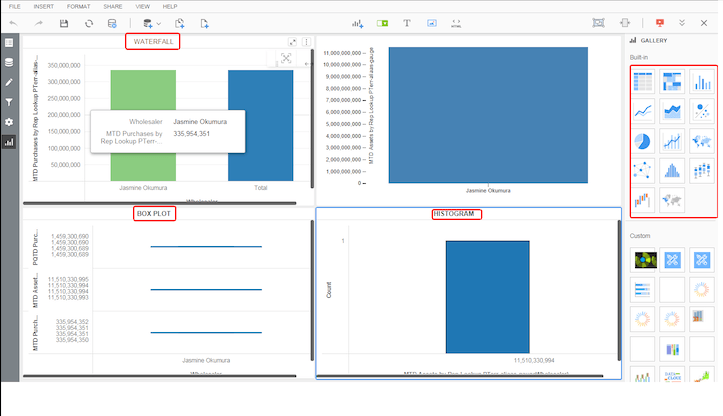
 

Steps to Reproduce: 

  1. From Strategy Web, create a dossier with at least one visualization (e.g. waterfall, histogram, etc.) containing data
  2. Confirm that the dossier can be run and viewed as expected in Strategy Web
ka0PW0000001JUnYAM_0EM44000000R8WP.png


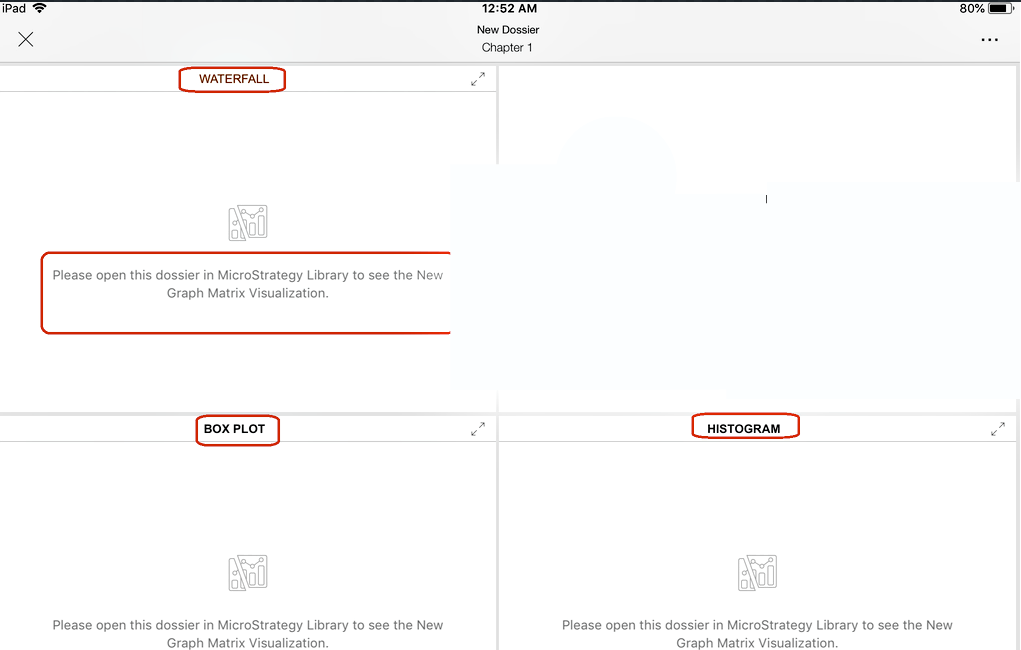
  1. From the Strategy Mobile application on an iPhone or iPad, run the same dossier. In the visualizations, you will see messages within the visualizations stating 'please open this dossier in Strategy Library to see the New Graph Matrix visualization'
ka0PW0000001JUnYAM_0EM44000000R8WF.png


Why is this happening?


Dossiers are not supported to be executed from the Strategy Mobile iOS application. Strategy has created a mobile application called Strategy Library, available for iOS and Android, which can be used to access your Strategy Library and to execute dossiers from a mobile device.
 

Solution

If you would like to view dossiers from a mobile device, first make sure that you have the Strategy Library application installed and configured. Then download the Strategy Library application for your mobile device (both Android and iOS are supported) from your app store and configure the application to point to your Library (Link).
Have other questions? Feel free to start a discussion or reach out to your Support liaison to open a case!
Want to upgrade to Strategy 2019? Visit the MicroStrategy website!


Comment

0 comments

Details

Knowledge Article

Published:

October 24, 2018

Last Updated:

March 21, 2024