EducationSoftwareStrategy.com
StrategyCommunity

Knowledge Base

Product

Community

Knowledge Base

TopicsBrowse ArticlesDeveloper Zone

Product

Download SoftwareProduct DocumentationSecurity Hub

Education

Tutorial VideosSolution GalleryEducation courses

Community

GuidelinesGrandmastersEvents
x_social-icon_white.svglinkedin_social-icon_white.svg
Strategy logoCommunity

© Strategy Inc. All Rights Reserved.

LegalTerms of UsePrivacy Policy
  1. Home
  2. Topics

KB442207: Textbox padding in report services documents is not retained when exporting to Excel in MicroStrategy Web 10.x


Shane Winslow

Cloud Support Expert I • MicroStrategy


This Knowledge Base Article outlines the behavior where textbox padding in a report services document in MicroStrategy Web 10.x is not retained when exporting to Excel. This is a limitation with Microsoft Excel.

SYMPTOM:
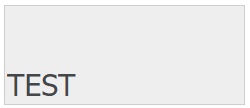
In Strategy Web 10.x, users can manually adjust the padding of textboxes to achieve the desired look and feel of the textbox. For example, the screenshot below shows a textbox in Strategy Web where the top padding was increased.
ka02R000000kUxDQAU_0EM44000000RCvY.png

However, when the report services document is exported to Excel, the padding is removed as seen below.

ka02R000000kUxDQAU_0EM44000000RCvT.png

 
STEPS TO REPRODUCE:

  1. Create a new blank report services document.
  2. Insert a large textbox into the document.
  3. Type 'TEST' in the texbox.
  4. Right-click on the textbox and choose Properties and Formatting.
  5. Under Alignment, change the Top padding to 0.50 inches.
  6. Click OK.
  7. Export the document to Excel.
  8. Notice the padding is not retained when exporting.

CAUSE:
This is working as designed in Strategy Web 10.x.
ACTION:
Microsoft Excel has the limitation of padding not being supported. 
 
The Strategy Internal Reference Number for this issue is: KB442207


Comment

0 comments

Details

Knowledge Article

Published:

November 6, 2018

Last Updated:

January 1, 2019