EducationSoftwareStrategy.com
StrategyCommunity

Knowledge Base

Product

Community

Knowledge Base

TopicsBrowse ArticlesDeveloper Zone

Product

Download SoftwareProduct DocumentationSecurity Hub

Education

Tutorial VideosSolution GalleryEducation courses

Community

GuidelinesGrandmastersEvents
x_social-icon_white.svglinkedin_social-icon_white.svg
Strategy logoCommunity

© Strategy Inc. All Rights Reserved.

LegalTerms of UsePrivacy Policy
  1. Home
  2. Topics

KB44224: Space is used as thousand separator in reports in MicroStrategy Integrity Manager 9.x


Community Admin

• Strategy


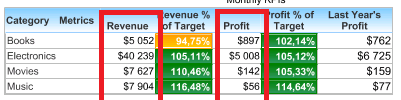
When running reports  to test in MicroStrategy Integrity Manager 9.x, space is used as thousand separator, not comma

SYMPTOM:
When running reports  to test in Strategy Integrity Manager 9.x, space is used as thousand separator, not comma, as shown below:
ka04W000000Oe9lQAC_0EM4400000026bJ.png

CAUSE:
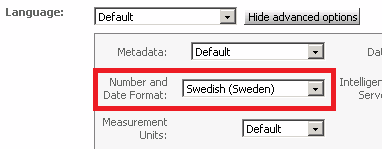
The thousand separator for reports running in Strategy Integrity Manager and Web is controlled by the locale setting under Web Preference->User Preferences->General->Language->Show advanced options->Number and Date Format, as shown below:
ka04W000000Oe9lQAC_0EM4400000026bI.png

 
If Swedish(Sweden) is selected for 'Number and Date Format', then the thousand separator is space.
ACTION:
This is working as designed. If comma is needed to be the thousand separator, select Default or 'English(US)' for 'Number and Date Format'.


Comment

0 comments

Details

Knowledge Article

Published:

June 13, 2017

Last Updated:

June 13, 2017