EducationSoftwareStrategy.com
StrategyCommunity

Knowledge Base

Product

Community

Knowledge Base

TopicsBrowse ArticlesDeveloper Zone

Product

Download SoftwareProduct DocumentationSecurity Hub

Education

Tutorial VideosSolution GalleryEducation courses

Community

GuidelinesGrandmastersEvents
x_social-icon_white.svglinkedin_social-icon_white.svg
Strategy logoCommunity

© Strategy Inc. All Rights Reserved.

LegalTerms of UsePrivacy Policy
  1. Home
  2. Topics

KB442247: How to export a report services document through a hyperlink on Presentation Mode in MicroStrategy Web


Min Zheng

Senior Manager, Cloud Support • MicroStrategy


SYMPTOM
In certain cases, users might not have access to the out-of-the-box export button in the menu bar when the header bar is hidden or customized. Using URL API to export the current document might require many efforts when the document contains prompt, selectors, panel selectors, etc.
The approach described below allows you to trigger the out-of-the-box export action through a hyperlink.
 
ACTION
There are two ways to trigger the action. 
Method 1:

  1. Edit the Report Services document from Strategy Web and insert an HTML container.
  2. Right-click and select Properties and Formatting > General. Set it as HTML container instead of iFrame. 
  3. Enter the following code into the HTML container:
  • Export to PDF:

 <div onclick="mstrApp.docModel.controller.printPDF();" style="cursor: pointer;">Export PDF</div>

  • Export to Excel:

<div onclick="mstrApp.docModel.controller.exportExcel();" style="cursor: pointer;">Export Excel</div>

  • Export to HTML:

<div onclick="mstrApp.docModel.controller.exportHTML();" style="cursor: pointer;">Export HTML</div>
Method 2:

  • Go to Web Administration page > Security > User Input Filtering, enable the "Allow JavaScript Execution for Report Services Documents Hyperlinks" setting.
ka04W000000XQTdQAO_0EM44000000RG7D.png
  • Edit the Report Services document in Strategy Web and insert a text box or an image.
  • Right-click and select Properties and Formatting > Navigation > Is hyperlink or right click and choose Edit links.
  • Enter the following hyperlink: 
  • Export to PDF:

javascript:mstrApp.docModel.controller.printPDF();

  • Export to Excel:

javascript:mstrApp.docModel.controller.exportExcel();

  • Export to HTML:

javascript:mstrApp.docModel.controller.exportHTML();
--> Replace : with : such as

ka04W000000XQTdQAO_0EM4W000001L8Ai.jpeg

5. Uncheck "Open in new window"
Note:
From in-house testing for 10.4.x, it may be observed that using Method 2, the export works but the original document page is blocked by the loading icon as below, which could not be dismissed.
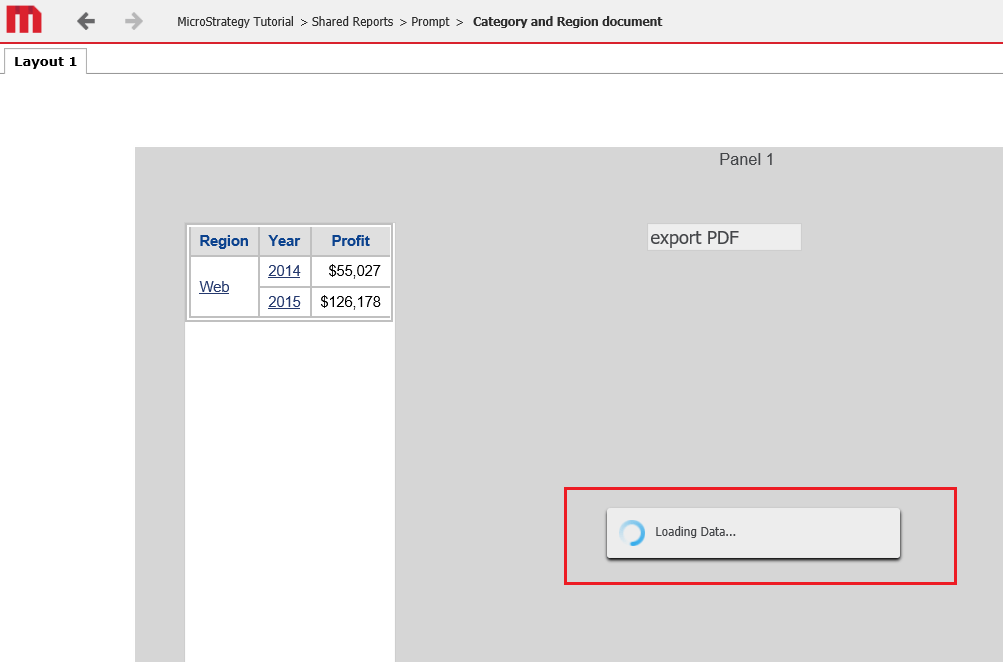
ka04W000000XQTdQAO_0EM44000000RG7N.png

This behavior would not be observed for Strategy 2019 or above. 
Any user who encounters this problem could use Method 1 instead. 
KB442247


Comment

0 comments

Details

Knowledge Article

Published:

November 14, 2018

Last Updated:

November 14, 2018