Starting with the release of Strategy ONE (March 2024), dossiers are also known as dashboards.
DESCRIPTION:
Starting Strategy 10.11, a new feature is available for performance optimization when dealing with derived attributes. When a derived attribute is built off of data from a single live data import cube, then the calculation of the derived attribute will be pushed down into the query against the data source rather than being done in the analytical engine. This can greatly reduce the amount of data that needs to be returned to Strategy and the amount of processing that has to be done in the analytical engine leading to better performance and reduced memory usage.
An example of this is below.
Take a dossier built with the below design. Liveelement1 and liveelement2 are both live connect data import cubes fetching data. Day Date (year) is a derived attribute for year created off of the date attribute.
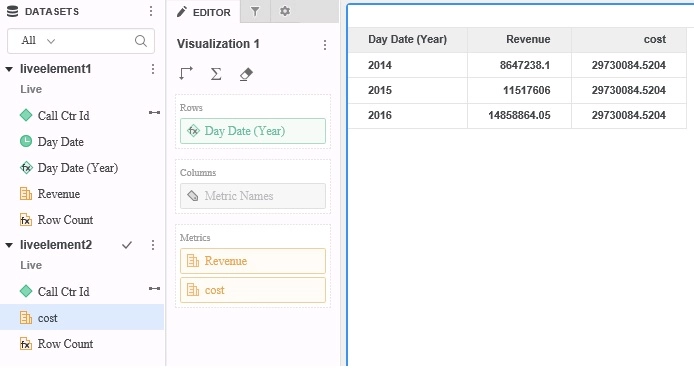
In 10.11 and above with the new feature the following queries will be seen in query details when fetching data from liveelement1. Notice how the year function is used to retrieve year level data. This will lead to selecting only 45 and 3 rows for the respective queries.
select distinct a11.[call_ctr_id] AS call_ctr_id,
YEAR(a11.[day_date]) AS DA_Form_0
from (select day_date, call_ctr_id, sum(tot_dollar_sales) from day_ctr_sls group by day_date, call_ctr_id) a11
select YEAR(a11.[day_date]) AS DA_Form_0,
sum(a11.[Expr1002]) AS WJXBFS1
from (select day_date, call_ctr_id, sum(tot_dollar_sales) from day_ctr_sls group by day_date, call_ctr_id) a11
group by YEAR(a11.[day_date])
In earlier versions the SQL will instead resemble the below queries. In these queries the day attribute is selected directly. This leads to over one thousand times the amount of data being returned over the network. It also means year will need to be calculated in the analytical engine taking additional time.
select distinct a12.[day_date] AS day_date,
a12.[call_ctr_id] AS call_ctr_id
from (select day_date, call_ctr_id, sum(tot_dollar_sales) from day_ctr_sls group by day_date, call_ctr_id) a12
select a11.[day_date] AS day_date,
sum(a11.[Expr1002]) AS WJXBFS1
from (select day_date, call_ctr_id, sum(tot_dollar_sales) from day_ctr_sls group by day_date, call_ctr_id) a11
group by a11.[day_date]
This feature is only available for simple derived elements made off of live connect data import cubes. If the cube is an in memory cube then derived elements will use the old logic in the analytical engine to calculate the derived element. This will also only work for data import and not mapped schema based reports. Finally, this will only work for derived attributes using functions that are supported and mapped for the database platform in question. If the database does not have a function (year function for example) the query cannot be pushed down to the database and the visualization will show empty values for those derived attributes that could not be pushed down.
To take advantage of this new feature upgrade to Strategy 10.11 or above.
If you are upgrading to Strategy 2019 or above, to pick up the feature, enable project level setting "Data Engine Version" to 11. This property can only be enabled through Workstation. For more details on enabling the setting, refer to Change Data Engine Version. Also enable feature flag called "Always calculate Derived Attribute at source for Connect Live Intelligent Cubes Datasets".
If you are upgrading to Strategy 11.0, to pick up the feature, enable project level setting "Data Engine Version" to 11. This property can only be enabled through Workstation. For more details on enabling the setting, refer to Change Data Engine Version.
If you are upgrading to Strategy 10.11: To pick up the feature, enable the Feature Flag "Defect fixes that may impact Data, SQL, MDX, CSI" within the Web Preferences -> Project Defaults. For more details on enabling Feature Flags refer to What are the Feature Flag options and what do they accomplish in MicroStrategy Web 10.8 and up.
Strategy internal reference numbers for this are KB442250 and F6621.
