How Strategy parse JSON file into tables:
If the JSON file contains multiple arrays, they will be imported as multiple tables.
To better exploit JSON file import of Strategy, it is highly recommended to follow the following example.
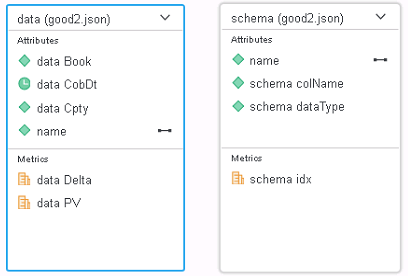
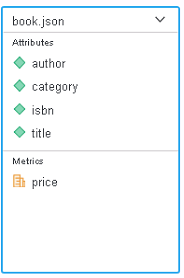
A Strategy-friendly JSON file:
[
         {
            "author":"Nigel Rees",
            "category":"reference",
            "price":8.95,
            "title":"Sayings of the Century"
         },
         {
            "author":"Evelyn Waugh",
            "category":"fiction",
            "price":12.99,
            "title":"Sword of Honour"
         },
         {
            "author":"Herman Melville",
            "category":"fiction",
            "isbn":"0-553-21311-3",
            "price":8.99,
            "title":"Moby Dick"
         },
         {
            "author":"J. R. R. Tolkien",
            "category":"fiction",
            "isbn":"0-395-19395-8",
            "price":22.99,
            "title":"The Lord of the Rings"
         }
]

How to organize Strategy-friendly JSON files?
The key point to organize a Strategy-friendly JSON file is to make clear what you want to turn into a table and what you want to turn into rows. If you want to turn data into a table, put it into an array. If you want to turn data into a row, put it into an object.
Examples
1. Bad usage of Array
JSON before optimization:
{
   "TilesetName":"mapbox.enterprise-boundaries-a0-v1",
   "PointLayerName":"points_admin_0",
   "PolyLayerName":"boundaries_admin_0",
   "level":"0",
   "data":{
      "LB":{
         "name":"Lebanon",
         "bounds":[
            35.104,
            33.055,
            36.623,
            34.692
         ],
         "country_code":"LB"
      },
      "IO":{
         "name":"British Indian Ocean Territory (the)",
         "bounds":[
            72.353,
            -7.445,
            72.496,
            -7.233
         ],
         "country_code":"IO"
      },
      "TF":{
         "name":"French Southern Territories",
         "bounds":[
            68.732,
            -49.734,
            70.562,
            -48.655
         ],
         "country_code":"TF"
      },
      "SN":{
         "name":"Senegal",
         "bounds":[
            -17.53,
            12.307,
            -11.346,
            16.692
         ],
         "country_code":"SN"
      }
   }
}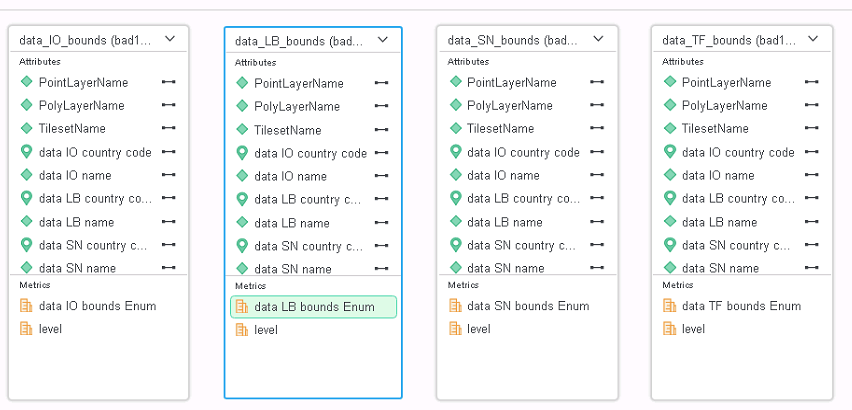

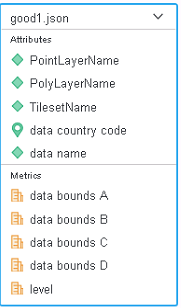
This JSON provide bounds of each country. It organizes bounds information of each country as an array. As we have introduced, after importing into Strategy, each “bounds” will be turned into a table. Other information like “name”, “country code” and so on will be duplicated for each row. And since each country corresponds to a table, the number of tables may be very large. Turning “countries” into an array and turning “bounds” into objects will make the JSON friendly for Strategy.
JSON after optimization:
{
   "TilesetName":"mapbox.enterprise-boundaries-a0-v1",
   "PointLayerName":"points_admin_0",
   "PolyLayerName":"boundaries_admin_0",
   "level":"0",
   "data":[
      {
         "name":"Lebanon",
         "bounds":{
            "A":35.104,
            "B":33.055,
            "C":36.623,
            "D":34.692
         },
         "country_code":"LB"
      },
      {
         "name":"British Indian Ocean Territory (the)",
         "bounds":{
            "A":72.353,
            "B":-7.445,
            "C":72.496,
            "D":-7.233
         },
         "country_code":"IO"
      },
      {
         "name":"French Southern Territories",
         "bounds":{
            "A":68.732,
            "B":-49.734,
            "C":70.562,
            "D":-48.655
         },
         "country_code":"TF"
      },
      {
         "name":"Senegal",
         "bounds":{
            "A":-17.53,
            "B":12.307,
            "C":-11.346,
            "D":16.692
         },
         "country_code":"SN"
      }
   ]
}

2. Bad usage of Object
JSON before optimization:
{
   "label":"geo",
   "category":{
      "index":{
         "AL011":0,
         "AL012":1,
         "AL013":2,
         "AL014":3,
         "AL015":4,
         "AL021":5,
         "AL022":6,
         "AL031":7
      },
      "label":{
         "AL011":"Dibër",
         "AL012":"Durrës",
         "AL013":"Kukës",
         "AL014":"Lezhë",
         "AL015":"Shkodër",
         "AL021":"Elbasan",
         "AL022":"Tiranë",
         "AL031":"Berat"
      }
   }
}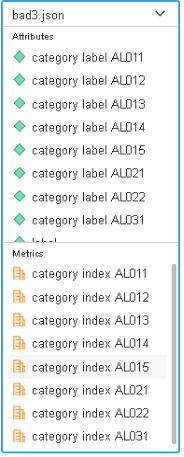

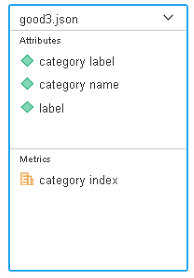
In this example, no array exists. A table will be created, and all data are put into a row. This kind of structure will make final table contain too much columns and hard to use. By re-organizing data like the following, the final table become simple and easy to understand.
JSON after optimization:
{
   "label":"geo",
   "category":[
      {
         "name":"AL011",
         "index":0,
         "label":"Dibër"
      },
      {
         "name":"AL012",
         "index":1,
         "label":"Durrës"
      },
      {
         "name":"AL013",
         "index":2,
         "label":"Kukës"
      },
      {
         "name":"AL014",
         "index":3,
         "label":"Lezhë"
      },
      {
         "name":"AL015",
         "index":4,
         "label":"Shkodër"
      },
      {
         "name":"AL021",
         "index":5,
         "label":"Elbasan"
      },
      {
         "name":"AL022",
         "index":6,
         "label":"Tiranë"
      },
      {
         "name":"AL031",
         "index":7,
         "label":"Berat"
      }
   ]
}

3. Organized JSON but not good for Strategy
JSON before optimization:
[
   {
      "name":"hello from pid 63492",
      "schema":[
         {
            "dataType":"date",
            "colName":"CobDt",
            "idx":0
         },
         {
            "dataType":"string",
            "colName":"Book",
            "idx":1
         },
         {
            "dataType":"string",
            "colName":"Cpty",
            "idx":2
         },
         {
            "dataType":"double",
            "colName":"PV",
            "idx":3
         },
         {
            "dataType":"double",
            "colName":"Delta",
            "idx":4
         }
      ],
      "data":[
         [
            "2017-05-19",
            "BK1",
            "xyz",
            123.09999999999999,
            0.40000000000000002
         ],
         [
            "2017-05-19",
            "BK2",
            "abc",
            10.1,
            0.29999999999999999
         ],
         [
            "2017-05-19",
            "BK2",
            "xyz",
            1111.0999999999999,
            -0.59999999999999998
         ]
      ]
   }
]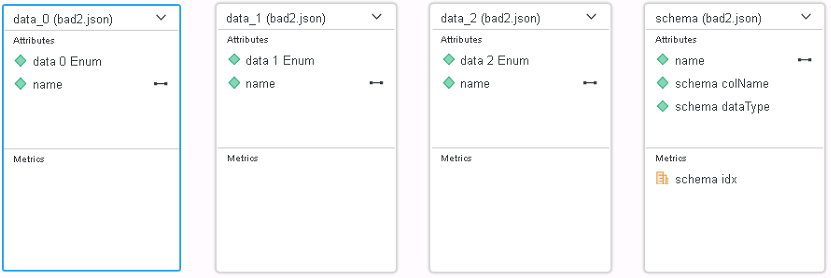
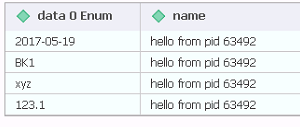
This JSON is easy to understand by human beings. The first part defines schema and the second part provides data, and each array in data object corresponds to a row. But after importing into Strategy, each array is turned into a table. This is obviously not correct. To put data into rows, we need change the arrays into objects.
JSON after optimization:
[
   {
      "name":"hello from pid 63492",
      "schema":[
         {
            "dataType":"date",
            "colName":"CobDt",
            "idx":0
         },
         {
            "dataType":"string",
            "colName":"Book",
            "idx":1
         },
         {
            "dataType":"string",
            "colName":"Cpty",
            "idx":2
         },
         {
            "dataType":"double",
            "colName":"PV",
            "idx":3
         },
         {
            "dataType":"double",
            "colName":"Delta",
            "idx":4
         }
      ],
      "data":[
         {
            "CobDt":"2017-05-19",
            "Book":"BK1",
            "Cpty":"xyz",
            "PV":123.09999999999999,
            "Delta":0.40000000000000002
         },
         {
            "CobDt":"2017-05-19",
            "Book":"BK2",
            "Cpty":"abc",
            "PV":10.1,
            "Delta":0.29999999999999999
         },
         {
            "CobDt":"2017-05-19",
            "Book":"BK2",
            "Cpty":"xyz",
            "PV":1111.0999999999999,
            "Delta":-0.59999999999999998
         }
      ]
   }
]