EducationSoftwareStrategy.com
StrategyCommunity

Knowledge Base

Product

Community

Knowledge Base

TopicsBrowse ArticlesDeveloper Zone

Product

Download SoftwareProduct DocumentationSecurity Hub

Education

Tutorial VideosSolution GalleryEducation courses

Community

GuidelinesGrandmastersEvents
x_social-icon_white.svglinkedin_social-icon_white.svg
Strategy logoCommunity

© Strategy Inc. All Rights Reserved.

LegalTerms of UsePrivacy Policy
  1. Home
  2. Topics

KB442256: Dynamic dimensionality does not work with the new derived element for aggregation from base metric.


Community Admin

• Strategy


This article describes a fix we made to provide the correct data for the metric calculation related to sorting and aggregation-from-base when using new derived elements.

Starting with the release of Strategy ONE (March 2024), dossiers are also known as dashboards.
In 11.0, we make some modification to provide the correct metric values in the case

  • Using the new derived elements
  • for some functions related to sorting such as RunningSum,
  • this metric is aggregation from base

STEPS TO REPRODUCE

  • Create a MTDI cube with: CITY_SUBCAT_SLS, LU_SUBCATEG
  • Create Dossier based on the MTDI cube
  • Create AFB metric: RunningSum(Tot Cost)<BreakBy=Column, SortBy=Auto>, and choose AFB in "Metric Options"
  • Add Category and the above metric to the grid
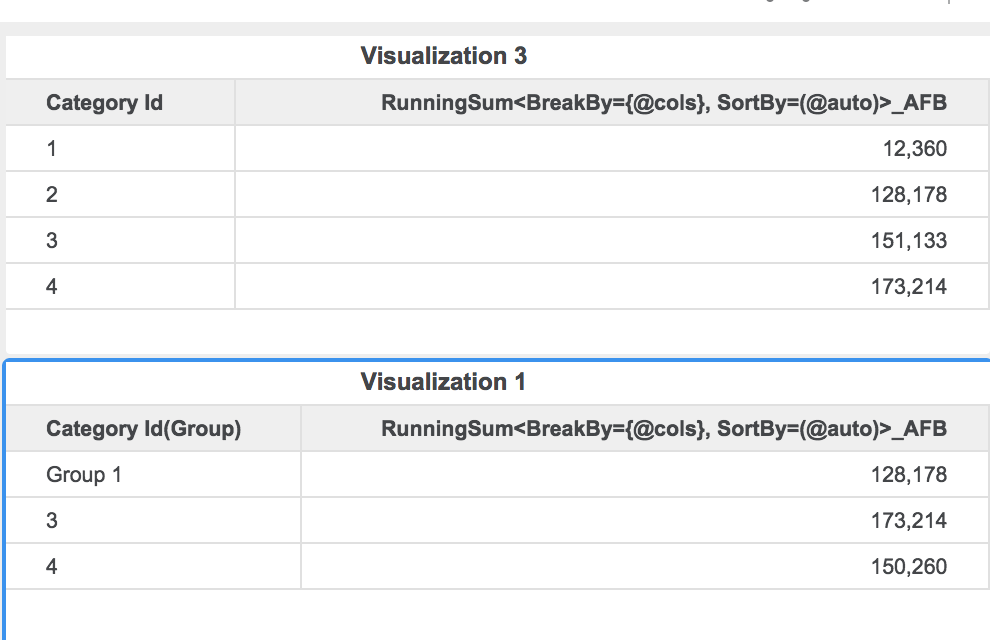
  • Group first two elements from Category, we can see the metric values are incorrect. For example, in 2nd plot, Element 3 and Element 4 should be same as the 1st plot, which are not.
ka0PW0000001JU3YAM_0EM44000000RVj8.png

CAUSE
This is a known defect in Strategy 10.11 or earlier. 
ACTION
This issue has been addressed in Strategy 11.0 or later. To pick up the fix,

  1. Upgrade to 11.0 or newer release,
  2. Enable project level setting "Data Engine Version" to 11. This property can only be enabled through Workstation. For more details on enabling the setting, refer to Change Data Engine Version.


After the above actions, the user should be able to see the correct data as the following:
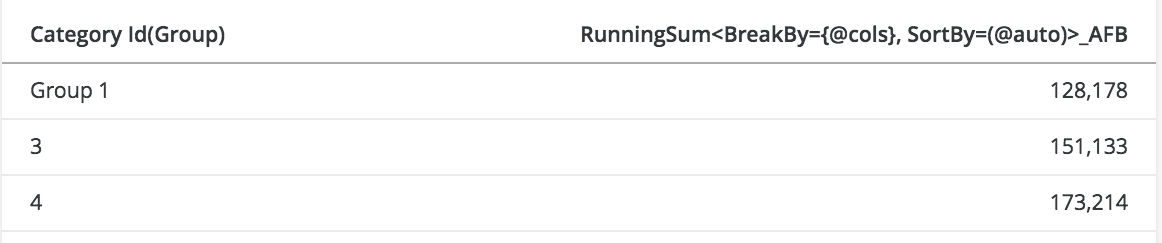
ka0PW0000001JU3YAM_0EM44000000RVjD.png

The internal reference number is KB442256


Comment

0 comments

Details

Knowledge Article

Published:

November 19, 2018

Last Updated:

March 21, 2024