SYMPTOM
In 11.0 with Data Engine Version = 11 (For more details on enabling the setting, refer to Change Data Engine Version),
STEPS TO REPRODUCE:
1. This example uses Strategy Tutorial to demonstrate the problem and the fix.
2. Create a Data Import cube with Strategy Tutorial WH tables.
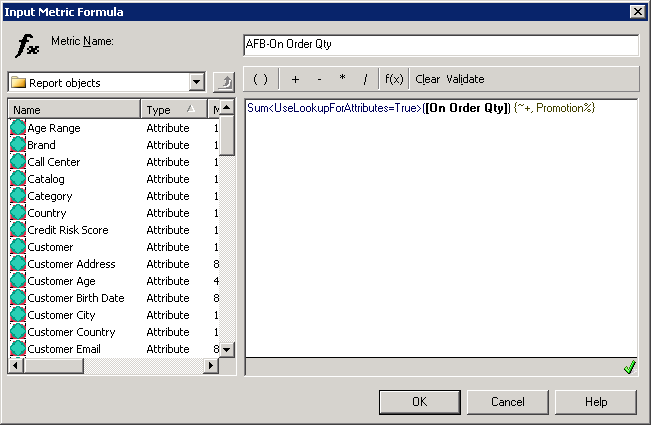
3. Create a subset report and create a aggregate from base derived metric with following expression:
sum<UseLookupForAttributes=True>([On Order Qty]) {~+, Promotion%}
4. Create the grid with following attribute, metrics, filters:
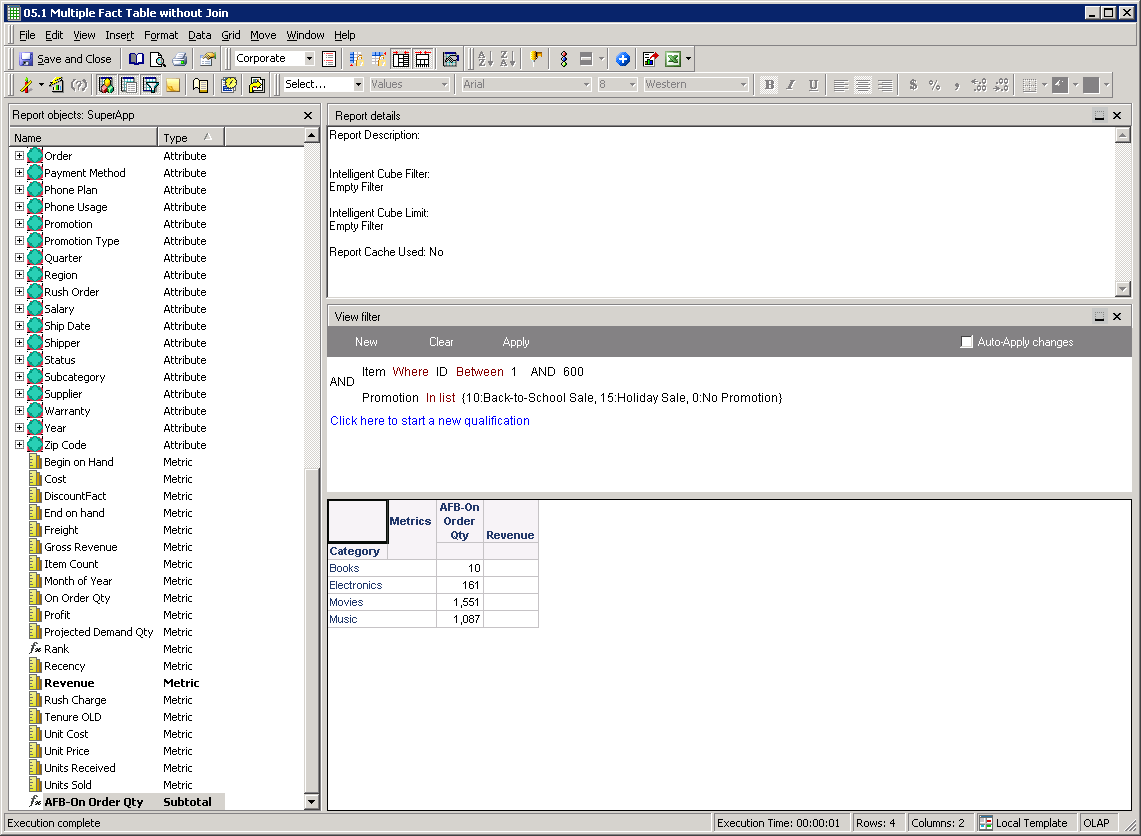
Note that Revenue is NULL, which is not correct. The CSI for the above report is the following:
...
Intelligent Cube SQL Statements:

Pass0 - 	Duration: 0:00:00.03
Tables Accessed:
Table10	[L_CATEGORY]:	Category, 		LOOKUP_TABLE
Table93	[REL_SUBCATEGORY_ITEM]:	Subcategory, Item, 		RELATIONSHIP_TABLE,	ONE_TO_MANY
Table106	[REL_CATEGORY_SUBCATEGORY]:	Category, Subcategory, 		RELATIONSHIP_TABLE,	ONE_TO_MANY
Table118	[F_INVENTORY_CURR_FORTH]:	Item, 	Unit Cost, On Order Qty, Projected Demand Qty, 	FACT_TABLE
Table129	[F_ORDER_DETAIL]:	Promotion, Employee, Item, Day, Customer, Phone Usage, Order, 	Unit Cost, Unit Price, Gross Revenue, Revenue, Units Sold, Profit, Cost, DiscountFact, Item Count, 	FACT_TABLE

select	[Category]@[CATEGORY_ID],
	[Category]@[CATEGORY_DESC],
	sum([[F_INVENTORY_CURR_FORTH].On Order Qty])@{[Category]} as [AFB-On Order Qty],
	sum(IF([Promotion]@[PROMOTION_ID] in (1, 2, 0), [[F_ORDER_DETAIL].Revenue], NULLIF(0, 0)))@{[Category]} as [Revenue]
from	SuperApp
with Table Join Tree: 	(Set of distinct Tuple([Customer]@[CUSTOMER_ID], [Day]@[DAY_DATE], [Employee]@[EMP_ID], [Item]@[ITEM_ID], [Order]@[ORDER_ID], [Phone Usage]@[CUSTOMER_ID], [Promotion]@[PROMOTION_ID]) where Tuple([Customer]@[CUSTOMER_ID], [Day]@[DAY_DATE], [Employee]@[EMP_ID], [Item]@[ITEM_ID], [Order]@[ORDER_ID], [Phone Usage]@[CUSTOMER_ID], [Promotion]@[PROMOTION_ID]) in [F_ORDER_DETAIL]<[Item]@[ITEM_ID] between 1 and 600>)
	 Join [REL_SUBCATEGORY_ITEM] with output level Tuple([Day]@[DAY_DATE], [Employee]@[EMP_ID], [Item]@[ITEM_ID], [Order]@[ORDER_ID], [Phone Usage]@[CUSTOMER_ID], [Promotion]@[PROMOTION_ID], [Subcategory]@[SUBCAT_ID])
	 Join [REL_CATEGORY_SUBCATEGORY] with output level Tuple([Category]@[CATEGORY_ID], [Day]@[DAY_DATE], [Employee]@[EMP_ID], [Item]@[ITEM_ID], [Order]@[ORDER_ID], [Phone Usage]@[CUSTOMER_ID], [Promotion]@[PROMOTION_ID])
display having	[Promotion]@[PROMOTION_ID] in (0, 1, 2)

[Analytical engine calculation steps:
	1.  Perform cross-tabbing
]
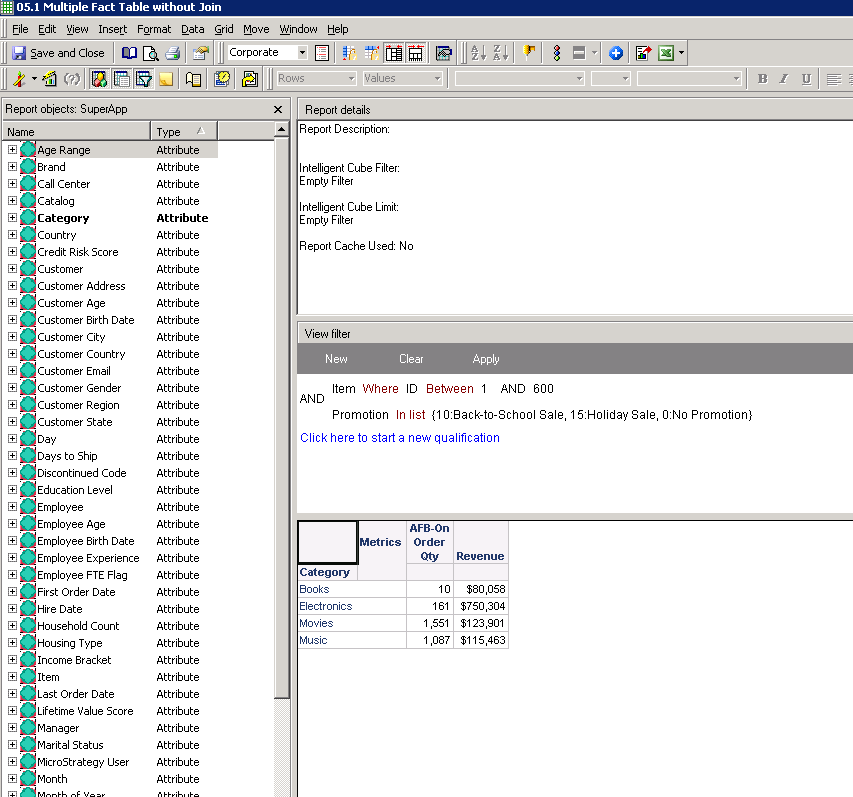
Revenue metric values are shown correctly. The CSI for the above report is the following:
...
Intelligent Cube SQL Statements:

Pass0 - 	Duration: 0:00:00.01
Tables Accessed:
Table10	[L_CATEGORY]:	Category, 		LOOKUP_TABLE
Table92	[REL_SUBCATEGORY_ITEM]:	Subcategory, Item, 		RELATIONSHIP_TABLE,	ONE_TO_MANY
Table104	[REL_CATEGORY_SUBCATEGORY]:	Category, Subcategory, 		RELATIONSHIP_TABLE,	ONE_TO_MANY
Table116	[F_INVENTORY_CURR_FORTH]:	Item, 	Unit Cost, On Order Qty, Projected Demand Qty, 	FACT_TABLE
Table127	[F_ORDER_DETAIL]:	Promotion, Employee, Item, Day, Customer, Phone Usage, Order, 	Unit Cost, Unit Price, Gross Revenue, Revenue, Units Sold, Profit, Cost, DiscountFact, Item Count, 	FACT_TABLE


select	[Category]@[CATEGORY_ID],
	[Category]@[CATEGORY_DESC],
	sum([[F_INVENTORY_CURR_FORTH].On Order Qty])@{[Category]} as [AFB-On Order Qty],
	sum(IF([Promotion]@[PROMOTION_ID] in (1, 2, 0), [[F_ORDER_DETAIL].Revenue], NULLIF(0, 0)))@{[Category]} as [Revenue]
from	SuperApp
with Table Join Tree: 	[F_ORDER_DETAIL]<[Item]@[ITEM_ID] between 1 and 600>
	 Join [REL_SUBCATEGORY_ITEM] with output level Tuple([Day]@[DAY_DATE], [Employee]@[EMP_ID], [Item]@[ITEM_ID], [Order]@[ORDER_ID], [Phone Usage]@[CUSTOMER_ID], [Promotion]@[PROMOTION_ID], [Subcategory]@[SUBCAT_ID])
	 Join [REL_CATEGORY_SUBCATEGORY] with output level Tuple([Category]@[CATEGORY_ID], [Day]@[DAY_DATE], [Employee]@[EMP_ID], [Item]@[ITEM_ID], [Order]@[ORDER_ID], [Phone Usage]@[CUSTOMER_ID], [Promotion]@[PROMOTION_ID])
display having	[Promotion]@[PROMOTION_ID] in (0, 1, 2)

[Analytical engine calculation steps:
	1.  Perform cross-tabbing
]
