EducationSoftwareStrategy.com
StrategyCommunity

Knowledge Base

Product

Community

Knowledge Base

TopicsBrowse ArticlesDeveloper Zone

Product

Download SoftwareProduct DocumentationSecurity Hub

Education

Tutorial VideosSolution GalleryEducation courses

Community

GuidelinesGrandmastersEvents
x_social-icon_white.svglinkedin_social-icon_white.svg
Strategy logoCommunity

© Strategy Inc. All Rights Reserved.

LegalTerms of UsePrivacy Policy
  1. Home
  2. Topics

KB442263 : With Data Engine Version set to 11, data mismatch occurs between In-Memory and Live Intelligent Cube, when there are multiple conditions applied to a metric.


Community Admin

• Strategy


This knowledge base article describes a defect With Data Engine Version set to 11, data mismatch occurs between In-Memory and Live Intelligent Cube, when there are multiple conditions applied to a metric, like metric qualification inside a conditional metric.

SYMPTOM:
In-Memory Intelligent Cube returns a different number of rows when switched to Connect Live mode.
STEPS TO REPRODUCE:
This discrepancy is only seen when the the Data Engine Version is set to 11. For more details on enabling the setting, refer to Change Data Engine Version.
1. Create a new dashboard in Strategy Tutorial Project with Web. 
2. Create Dataset #1 with table CITY_CTR_SLS and choose Connect Live mode 
3. Create M1 as Sum([Tot Cost]){~+} 
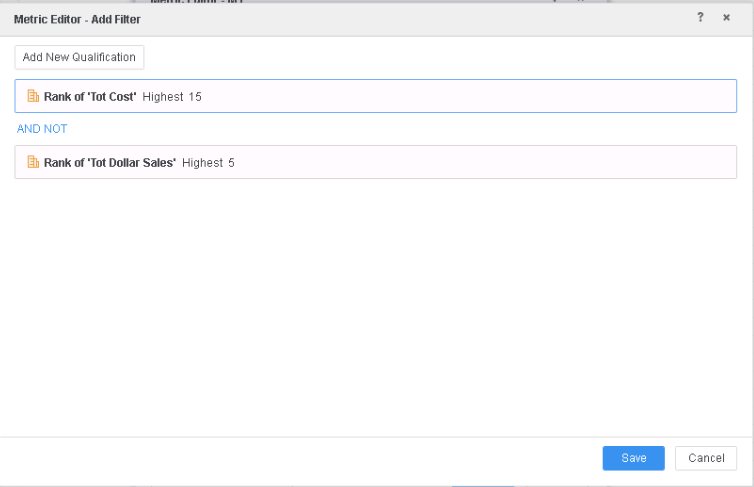
4. Apply 2 filters to the metric 
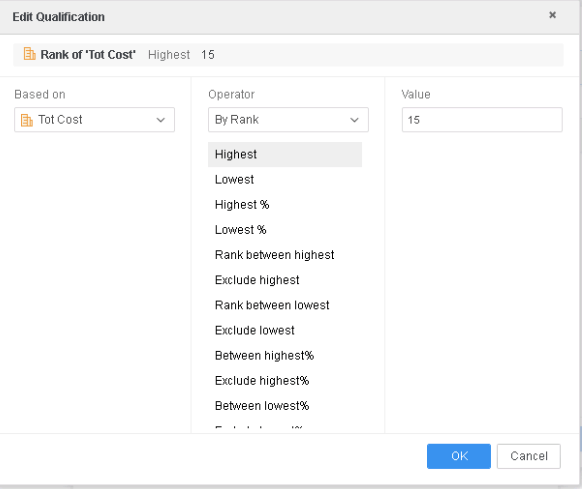
          4a. Rank of “Tot Cost” Highest 15.
ka04W000000Ob2IQAS_0EM44000000RSQU.png

          4b. Rank of “Tot Dollar Sales” Highest 5.
          4c. The 2 filter should be in “AND NOT” relationship.
ka04W000000Ob2IQAS_0EM44000000RSQZ.png

5. Save the metric 
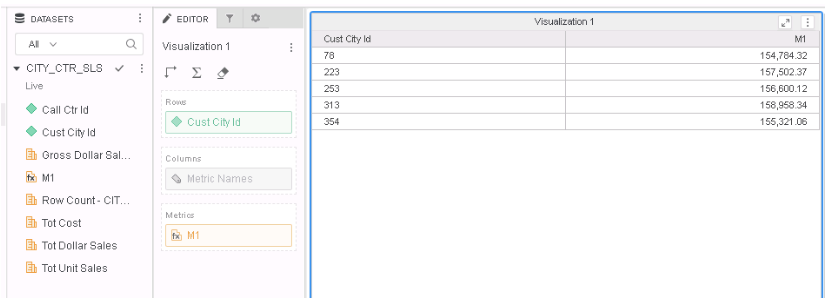
6. Add both Cust City Id and M1 to the grid; there are only 5 rows on the grid.
ka04W000000Ob2IQAS_0EM44000000RSQj.png

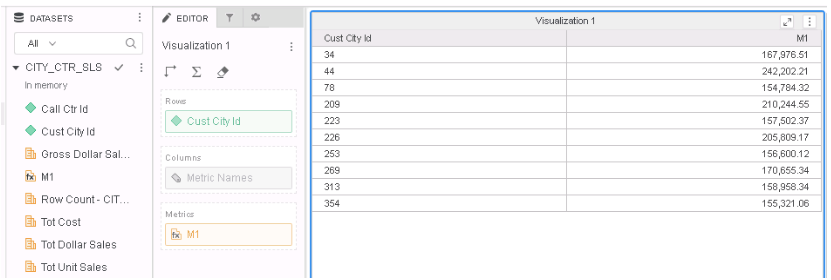
7. Switch the Data Access Mode to In-Memory; notice there are 10 rows.
ka04W000000Ob2IQAS_0EM44000000RSQo.png

CAUSE:
The metric qualification was incorrectly put in both view filter and metric condition when Live mode is used.
ACTION/RESOLUTION:
This defect is addressed in Strategy 11.1 or above.
Strategy reference numbers for this technical note are KB442263 and DE116995.


Comment

0 comments

Details

Knowledge Article

Published:

November 19, 2018

Last Updated:

December 31, 2018