EducationSoftwareStrategy.com
StrategyCommunity

Knowledge Base

Product

Community

Knowledge Base

TopicsBrowse ArticlesDeveloper Zone

Product

Download SoftwareProduct DocumentationSecurity Hub

Education

Tutorial VideosSolution GalleryEducation courses

Community

GuidelinesGrandmastersEvents
x_social-icon_white.svglinkedin_social-icon_white.svg
Strategy logoCommunity

© Strategy Inc. All Rights Reserved.

LegalTerms of UsePrivacy Policy
  1. Home
  2. Topics

KB44227: Base Table Logical and Physical View are empty when creating table alias for a Warehouse Patition Mapping in MicroStrategy Developer 9.x


Stefan Zepeda

Salesforce Solutions Architect • Strategy


Base Table Logical and Physical View are empty when creating table alias for a Warehouse Patition Mapping in MicroStrategy Developer

SYMPTOM:
 
User right-clicks on a warehouse partition mapping table and selects "Create Table Alias".
 

ka02R000000kbnrQAA_0EM440000002CjT.png

 
The alias appears, and upon opening the editor the user finds that the two tabs for Base Table Logical and Physical views are empty even after updating schema and re-reading the warehouse catalog:

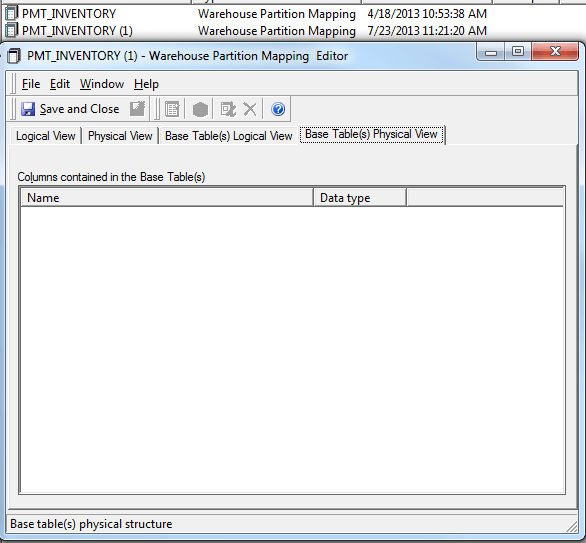
ka02R000000kbnrQAA_0EM440000002CjX.png
ka02R000000kbnrQAA_0EM440000002CjZ.png

 
CAUSE:
 
This occurs because Strategy does not currently support creating aliases for warehouse partition mapping tables.
 
ACTION:
 
An enhancement request has been logged to Strategy Technology. Contact Strategy Technical Support for an update on this issue.
 
WORKAROUND:
 
Instead of creating an alias, create a database view and import that table into the warehouse catalog.


Comment

0 comments

Details

Knowledge Article

Published:

June 8, 2017

Last Updated:

June 8, 2017