Starting with the release of Strategy ONE (March 2024), dossiers are also known as dashboards.
SYMPTOM
For Dossiers running against In-Memory and/or Live Intelligent Cubes, when there are multiple tables that qualify to calculate a metric then a random table is picked up to calculate the metric and does not consider to exclude tables with 0 rows and best smallest table to improve the performance of the query.
STEPS TO REPRODUCE:
1. This example uses Strategy Tutorial to demonstrate the problem and the fix.
2. Consider a Data Import In-Memory Intelligent Cube structure (only necessary tables are displayed and rest are hidden for easy understanding):
...
Table20 [L_COUNTRY]: Country, LOOKUP_TABLE Rows:7 LS:3
...
Table28 [L_REGION]: Region, LOOKUP_TABLE Rows:12 LS:10
...
Table60 [REL_COUNTRY_CALL_CENTER]: Country, Call Center, RELATIONSHIP_TABLE, ONE_TO_MANY Rows:18 LS:10
...
Table96 [REL_QUARTER_MONTH]: Quarter, Month, RELATIONSHIP_TABLE, ONE_TO_MANY Rows:48 LS:13
...
Table130 [F_REGION_SUBCATEG_MNTH_SLS_FORTH]: Region, Quarter, Subcategory, Gross Revenue, Revenue, Units Sold, Profit, Cost, FACT_TABLE Rows:357 LS:22
...
Table132 [F_STATE_REGION_MNTH_SLS]: Region, Customer State, Month, Gross Revenue, Revenue, Units Sold, Profit, Cost, FACT_TABLE Rows:350 LS:23
...
Table135 [F_SUBCATEG_MNTH_LOC_SLS_FORTH]: Call Center, Subcategory, Month, Gross Revenue, Revenue, Units Sold, Profit, Cost, FACT_TABLE Rows:13000 LS:22
Table136 [F_YR_CATEGORY_SLS]: Category, Year, Gross Revenue, Revenue, Units Sold, Profit, Cost, FACT_TABLE Rows:12 LS:6
Total:137 tables
2. Create a subset report against the Data Import Cube with following structure:
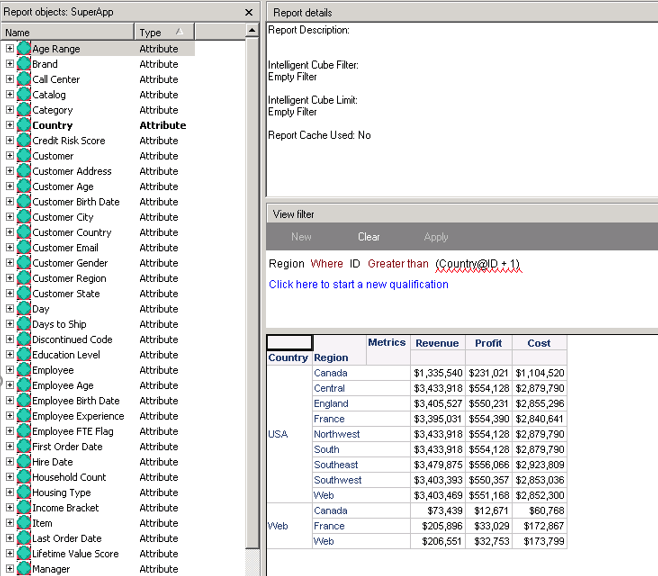
Here is the CSI of the above report:
Intelligent Cube SQL Statements:

Tables Accessed:
Table20	[L_COUNTRY]:	Country, 		LOOKUP_TABLE
Table28	[L_REGION]:	Region, 		LOOKUP_TABLE
Table60	[REL_COUNTRY_CALL_CENTER]:	Country, Call Center, 		RELATIONSHIP_TABLE,	ONE_TO_MANY
Table96	[REL_QUARTER_MONTH]:	Quarter, Month, 		RELATIONSHIP_TABLE,	ONE_TO_MANY
Table130	[F_REGION_SUBCATEG_MNTH_SLS_FORTH]:	Region, Quarter, Subcategory, 	Gross Revenue, Revenue, Units Sold, Profit, Cost, 	FACT_TABLE
Table135	[F_SUBCATEG_MNTH_LOC_SLS_FORTH]:	Call Center, Subcategory, Month, 	Gross Revenue, Revenue, Units Sold, Profit, Cost, 	FACT_TABLE

select	[Country]@[COUNTRY_ID],
	[Country]@[CUST_COUNTRY_DESC],
	[Region]@[REGION_ID],
	[Region]@[REGION_NAME],
	sum([[F_SUBCATEG_MNTH_LOC_SLS_FORTH].Cost])@{[Country],[Region]} as [Cost],
	sum([[F_SUBCATEG_MNTH_LOC_SLS_FORTH].Profit])@{[Country],[Region]} as [Profit],
	sum([[F_SUBCATEG_MNTH_LOC_SLS_FORTH].Revenue])@{[Country],[Region]} as [Revenue]
from	SuperApp
with Table Join Tree: 	[F_SUBCATEG_MNTH_LOC_SLS_FORTH]
	 Join [REL_COUNTRY_CALL_CENTER] with output level Tuple([Call Center]@[CALL_CTR_ID], [Country]@[COUNTRY_ID], [Month]@[MONTH_ID], [Subcategory]@[SUBCAT_ID])
	 Join [REL_QUARTER_MONTH] with output level Tuple([Call Center]@[CALL_CTR_ID], [Country]@[COUNTRY_ID], [Month]@[MONTH_ID], [Quarter]@[QUARTER_ID], [Subcategory]@[SUBCAT_ID])
	 Join [F_REGION_SUBCATEG_MNTH_SLS_FORTH] with output level Tuple([Call Center]@[CALL_CTR_ID], [Country]@[COUNTRY_ID], [Month]@[MONTH_ID], [Region]@[REGION_ID], [Subcategory]@[SUBCAT_ID]) <[Region]@[REGION_ID] > ([Country]@[COUNTRY_ID] + 1)>

[Analytical engine calculation steps:
	1.  Perform cross-tabbing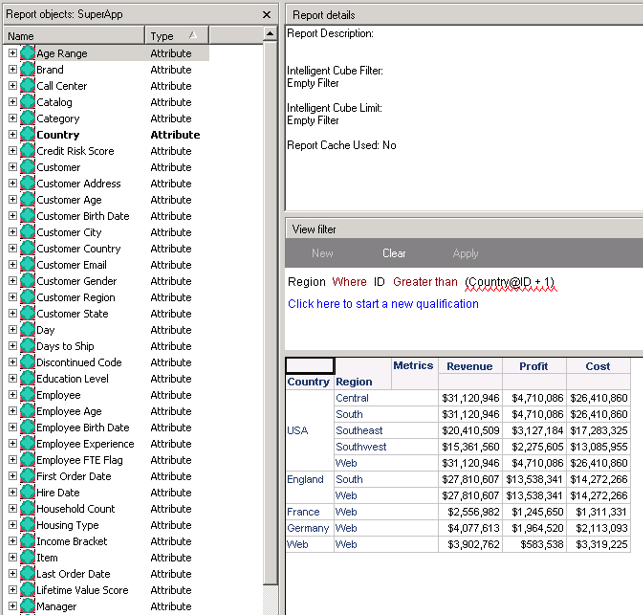
Here is the CSI of the above report:
Intelligent Cube SQL Statements:
Tables Accessed:
Table20	[L_COUNTRY]:	Country, 		LOOKUP_TABLE
Table28	[L_REGION]:	Region, 		LOOKUP_TABLE
Table60	[REL_COUNTRY_CALL_CENTER]:	Country, Call Center, 		RELATIONSHIP_TABLE,	ONE_TO_MANY
Table132	[F_STATE_REGION_MNTH_SLS]:	Region, Customer State, Month, 	Gross Revenue, Revenue, Units Sold, Profit, Cost, 	FACT_TABLE
Table135	[F_SUBCATEG_MNTH_LOC_SLS_FORTH]:	Call Center, Subcategory, Month, 	Gross Revenue, Revenue, Units Sold, Profit, Cost, 	FACT_TABLE

select	[Country]@[COUNTRY_ID],
	[Country]@[CUST_COUNTRY_DESC],
	[Region]@[REGION_ID],
	[Region]@[REGION_NAME],
	sum([[F_SUBCATEG_MNTH_LOC_SLS_FORTH].Cost])@{[Country],[Region]} as [Cost],
	sum([[F_SUBCATEG_MNTH_LOC_SLS_FORTH].Profit])@{[Country],[Region]} as [Profit],
	sum([[F_SUBCATEG_MNTH_LOC_SLS_FORTH].Revenue])@{[Country],[Region]} as [Revenue]
from	SuperApp
with Table Join Tree: 	[F_SUBCATEG_MNTH_LOC_SLS_FORTH]
	 Join [REL_COUNTRY_CALL_CENTER] with output level Tuple([Call Center]@[CALL_CTR_ID], [Country]@[COUNTRY_ID], [Month]@[MONTH_ID], [Subcategory]@[SUBCAT_ID])
	 Join (Set of distinct Tuple([Month]@[MONTH_ID], [Region]@[REGION_ID]) where Tuple([Month]@[MONTH_ID], [Region]@[REGION_ID]) in [F_STATE_REGION_MNTH_SLS]) with output level Tuple([Call Center]@[CALL_CTR_ID], [Country]@[COUNTRY_ID], [Month]@[MONTH_ID], [Region]@[REGION_ID], [Subcategory]@[SUBCAT_ID]) <[Region]@[REGION_ID] > ([Country]@[COUNTRY_ID] + 1)>

[Analytical engine calculation steps:
	1.  Perform cross-tabbing
]