EducationSoftwareStrategy.com
StrategyCommunity

Knowledge Base

Product

Community

Knowledge Base

TopicsBrowse ArticlesDeveloper Zone

Product

Download SoftwareProduct DocumentationSecurity Hub

Education

Tutorial VideosSolution GalleryEducation courses

Community

GuidelinesGrandmastersEvents
x_social-icon_white.svglinkedin_social-icon_white.svg
Strategy logoCommunity

© Strategy Inc. All Rights Reserved.

LegalTerms of UsePrivacy Policy
  1. Home
  2. Topics

KB442275: Covariance function uses Sample Covariance formula in Analytical Engine instead of Population Covariance


Community Admin

• Strategy


Before MicroStrategy 2019, Analytical Engine uses Sample Covariance formula for the covariance function while data sources use Population Covariance formula, therefore data mismatch can happen.

Starting with the release of Strategy ONE (March 2024), dossiers are also known as dashboards.
Symptoms

  • Metric uses Covariance function
  • Covariance function results in larger value than expected

Glossary

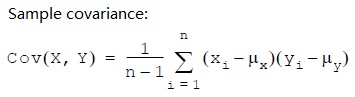
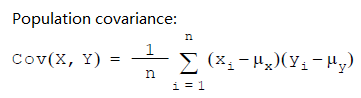
  • Covariance: As a statistical concept, Covariance is the measure of the joint variability of two random variables. There are 2 different methods in calculating Covariance:


ka0PW0000001JTAYA2_0EM2R000000liE7.jpeg


ka0PW0000001JTAYA2_0EM2R000000liER.jpeg

*μ = average value of its subscript

Steps to Reproduce


1.    Create a new dossier and add new data -> Clipboard
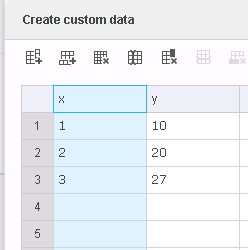
ka0PW0000001JTAYA2_0EM2R000000liMV.jpeg

2.    Create a derived metric to calculate the covariance between x and y.
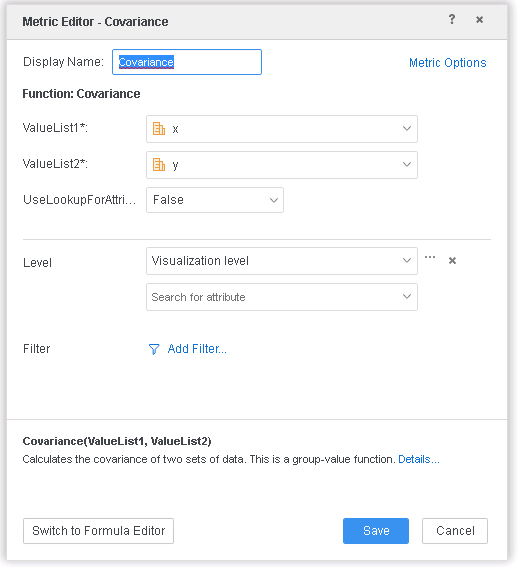
ka0PW0000001JTAYA2_0EM2R000000liMf.jpeg

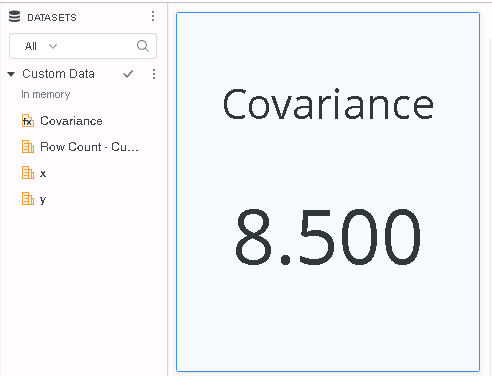
3.    Add the Covariance metric created above into a KPI Visualization.
ka0PW0000001JTAYA2_0EM2R000000liNi.jpeg

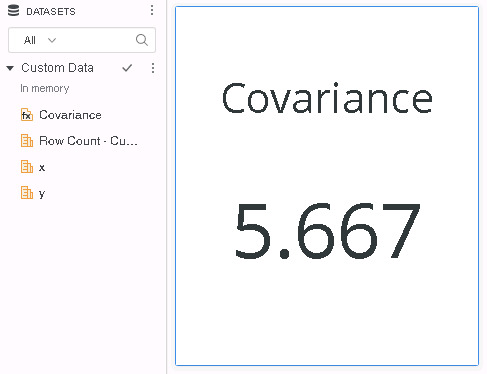
However, based on other data source calculation, the value calculated from the Covariance formula is 5.67. 

Cause


This is caused by the difference between “Population Covariance” and “Sample Covariance” functions. 
In Data Engine, covariance is calculated with the Sample Covariance formula while in other data sources, the covariance formula is Population Covariance.
The only difference in formula for Population Covariance and Sample Covariance lies in the fact that Population Covariance is calculated over the entire dataset(N) whereas Sample Covariance is calculated over a sample (N-1), so that the denominator of the Population Covariance is 1 larger than that of the Sample Covariance and will lead to smaller result value.

Solution


To resolve this defect, please upgrade to Strategy 2019 or above, and set Data Engine Version setting to 11.

  • The project level setting Data Engine Version can only be enabled through Workstation. For more details on enabling the setting, see Change Data Engine Version.


In the new fix, Covariance formula is Population Covariance by default in Data Engine Version 11, and is Sample Covariance by default in Version 10.
ka0PW0000001JTAYA2_0EM2R000000liO2.jpeg

Strategy Internal Reference number for this technical note is  KB442275 and DE101196.


Comment

0 comments

Details

Knowledge Article

Published:

November 19, 2018

Last Updated:

March 21, 2024