Starting with the release of Strategy ONE (March 2024), dossiers are also known as dashboards.
DESCRIPTION:
When performing Integrity manager comparison test on reports/documents using wildcard, Integrity manager result may report SQL failure between the base and target reports if base and target tests results into different wildcard resolution.
For reference, here is the list of wildcards that may be be used in Strategy.
Here is an example:
STEPS TO REPRODUCE:
1. Create the following report:
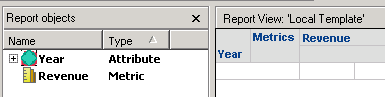
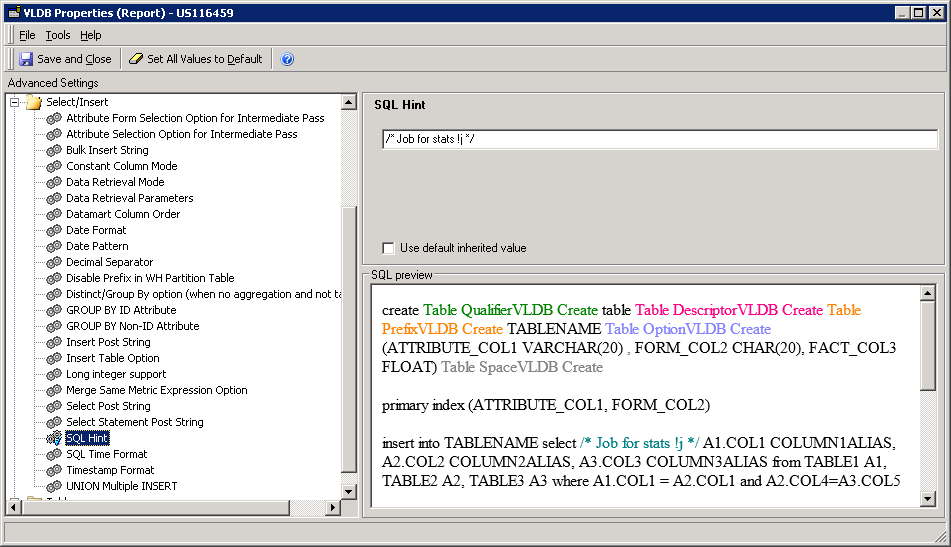
2. Go to Data menu and select VLDB Properties... and change the following property to have the wild card for JobID.
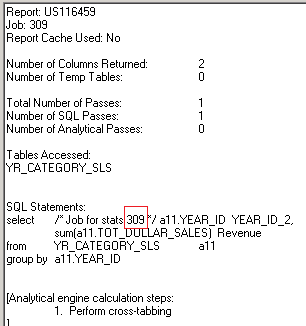
3. Run the report in SQL view and notice that job ID is part of the SQL.
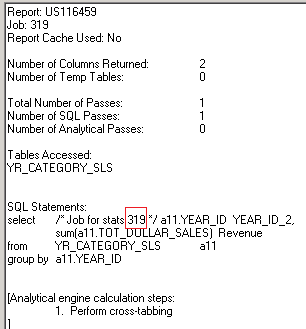
4 Close the report, clear report cache and run the report in SQL view again and notice that job ID is part of the SQL and is different.
CAUSE:
Running the above report again will produce different SQL. This is an expected behavior. If the wildcard is used in a filter of a report/document, it will always generate different SQL.
ACTION:
Starting Strategy 11.0 release, Following wild cards are now resolved in Query Execution phase and not in SQL Generation phase. So, any report's SQL view (without executing it first) will not show the resolved wild cards. The he wild cards will be resolved in Query Execution phase and will have no functionality impact on the report execution. Since Integrity manager compares the SQL before execution, it may report SQL failure between base and target reports for report/document/dossier with wildcard during integrity manager comparison test. However, this failure can be ignored if the user confirms it's caused by a wildcard usage.
Following wildcards are NOT replaced in SQL Generation but are replaced in Query Engine Execution:
!d: Date
!j: Job ID
!t Timestamp
!s User Session GUID
!i Job PU ID
!u User Name
!p Project Name
!z Project ID
Strategy reference numbers for this technical note are KB442292 and US116459.
