SYMPTOM
Element sorting order may change for non-English text attribute forms and text metrics from Strategy 10.4.4 or 10.6.
This might happen to non-multilingual text attribute forms and text metrics, like in Japanese or Chinese.
Here is an example for Japanese.
In version before 10.4.4 or 10.6, it is observed that the sorting order for attribute elements is like below:
東京-Tokyo
神奈川-Kanagawa
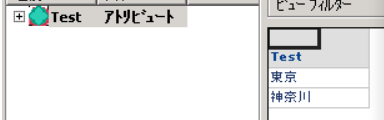
After upgrading same environment to 10.4.4 or 10.6 or above, it changes to below:
神奈川-Kanagawa
東京-Tokyo

ANSWER
This is expected behavior due to code change starting from Strategy 10.4.4 or 10.6, where default collation order for non-multilingual text attribute forms and text metrics has been added.
After this change, the behavior depends on the locale for the OS user who starts Strategy Intelligence Server service.
For Windows, the locale setting refers to Region format as below:

For Linux, the locale setting refers to LC_MESSAGES.
User can either change all locale settings for LANG or choose to change LC_MESSAGES only.
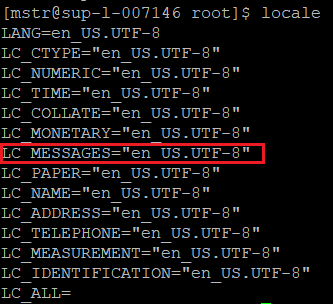
For above example, even for version above 10.4.4 or 10.6, the behavior is different per this region format setting.
If the locale is set to English, it will persist the behavior as before.
東京-Tokyo
神奈川-Kanagawa
If the locale is set to Japanese, user will observe the new behavior.
神奈川-Kanagawa
東京-Tokyo
KB442313
