EducationSoftwareStrategy.com
StrategyCommunity

Knowledge Base

Product

Community

Knowledge Base

TopicsBrowse ArticlesDeveloper Zone

Product

Download SoftwareProduct DocumentationSecurity Hub

Education

Tutorial VideosSolution GalleryEducation courses

Community

GuidelinesGrandmastersEvents
x_social-icon_white.svglinkedin_social-icon_white.svg
Strategy logoCommunity

© Strategy Inc. All Rights Reserved.

LegalTerms of UsePrivacy Policy
  1. Home
  2. Topics

KB442330: Multiform Attribute Cannot be Displayed in ESRI Map on MicroStrategy Web


Community Admin

• Strategy


Multiform attribute cannot be displayed in ESRI map on MicroStrategy Web.

Starting with the release of Strategy ONE (March 2024), dossiers are also known as dashboards.
SYMPTOM:
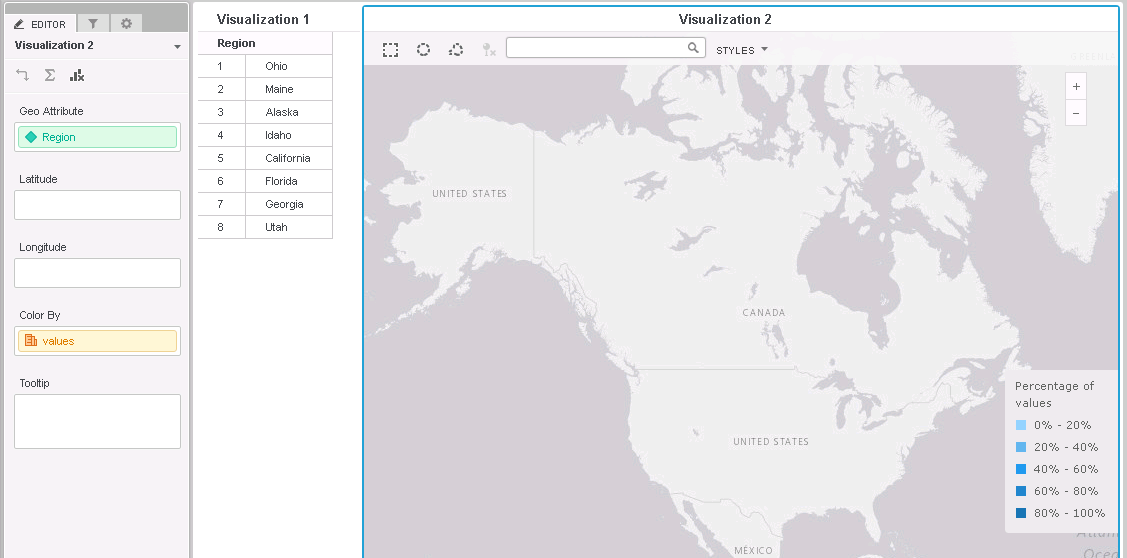
Multiform attribute cannot be displayed in ESRI map on Strategy Web 10.X as seen below:
ka0PW0000001Ji1YAE_0EM44000000RMlK.png


STEPS TO REPRODUCE:
1. Build an attribute with multiple forms, one ID form and one with Geography elements like country names
2. Add this attribute into ESRI map visualizations in VI dashboard or Dossier, no markers or areas are displayed on the Map
 
CAUSE:
For a normal multiform attribute, the first attribute form will be taken as the geography attribute. Sine the first attribute form is always the ID form with elements of numbers, it cannot be displayed on ESRI map.
 
WORKAROUND:
Users can take either of the following methods to avoid this issue:
  1. Switch the ESRI Map visualization to Grid, right mouse click on the multiform attribute and choose to display the form with geography elements only. Switch back to ESRI Map and the attribute should be displayed on map.
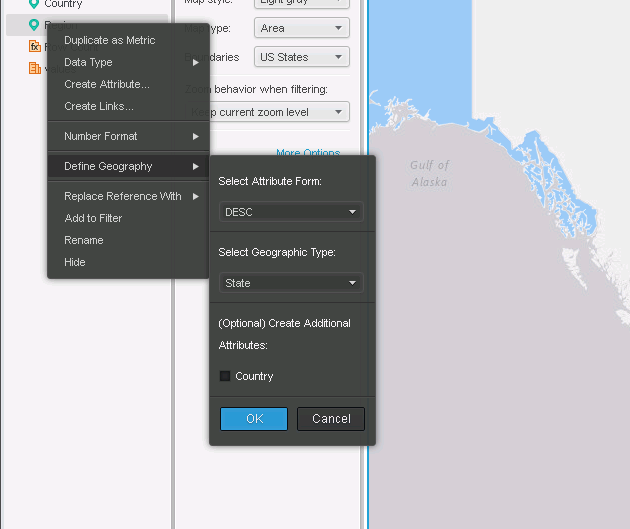
  2. Right mouse click on the attribute, choose Define Geography. Select the form with geography elements and define a proper geographic type for it. ESRI Map will use the geographic type form of a geography attribute automatically.
ka0PW0000001Ji1YAE_0EM44000000RMlP.png

  KB442330


Comment

0 comments

Details

Knowledge Article

Published:

November 29, 2018

Last Updated:

March 21, 2024