EducationSoftwareStrategy.com
StrategyCommunity

Knowledge Base

Product

Community

Knowledge Base

TopicsBrowse ArticlesDeveloper Zone

Product

Download SoftwareProduct DocumentationSecurity Hub

Education

Tutorial VideosSolution GalleryEducation courses

Community

GuidelinesGrandmastersEvents
x_social-icon_white.svglinkedin_social-icon_white.svg
Strategy logoCommunity

© Strategy Inc. All Rights Reserved.

LegalTerms of UsePrivacy Policy
  1. Home
  2. Topics

KB442352: MicroStrategy 10.4 D3 Word Cloud Visualization "Cannot Read property 'D3' of undefined"


Community Admin

• Strategy


This is an overview of an issue where the D3 Word Cloud Visualization downloaded from Community no longer runs on MicroStrategy 10.4 and instead displays "Cannot Read property 'D3' of undefined after attempting to load a Dossier with this newly downloaded D3 Word Cloud Visualization. A workaround is provided within.

Starting with the release of Strategy ONE (March 2024), dossiers are also known as dashboards.
SYMPTOM:
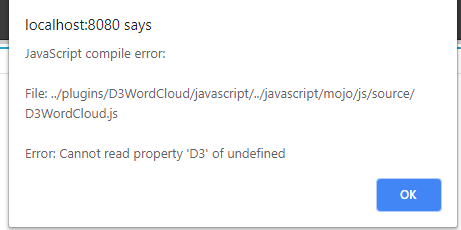
Attempting to load newer versions of the D3WordCloud Visualization from the Visualization Gallery against Strategy 10.4 will display a JavaScript compiler error with the path to D3WordCloud.js and an Error that reads: "Cannot Read property 'D3' of undefined."
 
STEPS TO REPRODUCE:
  1. Install the D3 WordCloud Visualization from this link
  2. Login to Strategy Web and navigate to any project 
  3. Left Click on Create -> VI Dashboard
  4. Chose the D3 Word Cloud Visualization
  5. See the below screenshot for the error:
ka0PW0000001JSqYAM_0EM44000000RRnI.png

CAUSE:
The D3 WordCloud Visualization was updated to included a reference to a mstrmojo class within the D3WordCloud.js file in October, 18, 2018. This mstrmojo class was not available in Strategy 10.4, so any D3WordCloud Visualization download that includes this change will not load, and instead displays a JavaScript compiler alert, as referenced in the above screenshot. The affected lines of code are copied below for convenience:
noConflictLibraries: [
mstrmojo.CustomVisBase.ENUM_EXTERNAL_LIBS.D3
],
ACTION:
Create a backup of the existing D3WordCloud.js file, and remove lines 24 -> 26 of the D3WordCloud.js file. Note that if the plugin was installed in multiple Strategy Web environment(s), this change will need to be made in all affected environments in order to resolve this issue. 

  1. Login to all environment(s) where Strategy D3WordCloud Visualization was installed
  2. Navigate to <Strategy Web Home folder location>/plugins/D3WordCloud/javascript/mojo/js/source/
  3. Create a backup of the D3WordCloud.js file and rename it (e.g. D3WordCloudOLD.js)
  4. Edit D3WordCloud.js and navigate to lines 24 -> 26 in this file (Screenshot provided below)
ka0PW0000001JSqYAM_0EM44000000RRnN.png
  1. Either Comment out lines 24 -> 26 by placing // in front of each line...
  2. Or delete the entire contents of lines 24 -> 26 which start with "noConflictLibraries: [" and ends with "],"
  3. Save the file
  4. Restart the Web Application Server (e.g. IIS, Tomcat, WebLogic, WebSphere, etc.) on all environment(s) where this change was made
  5. Repeat Steps 2-> 4 from the Steps to Reproduce at the top of this article and note that the JavaScript compiler error no longer appears

Comment

0 comments

Details

Knowledge Article

Published:

December 10, 2018

Last Updated:

March 21, 2024